
AI Jersey Design Generator
Design the Shirt, Not Just a Print
Pick a sport, name your colours, and get back a complete playing shirt — collar, sleeve panels, side stripes, sponsor block and numbering. Football kits, basketball jerseys, esports tops. Free, in about fifteen seconds.
Try the AI Jersey Design Generator — Free
Choose a cut, describe your colours in the box, and run the same idea through two or three colourways
AI Jersey Design Generator
Pick the sport and cut below, then describe your colours, panels and trim in the box. Use a made-up team name if you want lettering — real club, league and brand names will not be rendered. Whatever comes back, read every number and letter before anyone prints it.
Everything renders at 3:4 portrait, the natural shape for a hanging shirt. Need a graphic printed on a plain tee instead of a constructed kit? That is the AI t-shirt design generator. The crest that goes on the chest comes from the AI mascot generator or the AI fantasy football logo generator, and a club wordmark from the AI logo generator. To reshape a result for a pitch deck, use the AI image cropper.
AI Jersey Design Generator Examples
Six renders exactly as they came back — including the ones that show you where to be careful
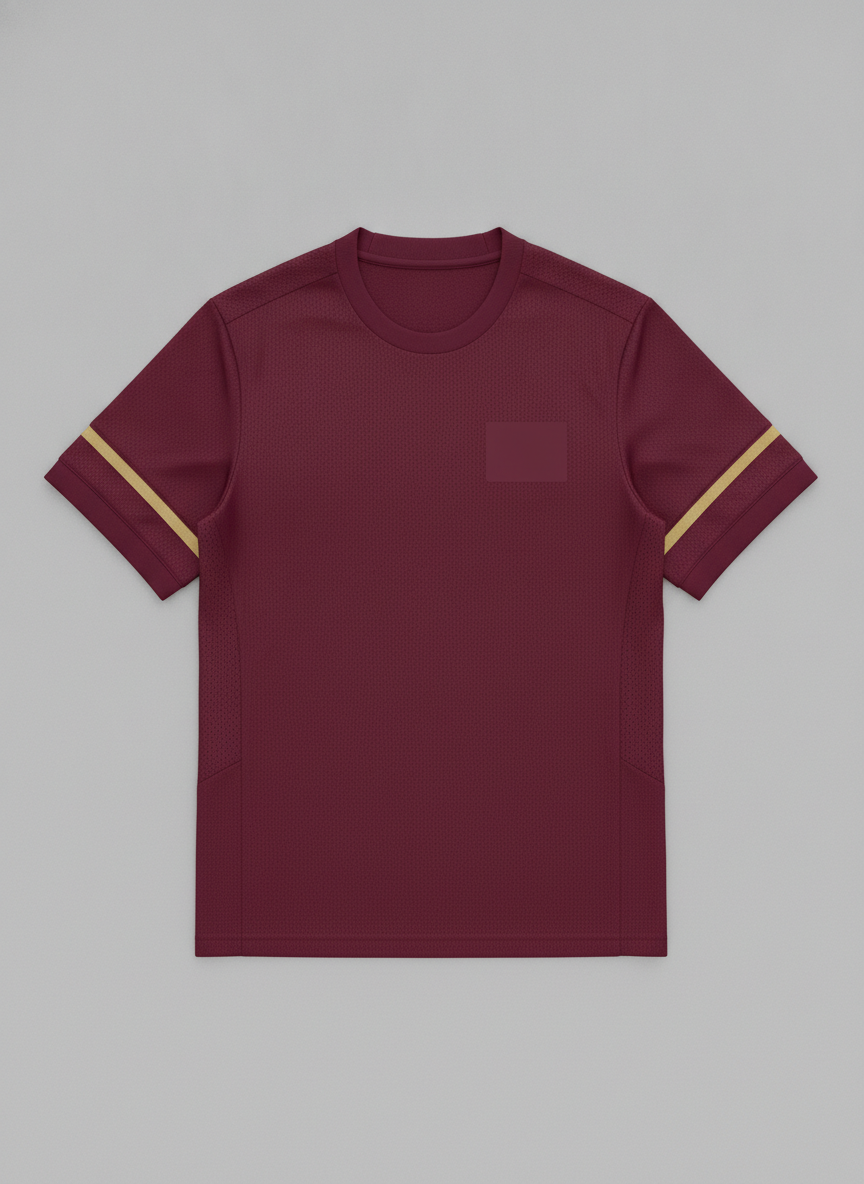
Two Stripes Asked For, One Delivered
The burgundy, the gold, the mesh texture and the side panels are all exactly right — and the brief said two thin gold stripes on each sleeve. Count them: there is one. This is the single most common miss, and it survives a glance because everything around it is convincing. Note also that the blank crest patch came back tonal, burgundy on burgundy, rather than as a distinct block.
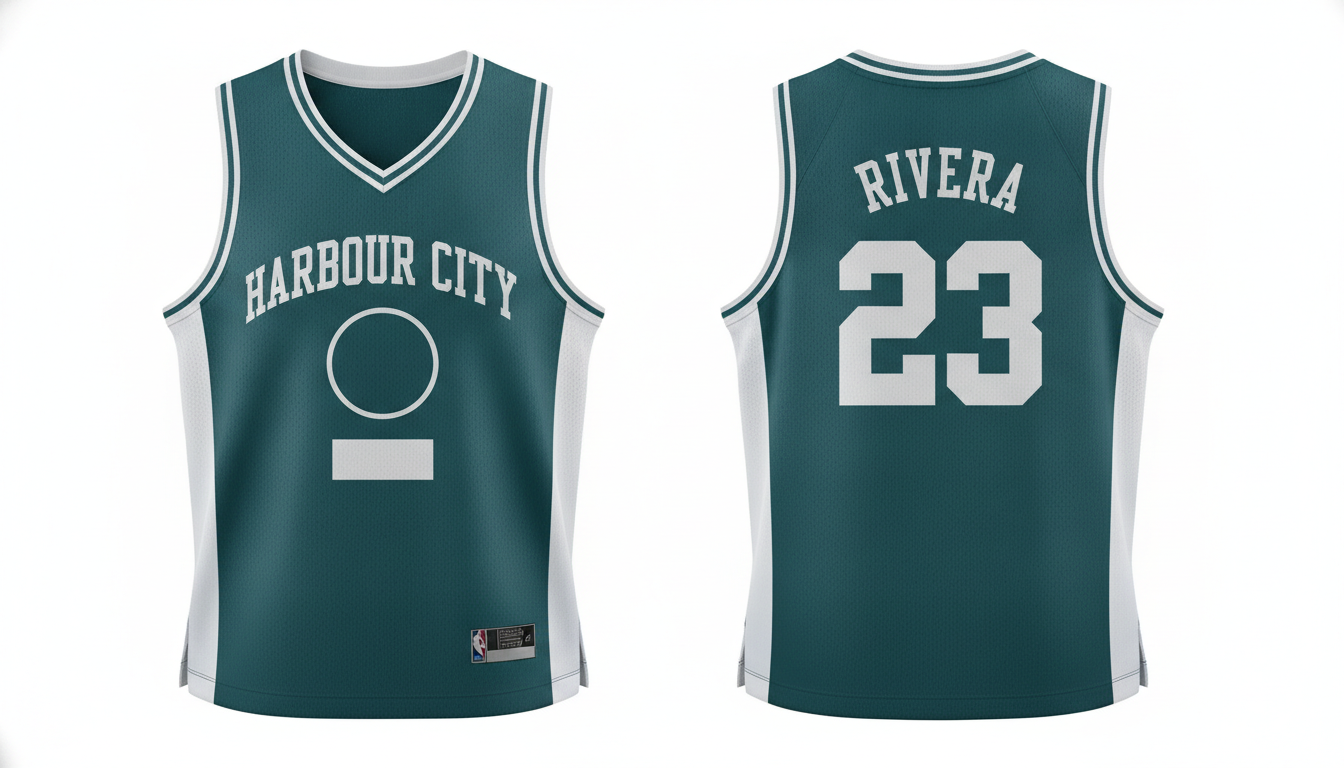
Spelling Perfect, and It Still Invented a Brand Label
Every character is correct — HARBOUR CITY across the chest, RIVERA arced over the number, and 23 on the back. Seventeen characters, all right first time. Then look at the bottom of the front panel: it added a small woven hem label carrying a league-style logo and a tick-shaped brand mark that nobody asked for, on a prompt that explicitly forbade real team and sportswear marks. It invents branding on its own initiative. Crop the hem of every render and check.
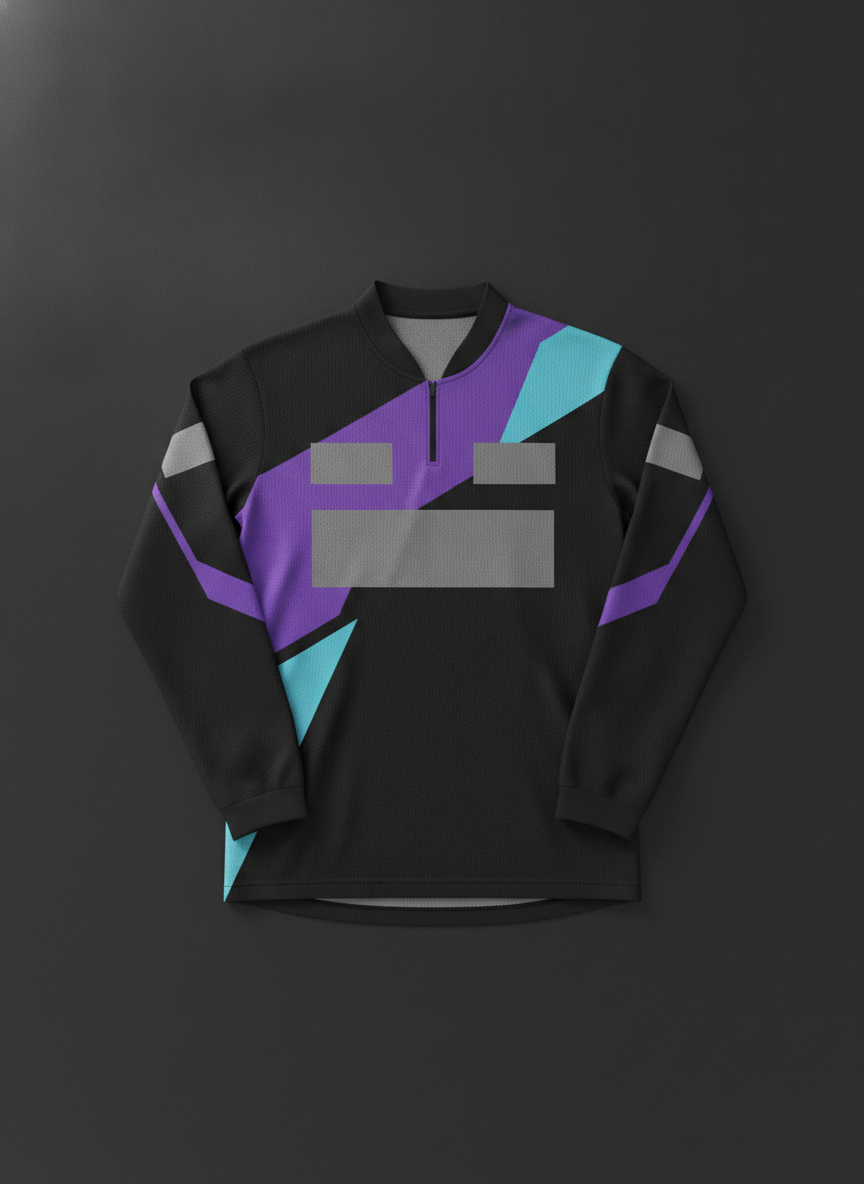
The Best Result of the Six
The stand up collar, the short front zip, the angular purple and cyan panelling and the three blank grey sponsor blocks are all exactly as briefed — and blank blocks are the point, because a sponsor logo should arrive as a real file rather than a model’s guess. Two drifts worth naming: the diagonal panels stop at the shoulder instead of running down the sleeves, and it came back long sleeved when most esports tops are short.
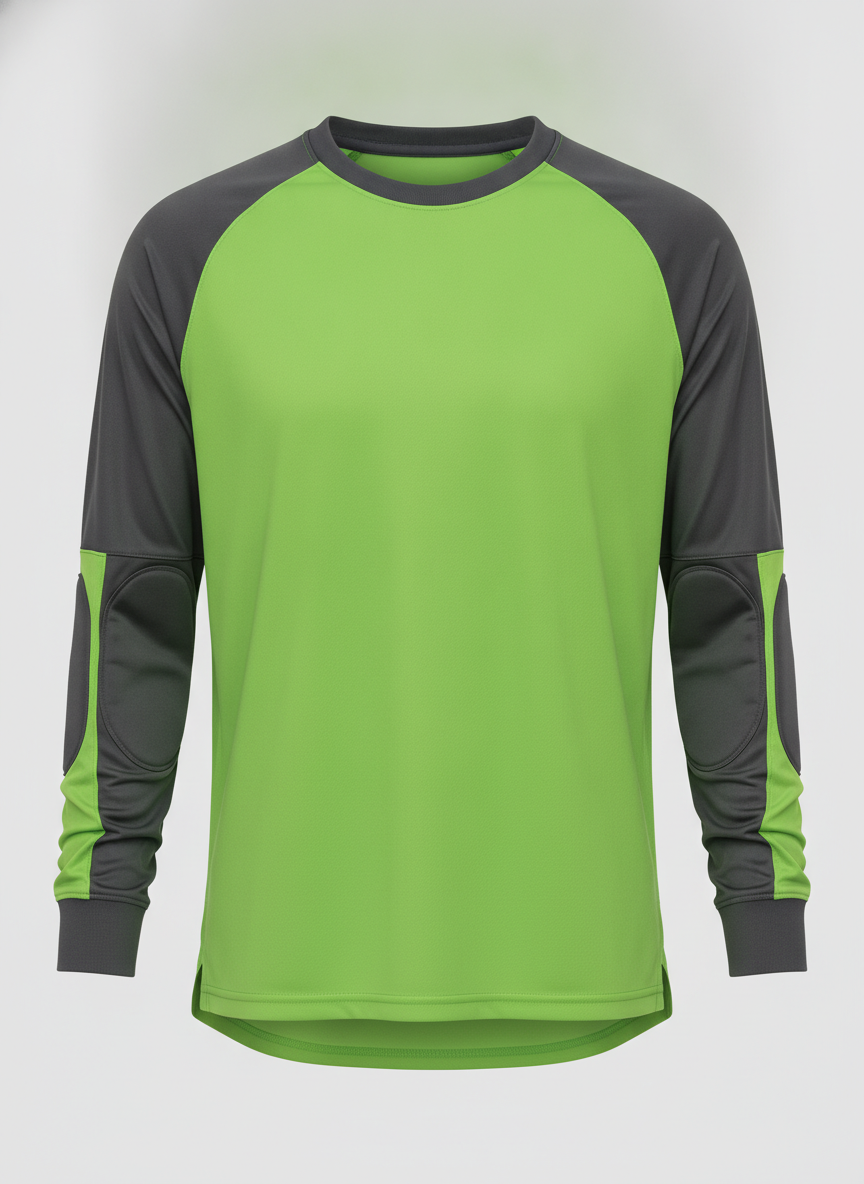
Everything Right Except the Thing It Dropped
The charcoal shoulder yoke running down both sleeves, the padded elbow panels, the ribbed cuffs and the longer dropped hem are all correct goalkeeper construction. But the small blank crest patch that was explicitly asked for is simply not there — no patch, no outline, nothing. It also quietly turned a requested flat lay into a ghost mannequin shot. Check for missing elements, not just wrong ones.
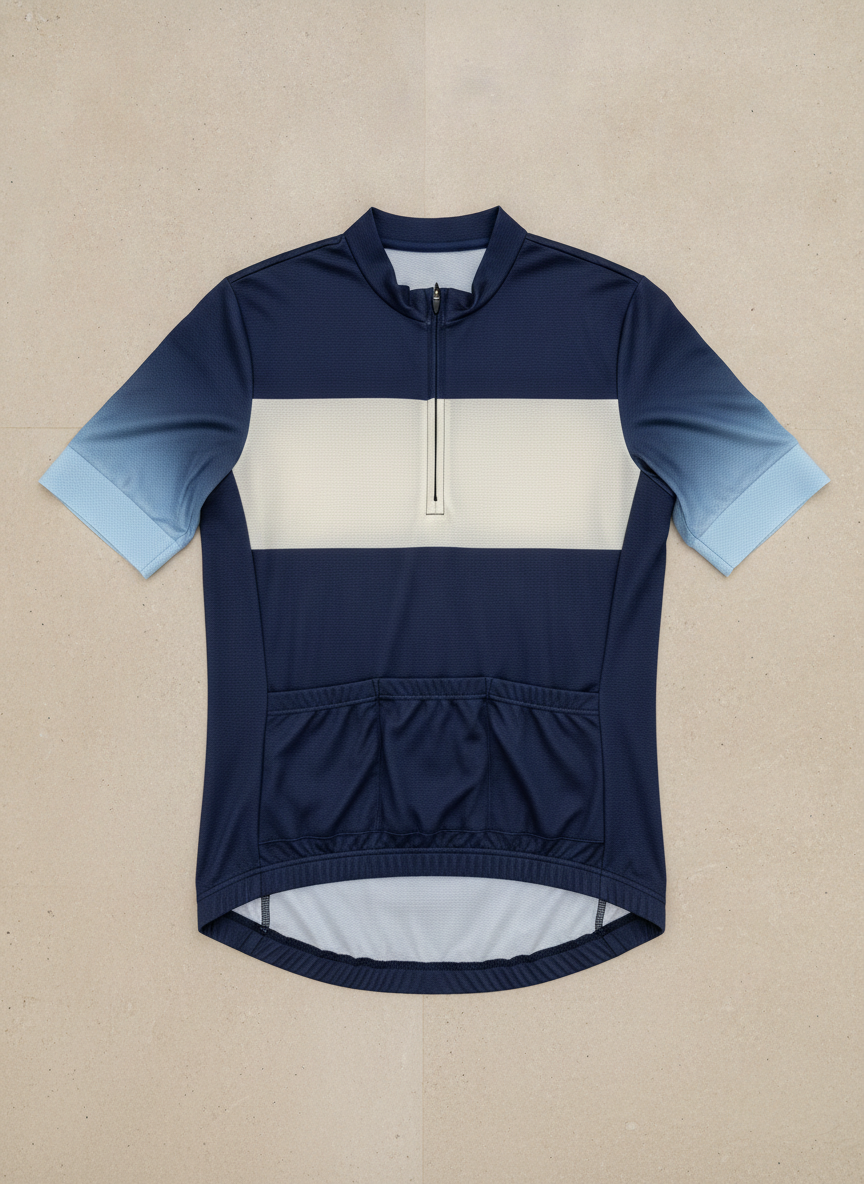
Pockets on the Wrong Side of the Shirt
The navy body, the wide cream chest band and the gradient fade at the sleeve cuffs are handsome and exactly as briefed. Two construction errors sit underneath that. The full length front zip came back as a quarter zip. And the three rear pockets are rendered on the front of the jersey, which is not a garment that exists — the pockets go on the back, where you can reach them riding. It gets the count right and the anatomy wrong.
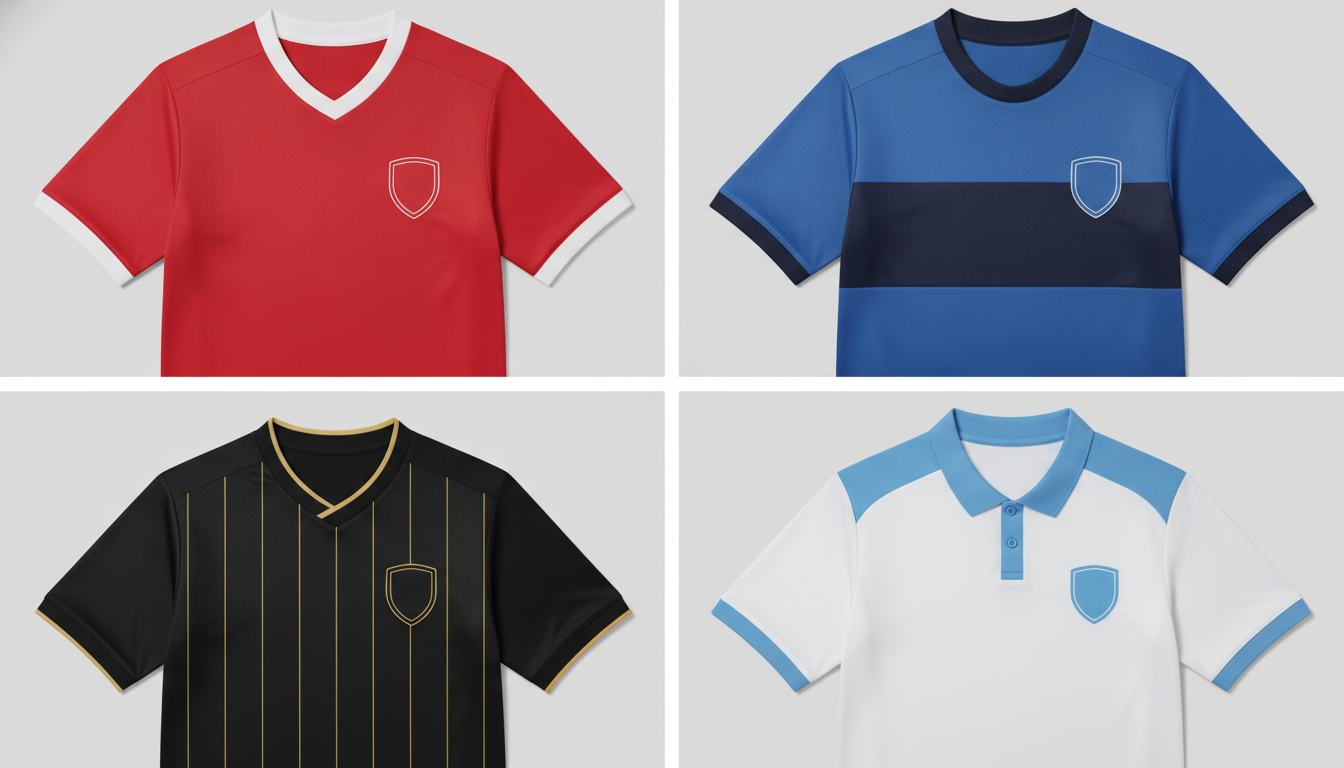
Four Colourways, Four Cropped Shirts
The count is right — four shirts — and all four colourways landed as specified: red with a white v-neck, royal blue with a navy chest band, black with gold pinstripes, white with a sky blue yoke and a button placket. This is the single most useful thing the tool does, because a committee decides in minutes from a grid. Two faults: every shirt is cropped off at the hem rather than shown whole at matching scale, and the blank chest sponsor block asked for on each one is missing from all four.
No Real Club, League or Brand Kits — and Why That Is Not Us Being Difficult
The most common request for a jersey generator is a replica, and it is the one thing this page will not do. Every preset asks for fictional placeholder names and blank crest patches on purpose. A shirt carries four separate trademarks, not one. The club crest, the league wordmark on the sleeve, the manufacturer’s mark and the shirt sponsor are each owned by somebody different, and a shirt bearing any of them without a licence is counterfeit merchandise from the moment it is printed — not from the moment it is sold. Clubs and leagues pursue this actively, and it is usually the print shop that receives the letter, which is why most of them will refuse the job anyway. Colours and shapes are not owned; marks are. You can absolutely design in the same spirit — the same stripe rhythm, a similar collar, that particular shade of claret — because a colourway is not protectable. What you cannot do is put somebody else’s badge on it. And it will sometimes add branding you did not ask for. The basketball jersey in the gallery above was generated on a prompt that explicitly forbade any real team, league or sportswear mark, and it still put a small woven label on the hem carrying a league-style logo and a tick-shaped brand mark. Nothing prompted that. So the guardrail in the presets is a strong default, not a guarantee — crop into the hem, the collar and the sleeve of anything you plan to print, and look for marks that wandered in on their own. So make your own crest and own it. Generate the shirt with the patch left blank, design a badge with the AI mascot generator or the AI fantasy football logo generator, and have your designer place the real file into the blank block afterwards. A sponsor’s logo should arrive the same way — from the artwork they send you, never from a model’s half-memory of it.
Numbering and Lettering Is Where This Slips — Check Every Character Before a Print Run
Curved fabric is the hardest place to render text, and a jersey is nothing but curved fabric. A surname arced across the shoulder blades, a number stretched over a chest, a squad digit wrapped around a sleeve — the model draws letterforms rather than setting type, and the arc is exactly where a malformed, doubled or dropped character disappears from a quick glance. It is usually right, which is exactly the trap. The basketball jersey in the gallery came back with all seventeen characters correct first time — team name, arced surname and squad number. Reliable enough to trust at a glance is not the same as reliable enough to print twenty times. Numerals are no safer than letters either: a 3 and an 8 differ by one closed counter, a 6 and a 5 by a stroke direction, and at jersey scale on a textured mesh you will read the number you expected rather than the one on screen. So treat every name and number as placement, not as artwork. The render tells you where the name sits, how big the number is and whether the arc suits the shoulder. It does not tell you how anything is spelled. Zoom in, read each character individually, and check them out of order so you cannot skim. Your printer sets the names properly anyway. Squad names and numbers go on from a type file with your actual team list, in the height the competition rules specify, which is the correct order of operations: the render settles the design, the type file settles the text. A misprinted run of twenty shirts is not a re-render, it is a reprint you pay for twice.
How the AI Jersey Design Generator Works
Three steps, and the third one is the one people skip
Pick the Sport and Cut
Football, basketball, esports, goalkeeper or cycling. The cut sets the collar, the sleeve and the hem, so choosing it first saves you describing all three.
Describe Colours and Panels
Name the body colour, the trim, the sleeve treatment and where the stripes run. Use a fictional team name if you want lettering on it — never a real one.
Proofread, Then Brief a Supplier
Read every number and letter character by character, then send the render with your panel colours, size run and squad list and ask the factory to redraw it onto their pattern.
What a Kit Supplier Needs That a PNG Does Not Contain
A render is a photograph of a shirt, and a sublimation factory prints from a pattern. Between the two sits a list: a flat vector layout on the manufacturer’s own block, panel by panel; CMYK values or named spot colours so the claret on the sleeve matches the claret on the body; real dimensions in millimetres; a size run from youth small to adult 3XL with the artwork rescaled for each; seam allowance; and a separate type file for names and numbers at the character height your competition specifies. None of that lives in an image, and no jersey generator produces it. What the image does is end the argument — the factory can see the collar you mean, the panel break you mean and the stripe weight you mean in one glance, which is the part that usually takes three weeks of email. Send the render, name the panel colours, attach the size run and the squad list, and ask them to redraw it onto their template. That redraw is where a pattern maker will also tell you which of your ideas adds cost, because a four-panel sleeve and a contrast underarm gusset are not the same price as a plain one.
Why Use a Custom Jersey Design AI
Because a kit is a constructed garment, and a graphic on a blank tee is not the same object
The Whole Garment, Not a Print
Collar shape, sleeve panels, shoulder yoke, side stripes, cuff treatment and fabric texture all render as part of the shirt. That is construction, not a graphic dropped onto a blank tee.
Colourways Side by Side
Run the same template in four colours and compare them on one screen. Committees decide in ten minutes from a grid and never decide at all from a paragraph of description.
Five Sports, Five Real Cuts
Football kit, basketball vest, esports top, goalkeeper shirt and race cut cycling jersey — each with the collar, hem and sleeve shape that sport actually uses, not one template recoloured.
Trademark Safe by Default
Every preset asks for fictional placeholder names and blank crest patches. No real club, league or sportswear marks are rendered, so nothing you take to a printer is counterfeit.
Sponsor and Crest Space Built In
Blank chest and sleeve blocks are left on purpose, so you can show a sponsor the placement and then drop in their real supplied logo file afterwards rather than letting a model guess at it.
Free, No Sign Up, No Watermark
About fifteen seconds per shirt and a clean PNG at the end. Try six directions before the first committee meeting instead of one sketch after it.
Who Uses It
Anyone about to commit a club’s money to twenty shirts they have only described in words
Amateur Club Organisers
The person who ends up choosing the kit is rarely a designer. Four colourways on one screen settles a WhatsApp group that has been arguing about hoops versus stripes since June.
School and College Coaches
Kit budgets get signed off by people who want to see the thing first. A render in the funding request is worth more than three paragraphs describing a shoulder yoke.
Esports Team Managers
A roster jersey is merchandise and a uniform at once. Design it with the sponsor blocks blank so you can show a prospective sponsor exactly what their placement looks like.
Sportswear Designers and Suppliers
Put six directions in front of a club at the first meeting instead of one CAD a fortnight later, then pattern properly from whichever one they point at.
AI Jersey Design Generator FAQ
Trademarks, numbering, sponsor blocks, briefing a manufacturer and what the file actually is
Free AI Jersey Design Generator — Football Kits, Basketball Jerseys and Esports Uniforms
A playing shirt is a constructed object, and that is the whole reason this page is separate from every other design tool on the site. A kit is not one colour with a picture on the front: it is a body panel, a pair of sleeve panels, a collar with its own construction, a shoulder yoke, side inserts down the seams, a cuff treatment, a chest block sized for a sponsor and a back sized for a name and a number. Change the collar from a v-neck to a button placket and the whole shirt reads differently. An AI jersey design generator is worth using because it renders all of that as a garment — flat, photographed from above, the way a manufacturer would shoot a sample — rather than showing you a graphic floating on a blank tee. You describe the colours and the panel logic, and about fifteen seconds later you are looking at the shirt.
That distinction also tells you which page you actually want. If the job is a slogan, a crest or artwork printed on the front of a plain tee for a charity run or a leavers’ hoodie, the AI t-shirt design generator is the better tool and will do a cleaner job, because there the garment is a given and the graphic is the point. Here the garment is the point. The badge that goes on the chest is a third job again: design a club crest or a character with the AI mascot generator or the AI fantasy football logo generator, a wordmark with the AI logo generator, and then have the real file placed into the blank patch on your shirt. Kit bag stickers and water bottle decals come from the AI sticker generator, a repeating all-over print for the sleeves from the AI pattern generator, and a stitched club badge from the AI embroidery design generator.
Two honest limits, because a kit design usually ends with somebody spending a club’s money. The first is trademarks. This free jersey design generator will not reproduce real club, league or sportswear brand marks, and every preset asks for fictional placeholder names and blank crest patches instead. A shirt carries four separate registered marks — crest, league, manufacturer, sponsor — each owned by a different party, and a shirt bearing any of them without a licence is counterfeit from the moment it is printed rather than the moment it is sold. Colourways and stripe patterns are not owned, so designing in the same spirit is perfectly legitimate; putting somebody else’s badge on your shirt is not. The second is text on fabric. Squad numbering and arced surnames sit on curved, stretched, textured surfaces, and that is exactly where GPT Image 2 draws a letterform instead of setting type. Characters come back malformed, doubled or dropped, and the arc hides it from a glance. Read every character individually before a print run, and treat any name or number in a render as placement rather than artwork.
The third thing worth knowing is what the file is. A team uniform design ai gives you a photograph of a shirt, not a production pattern. A sublimation factory needs a flat vector layout on their own block, panel by panel, in CMYK or named spot colours, at real dimensions in millimetres, with a full size run, seam allowance and a separate type file for the squad list at the character height the competition specifies. None of that is inside a PNG, and asking for it from an image generator is asking the wrong tool. Use the render for what it is unusually good at: showing a committee, a sponsor or a kit supplier the exact collar, panel break, stripe weight and colour balance you have in your head, which is the part that otherwise takes a month of email. Send it with the panel colours named, the size run attached and the squad list separate, and expect the factory to redraw it properly — that redraw is also your second chance to catch anything before twenty shirts are printed. Everything on this page is free to try, nothing is watermarked, results come back at 3:4 portrait, and paid plans start at $2.99 if you are working through a lot of variations. Scroll back up, pick a cut, and see the shirt.