
AI Paint by Numbers Generator
It Draws the Picture. It Cannot Count.
Six styles — outline template, flat-colour finish, pet portrait, landscape, floral and kit flat lay. This ai paint by numbers generator is free, needs no account and adds no watermark. Every preset deliberately returns blank regions rather than numbered ones, and the gallery below shows, at full size, exactly why.
Try the AI Paint by Numbers Generator — Free
Pick a style, generate a square canvas with clean empty regions, then number them yourself
AI Paint by Numbers Generator
Choose one of the six styles below and generate. Each is a complete scene on its own, so there is nothing you have to type — but the box underneath will take a line if you want a particular subject, season or palette. One thing to know before you start: every style here deliberately returns blank regions rather than printed numbers. That is on purpose. This model draws individual numerals beautifully and cannot count, sequence or place them one per region, so the reliable workflow is to let it build the artwork and to number the regions yourself afterwards.
Every preset returns a square 1:1 render with empty regions. Add the numbers afterwards in any vector or drawing app — the gallery below is the full argument for why that step is yours and not the model’s.
AI Paint by Numbers Generator Examples
Six squares exactly as they came back — count the pots, and check that the lines close
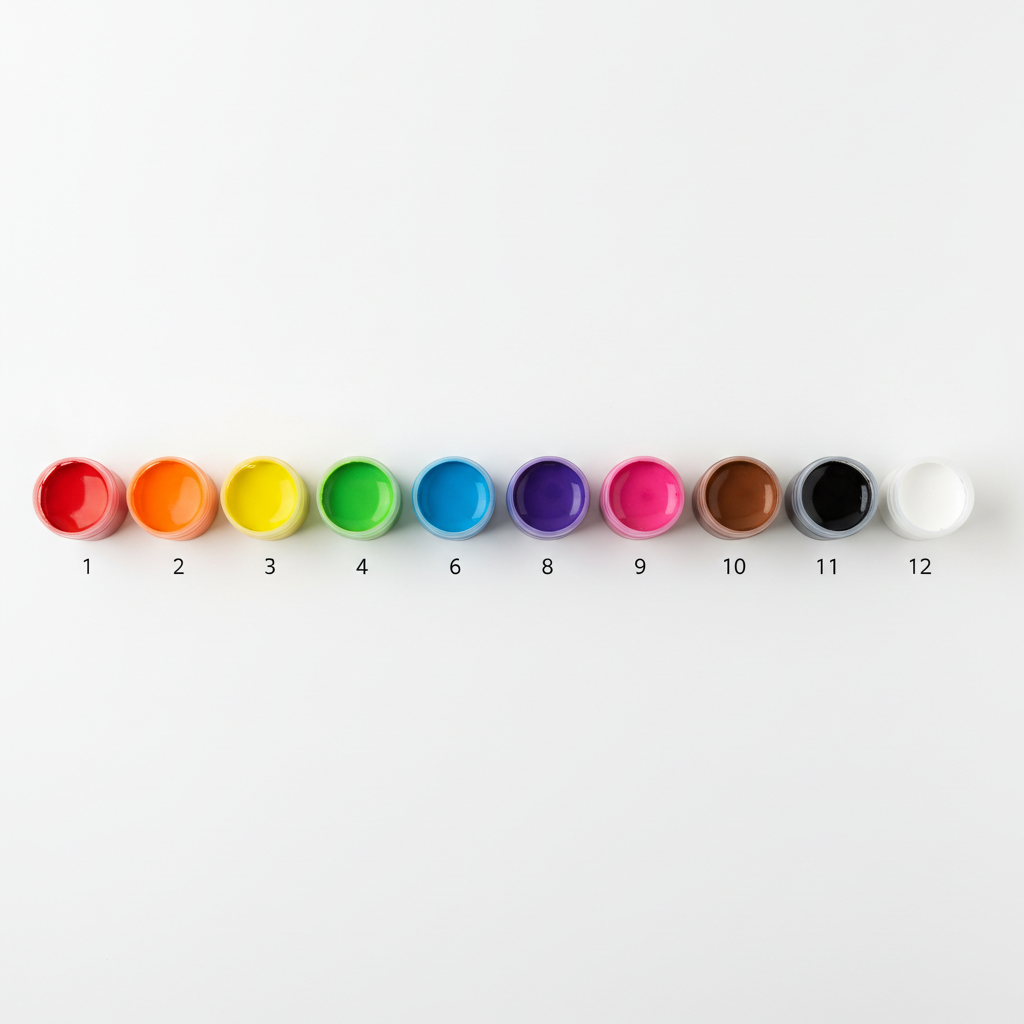
Asked for Twelve Pots Numbered 1 to 12. It Sent Ten, and Skipped 5 and 7.
Start here, because this single image is the whole argument of the page. The instruction was about as unambiguous as an instruction gets: exactly twelve pots, no more and no fewer, in one row, numbered underneath from left to right as 1 through 12, none repeated, none skipped, none out of sequence. Count the pots that came back and there are ten. Now read the numbers along the bottom: 1, 2, 3, 4, 6, 8, 9, 10, 11, 12. It dropped 5 and 7 from the middle of the sequence so that the last label still lands on 12 — the row ends exactly where it was told to end while containing two fewer things than it was told to contain. Every individual numeral is beautifully drawn, crisp and evenly weighted. That is the trap. The glyphs are perfect and the counting is not, so nothing about the image looks wrong until you actually count it. Two smaller lapses in the same frame, since they were also specified: the pots are not the same shape as each other — pot 3 has a thick lopsided rim with the paint surface shoved off to one side, and pot 12 is visibly wider than pot 11 — and the gaps are not identical, with the space between 9 and 10 noticeably wider than the space between 8 and 9.
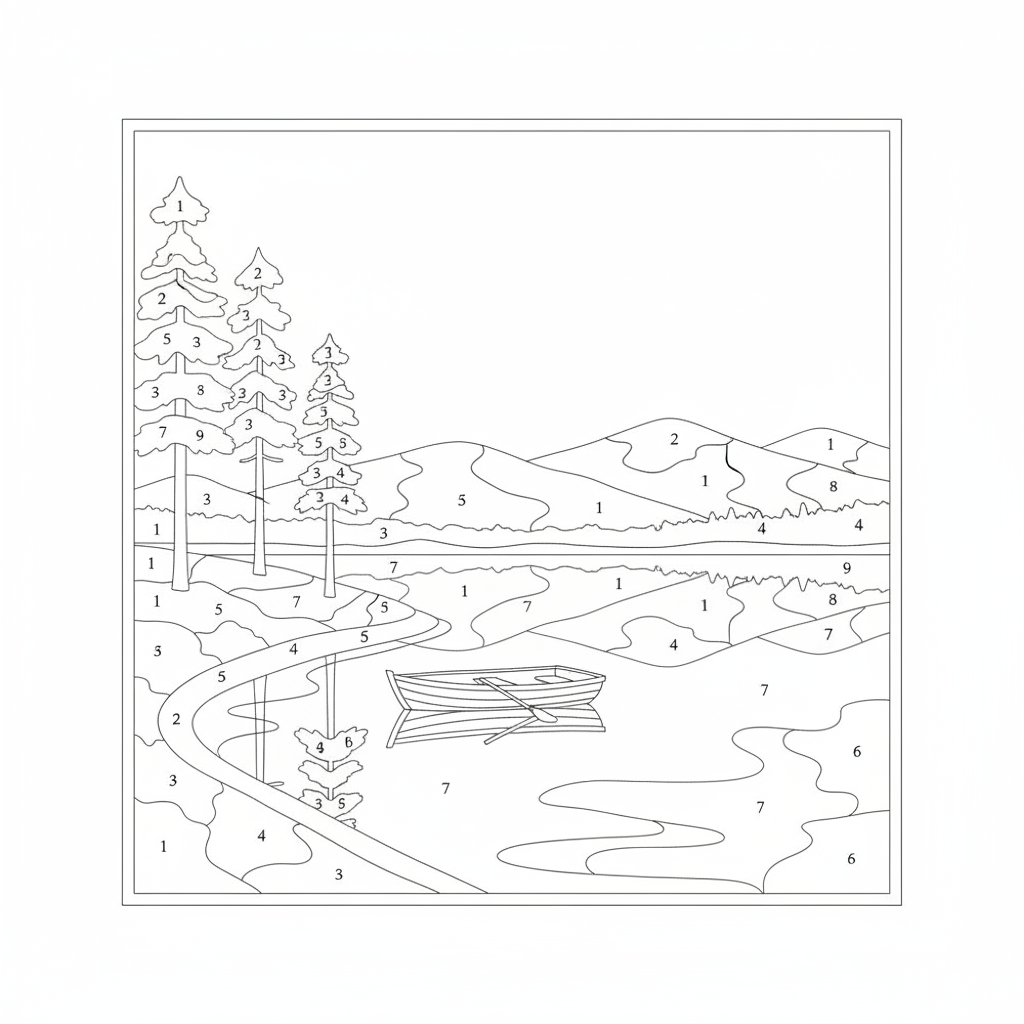
Every Region Numbered, It Was Told. The Sky Has No Number At All.
The drawing itself is genuinely good: three pine trees on the left bank as asked, one rowing boat on the water, hills behind, clean even line weight throughout, and most numerals sitting upright in single digits exactly as specified. Then look at what a person painting this would actually hit. The sky is the single largest region in the picture and it carries no numeral whatsoever — the painter has no instruction for roughly a third of the canvas. Several hill and water regions are likewise blank. In the other direction, individual pine branches contain two numerals each, not one: one branch holds a 5 and a 3, the branch below it holds a 3 and an 8, and the rule was one numeral per region. And down in the reflected tree at the bottom left, beside a malformed 4, sits a clear capital B — a letter, in an image that was restricted to the digits 1 through 9. It is not a badly drawn 8. It is flat-backed with two bowls, and it is a letter.
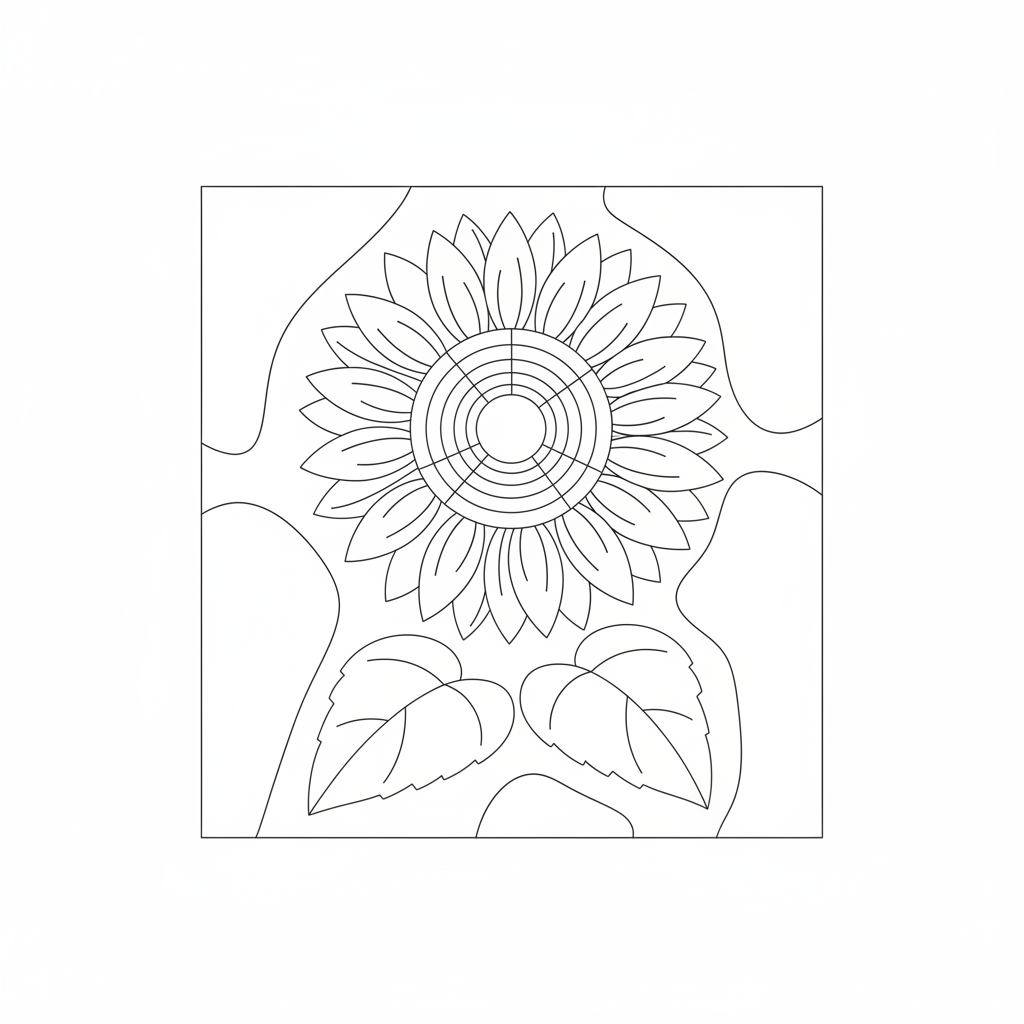
Asked to Put No Numbers In It At All, It Put No Numbers In It At All
This is the most useful image on the page and the reason the presets above are built the way they are. The instruction was the inverse of the two above: leave every region completely plain and empty, no numeral, no digit, no letter, no dot, no hatching, no shading. That is precisely what came back, first attempt, across the whole drawing — one sunflower head, exactly two leaves, a background split into a handful of large regions, and not a single mark inside any of them. Constraints about what to leave out are the instructions this model obeys most reliably, which is why every preset here generates the artwork and leaves the numbering to you. Two honest flaws remain. The flower has no stem: the two leaves sit below the bloom joined to nothing, so the head floats. And the centre is drawn as six concentric rings crossed by radiating spokes, which carves it into roughly thirty slivers far too narrow to get a brush into — fine as a drawing, unusable as a template without merging them.
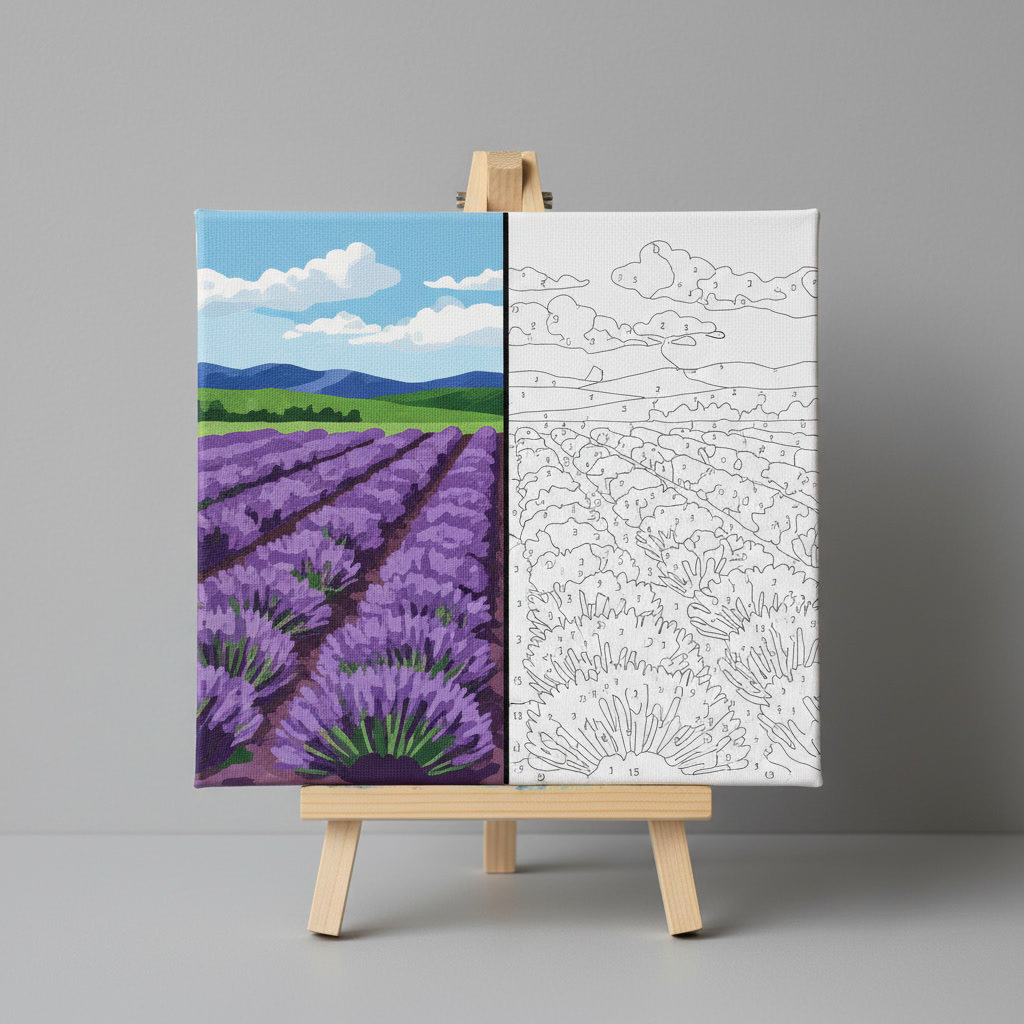
It Split the Canvas Perfectly Down the Middle, Then Put Two Different Pictures On It
The hard part of this one went right. The canvas is divided by a single straight vertical line running unbroken from top edge to bottom edge, landing within a couple of pixels of the true centre; the left half is fully painted in flat colour with no outline and no numeral anywhere in it; the right half is bare template. That is a compound instruction with four separate conditions and it kept all four. What it did not do is make the two halves the same picture. On the painted side there is a band of dark blue hills, a dark treeline below it and then the lavender. Cross the divide and the hills are gone entirely, the treeline is gone, and the rows start at a different height. It is not one picture half finished, it is two pictures butted together. Enlarge the template half and the numerals fall apart too: a few real digits survive, and the rest are open hooks and D-shaped scribbles that are not digits at all, many of them floating in the sky between cloud outlines rather than inside any enclosed region. The canvas was also specified as square, and it is noticeably taller than it is wide.
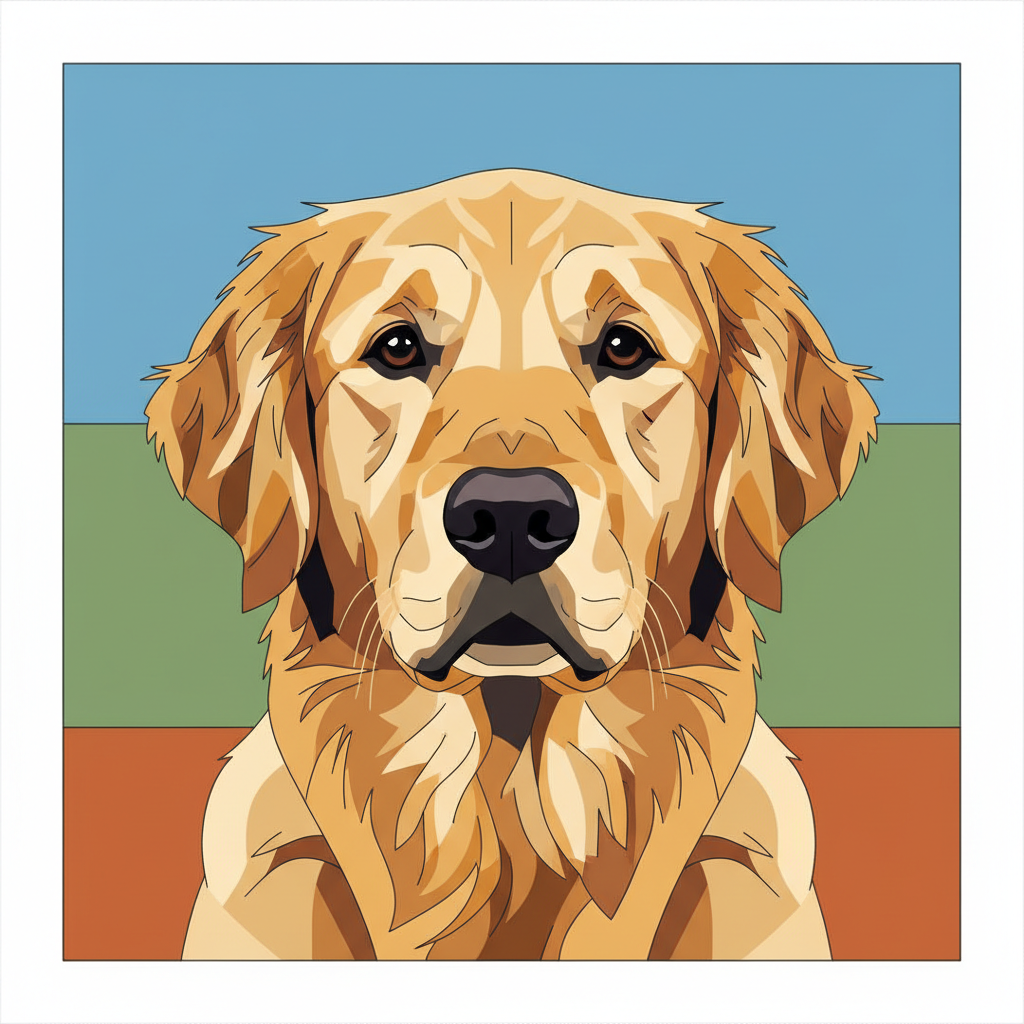
The Best Image Here, and the Two Eyes Are Not the Same Eye
Worth including because it mostly goes right. The flat-colour finish is exactly the look people want from a finished paint by numbers: solid unblended patches, no gradients, the fur reading as a mosaic rather than as hair, two eyes, one nose, two ears, and a background obeying the cap of three large flat areas. Then crop into the face. The left eye carries two separate white catchlights and the right eye carries one, so the light in the picture comes from two places at once on one side of the head and one place on the other. The eyes are also not the shape they were told to be — the left is a rounded almond, the right is narrower and sits slightly lower. And for template purposes there is a structural problem: the instruction was that every area be separated from the next by a visible dark outline, and across the forehead the tan patches simply change colour with no line between them. Lovely as a print. Not printable as a template.
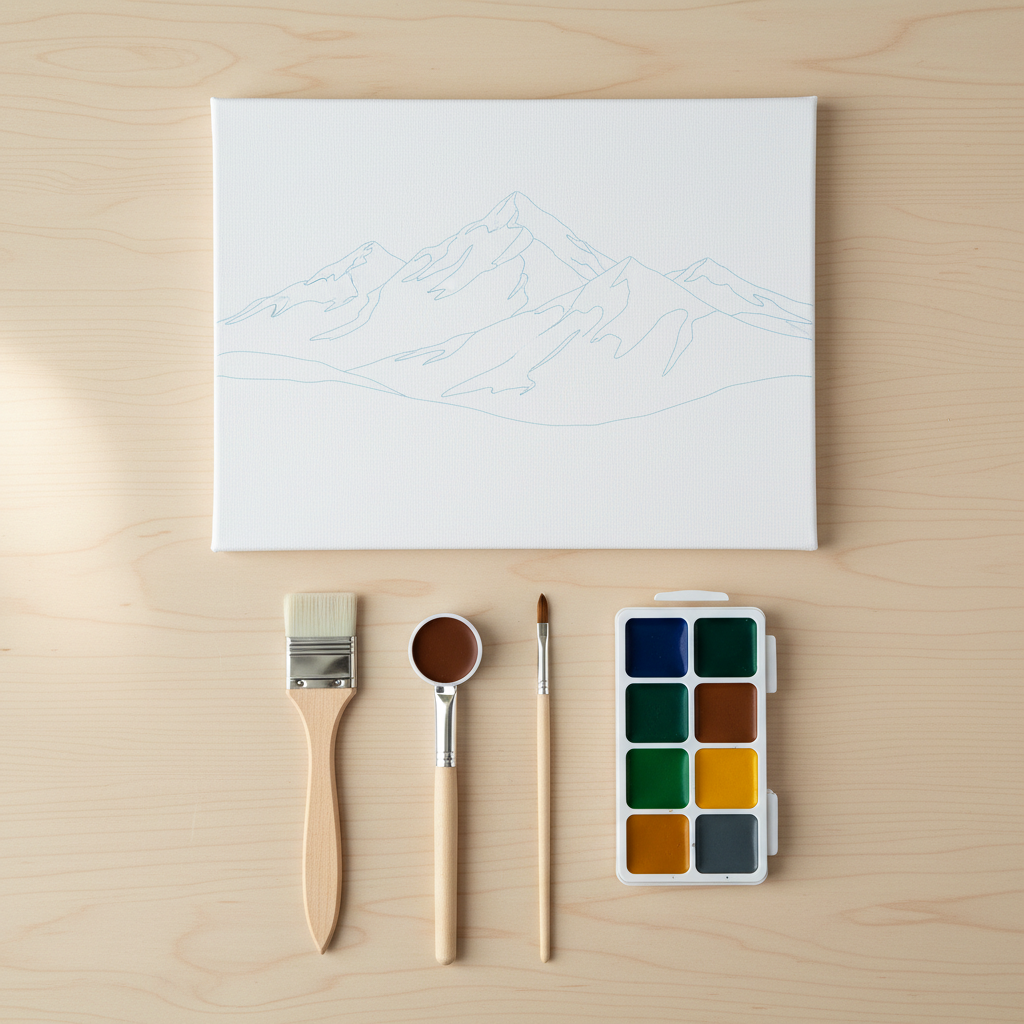
Three Brushes Requested. Two Brushes and One Invented Object Delivered.
At a glance this is a clean product flat lay and it would pass on a shop listing. The wide flat brush on the left is a real wide flat brush, the fine pointed brush on the right is a real fine pointed brush, the canvas lies flat with its faint blue outline drawing, the tray sits beside them, nothing else is on the table, and the whole thing is properly full bleed. Now look at the middle of the three. It has a wooden handle and a metal ferrule like a brush, and where the bristles should be there is a circular white-rimmed dish full of brown paint. It has no bristles of any kind. It is a paint pot fused onto a brush handle — an object that does not exist, sitting in the middle of a row where the eye simply reads it as the third brush. The canvas drawing has its own quieter problem: the mountain ridges are open contour lines that stop in mid-air rather than closing, so the drawing encloses almost no regions and is not a template at all.
All six were generated at 1:1 — the same model and the same ratio the tool above is locked to — so these are what the presets actually produce, not a showreel shot at a different size. Three of them were deliberately asked to carry numbers, which the presets do not, so that the counting and the drawing could be tested separately.
It Draws Numerals Beautifully and Cannot Count Them
This is the most important thing on the page, and it is the one defect that matters most for a paint by numbers generator specifically. The paint pot row was given an instruction with no wriggle room in it: exactly twelve pots, no more and no fewer, numbered underneath from left to right as 1 through 12, none repeated, none skipped, none out of sequence. Ten pots came back, labelled 1, 2, 3, 4, 6, 8, 9, 10, 11, 12. It deleted 5 and 7 from the middle of the sequence so that the final label still reads 12 — the row ends exactly where it was told to end while holding two fewer things than it was told to hold. Every glyph is crisp, evenly weighted and unmistakable, which is precisely why nobody catches it: the numbers look right, so you do not count the pots. The same split shows up in every numbered image here. The lake template numbers most regions correctly in single digits and leaves the sky — the largest region in the picture — with no number at all, puts two numerals inside single pine branches, and prints a capital B beside a 4. The lavender canvas produces glyphs that are not digits at all under magnification: open hooks and D shapes, several floating in the sky rather than inside any region. Drawing a numeral and running a sequence are separate abilities, and this model only has the first.
Outlines That Stop In Mid-Air Are Not Regions
A paint by numbers template only works if every line closes into a shape, and this model draws what an outline looks like rather than building one. The canvas in the kit flat lay is the clearest case: the mountain is rendered as a set of elegant ridge contours that simply stop in mid-air instead of joining anything, so almost nothing on that canvas is a closed region and the “template” cannot be filled at all. The lavender canvas has the same defect in its sky, where long horizontal lines run off between the cloud shapes and terminate. The second failure mode is the opposite one: regions too small to paint. The sunflower centre came back as six concentric rings crossed by radiating spokes, carving it into roughly thirty slivers, none wide enough to take a brush. The pattern across all six is consistent: simple subjects with few large shapes close reliably and hold even line weight; detailed scenes with fine structure fall apart. Generate simple, and merge anything narrower than about three millimetres at print size before you number it.
It Adds a Border to Drawings and Not to Photographs
This one is small, completely reproducible, and worth knowing before you send anything to a printer. All six images carried the same explicit framing instruction: full bleed, filling the whole square edge to edge, with no matte, no drop shadow, no tilt and no border added around the outside. The three photographic renders obeyed it exactly — the paint pots, the kit flat lay and the canvas on the easel all reach all four edges. All three drawn renders ignored it in the same way, returning a ruled rectangle inset from the edge with a white margin outside it: the lake template, the sunflower template and even the flat-colour retriever, which sits inside a white frame it was never asked for. Three out of three, in one direction. If you are printing a template, either trim that margin with the image cropper or design around it, because asking the model not to add it does not work.
Generate the Artwork. Number the Regions Yourself.
Everything above points at one working method, and the sunflower template is the proof that it works. Asked to leave every region completely plain and empty — no numeral, no digit, no letter, no dot, no hatching — this model did exactly that on the first attempt, right across the drawing. Constraints about what to leave out are the instructions it follows most faithfully, which is the exact opposite of how it handles instructions about counting. So all six presets here are built to hand you clean empty regions, and you add the numbers afterwards in any vector or drawing app. There is a reason beyond tidiness. A template is not decoration; it is a set of instructions that someone is going to follow with a brush for several hours. A region with no number is an hour of guessing, and a sequence that skips 5 and 7 means two pots in the kit match nothing on the canvas. Numbering it yourself takes a few minutes and removes the only part of the picture where being wrong actually costs anybody anything. One honest caveat on that sunflower: it obeyed the emptiness rule perfectly and still left the bloom floating with no stem joining it to its own leaves. Even the image that obeys best invents something.
How the AI Paint by Numbers Generator Works
Three steps, and the third one is what makes the template paintable
Pick a Style
Six presets: outline template, flat-colour finish, pet portrait, landscape, floral template and kit flat lay. Add a subject, a season or a palette in the box if you want one — the presets work with nothing typed.
Generate and Enlarge It
About fifteen seconds for a square render. Then enlarge it before you commit: check that the outlines close into shapes, and count anything the picture claims to contain a set number of.
Add the Numbers Yourself
This is the step that makes the template usable. Drop the artwork into any vector or drawing app, merge the slivers too narrow to paint, and number the regions by hand — it is the one part the model reliably gets wrong.
Template, Line Art or Painting — Picking the Right Page
This page builds the artwork a paint by numbers is traced from. For outlines meant to be filled with pencils rather than paint, the AI coloring page generator is the better fit, and for pure contour drawing the AI line art generator and the AI pencil sketch generator take over. To start from a photograph instead of a prompt, use AI photo to painting, and for a finished painterly look rather than flat regions try the AI oil painting generator or the AI watercolor generator. Pets are the most commissioned custom kit subject and the AI pet portrait generator is tuned for them. To convert the result into crisp scalable shapes before numbering, run it through the AI vector art generator, add your own labels with the AI typography generator, and trim the border the model adds with the AI image cropper.
Why Use This Paint by Numbers Generator
Because a custom kit costs forty dollars and takes three weeks to arrive
Clean Flat Colour, No Blending
The finished-canvas presets return solid unblended patches with hard edges, which is exactly the paint by numbers look and exactly what you need if you are going to trace the colour boundaries afterwards.
Templates That Actually Close
Simple subjects with large shapes — a flower head, a single tree, one animal — come back as closed paintable regions with even line weight. The presets here are written around subjects that behave.
Numbering Left To You On Purpose
Every preset generates blank regions rather than numbered ones. That is not a missing feature, it is the finding from the gallery turned into a design decision, and the sunflower proves the model honours it.
Square 1:1, Print Ready
Every render comes back square, which prints as a 20x20cm or 30x30cm canvas without cropping. Trim the ruled border the model adds to line drawings and it is ready for the printer.
Pets, Landscapes and Florals
The three subjects people actually commission as custom kits each get a preset tuned for them, in both the outline and the finished flat-colour treatment.
Free, No Sign Up, No Watermark
Generate as many as you like without an account and nothing is stamped on the result. Paid plans start at $2.99 and buy volume rather than features.
Who Uses It
Kit makers, craft sellers, teachers and anyone who wanted a quiet evening
Kit Makers
The outline and floral presets return closed regions with even line weight, which is the hard part of building a kit. Merge the slivers, number the regions, match the pots, and you have a product — just count the pots before you box them.
Pet Portrait Gifters
Custom pet kits are the most commissioned paint by numbers there is. The flat-colour pet preset is the most convincing thing this tool makes — check that both eyes carry the same number of catchlights before you send it to print.
Teachers and Group Leaders
A blank template in fifteen seconds beats an hour of searching for a printable. Generate the outline, print it at A4, and let the group choose their own colours rather than following a numbering that might have a letter in it.
Craft Shop Sellers
The kit flat lay preset produces listing-grade product photography without owning the product. It is the one style where full bleed is honoured, so it drops straight into a square marketplace thumbnail.
AI Paint by Numbers Generator FAQ
Numbering, your own photos, colour counts, printing and what it costs
Free AI Paint by Numbers Generator — Your Template in Fifteen Seconds
Buying a custom kit means forty dollars, a photograph emailed to a stranger and three weeks of waiting. Finding a free printable means an afternoon of search results that are all the same six flowers. An ai paint by numbers generator removes that whole step. Pick one of six styles, wait about fifteen seconds, and you have a square canvas to work from — a clean outline template, a flat-colour finished painting, a pet portrait, a rolling landscape, a floral template or a product-style kit flat lay. No account, no watermark, and as many attempts as you want.
Every preset on this paint by numbers maker does one deliberate thing: it leaves the regions blank. No printed numerals, no colour keys, no little labels. That is not the tool running short. It is the finding from the gallery above turned into a design decision, and the sunflower template is the evidence that it works — asked to leave every region completely plain, with no numeral, no digit, no letter, no dot and no hatching anywhere in the drawing, this model did exactly that on the first attempt. Instructions about what to leave out are the ones it follows most faithfully.
Three findings sit behind that decision, all demonstrated in the images rather than asserted. The first is that it cannot count. A row specified as exactly twelve paint pots numbered 1 through 12 came back as ten pots labelled 1, 2, 3, 4, 6, 8, 9, 10, 11, 12 — two numbers deleted from the middle so the sequence still ends where it was told to end. Every glyph was perfect. The second is that numerals and regions do not line up. A lake template told to put one single digit inside every region left the entire sky blank, put two numerals inside individual pine branches, and printed a capital B beside a 4; a lavender canvas produced marks that stop being digits at all under magnification. The third is that outlines do not always close. The mountain drawing in the kit flat lay is made of ridge lines that stop in mid-air, enclosing almost nothing, while the sunflower centre came back carved into thirty slivers too narrow for a brush.
So the method is short: let the model draw the picture, keep the subject simple so the shapes close, merge anything too narrow to paint, and number the regions yourself. A template is a set of instructions someone will follow with a brush for hours, and numbering it takes a few minutes. The neighbouring pages finish the job — pencil-filled outlines at the AI coloring page generator, pure contours at the AI line art generator, a photograph as the starting point at AI photo to painting, the most commissioned kit subject at the AI pet portrait generator, crisp scalable shapes at the AI vector art generator, a finished painterly treatment at the AI oil painting generator, a bigger file for canvas printing at the AI image upscaler, and the unwanted border trimmed at the AI image cropper. Everything here is free to try, nothing is watermarked, images come back square at 1:1, and paid plans start at $2.99. Scroll back up, make one, and count the pots before you box them.