
GOT IMAGE 2 vs Seedream
No Login, No Daily Credit Pool, No Watermark
Seedream is a genuinely strong photorealism model with real native resolution behind it — this page says so before it says anything else. Then it shows you where the two differ, with six renders as evidence rather than adjectives.
Run the Same Prompt Here — Free, No Account
These are the six presets that produced the gallery below. Pick one, describe your own version, and compare the result against whatever Seedream gives you for the same brief.
GOT IMAGE 2 — Free Seedream Alternative
Choose one of the six presets used for the gallery on this page, then describe your own subject, wording and colours in the box. No Dreamina account, no app and no shared daily credit pool — just type and generate.
Every preset here renders at 1:1 square, the ratio five of the six gallery images were generated at. For wider shapes, including the 16:9 valley below, start from the home page generator, which adds a ratio picker, or trim afterwards with the AI image cropper. If what you need is more pixels rather than a different shape, the AI image upscaler is the right stop — asking a prompt for 4K does not make a render bigger.
GOT IMAGE 2 vs Seedream, Row by Row
Everything in the Seedream column describes ByteDance’s apps and hosted APIs as reported at the time of writing. This model family ships a new version every few months; check before you rely on a row.
| GOT IMAGE 2 | Seedream | |
|---|---|---|
Account required | None — the generator on this page runs signed out | A Dreamina or Jimeng account, or an API key, at the time of writing |
Cost to start | Free tier, no card; paid plans from $2.99 | Free daily credits in Dreamina; roughly $0.03–$0.04 per image via API |
Model | GPT Image 2 | Seedream 4.0, 4.5 and 5.0 — ByteDance, versions change fast |
Native resolution | Standard render, then the AI image upscaler for more pixels | Up to 4K natively — a genuine strength, not a marketing line |
Watermark | None, on the free tier included | Free and trial output watermarked at the time of writing |
Daily allowance | No shared daily pool on the generator above | A daily credit grant shared with the video and avatar tools |
In-image text | Three lines of small label type legible under a crop, first try | Strong, and notably good at Chinese and English together |
Editing workflow | One model generates and edits; a separate image editor for your own files | Native multi-image input and consistent sets — genuinely capable |
Commercial use on free tier | Not restricted to personal use | Free tier reported as personal use only at the time of writing |
Stay With Seedream If
- You need native high resolution rather than an upscale. Rendering large from the start is a real architectural advantage and this page is not going to argue with it.
- Your work involves Chinese text set inside the image, where Seedream’s bilingual rendering is the strongest thing in its class at the time of writing.
- You are already inside CapCut or Dreamina, where the sign-in costs you nothing because you are signed in already and the video tools are next door.
- You are building against an API, where roughly three to four cents an image is hard to beat and a browser tool is not what you are shopping for.
Use GOT IMAGE 2 If
- You do not want another account, or you are on a machine where signing into a personal app is not an option.
- You iterate hard. A daily credit pool shared with video generation is a ceiling you will meet on exactly the afternoon you cannot afford to.
- You need the file clean. A watermarked, personal-use-only free render is not something you can put in front of a client.
- You want to hand someone a link that just works, with no onboarding step between them and a finished image.
Six Renders, Warts and All
Straight out of the presets above — including the ones where something went wrong
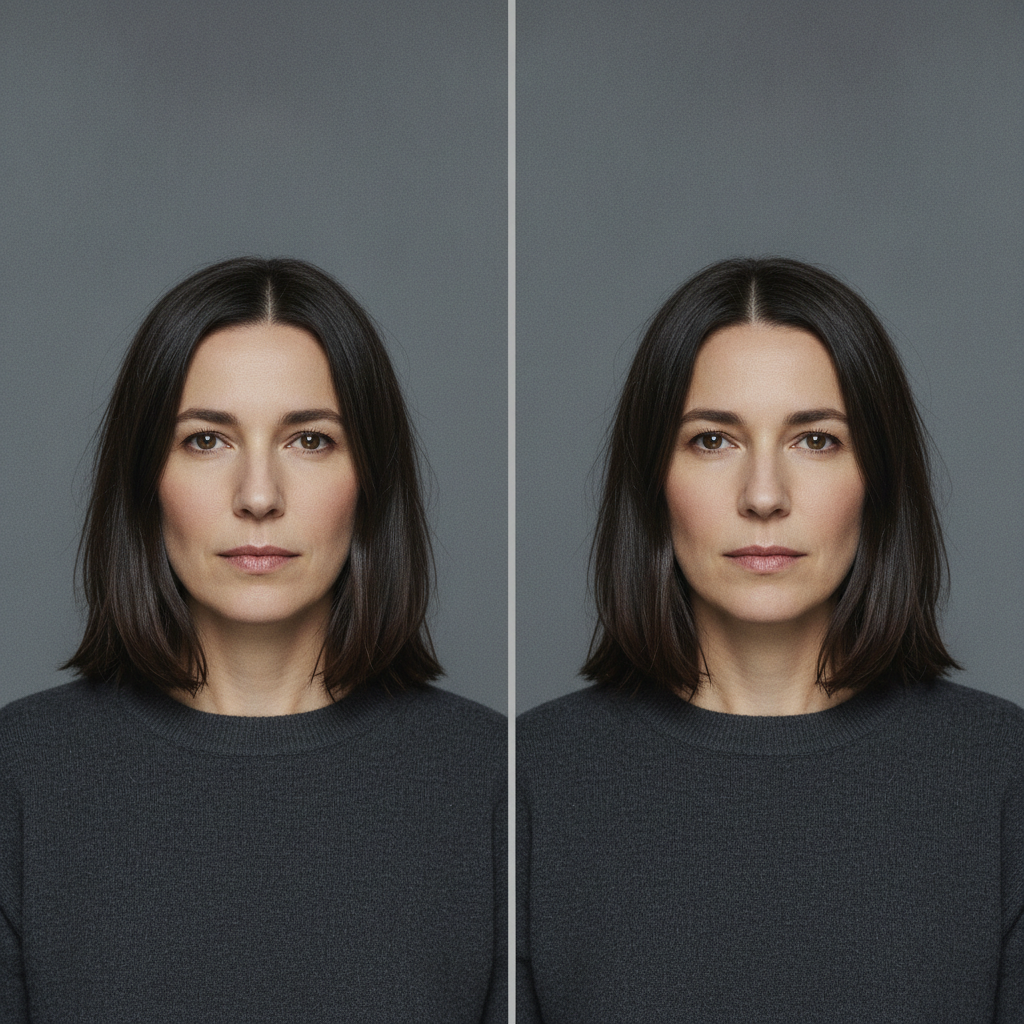
The Face Survived. The Jumper Did Not.
The prompt asked for the same person, the same pose and the same lighting on both sides of the divider, and the striking thing is how much of that actually landed. This is recognisably one woman, not two lookalikes: the brow, the eye spacing, the set of the mouth and the hairline all match, which is more than a split-frame prompt usually gets. Everything below the neck is a different story. Crop the two collars side by side at full size and the left one has a broad ribbed crew neck band while the right one is narrower and tighter, the knit is a coarser weave on the left, the hair falls in a different strand over each shoulder, and the right figure sits fractionally larger and lower in its half. The useful rule is that consistency is strong inside a single generation and weak across two — which is exactly why the next image on this page matters more than a second portrait would.
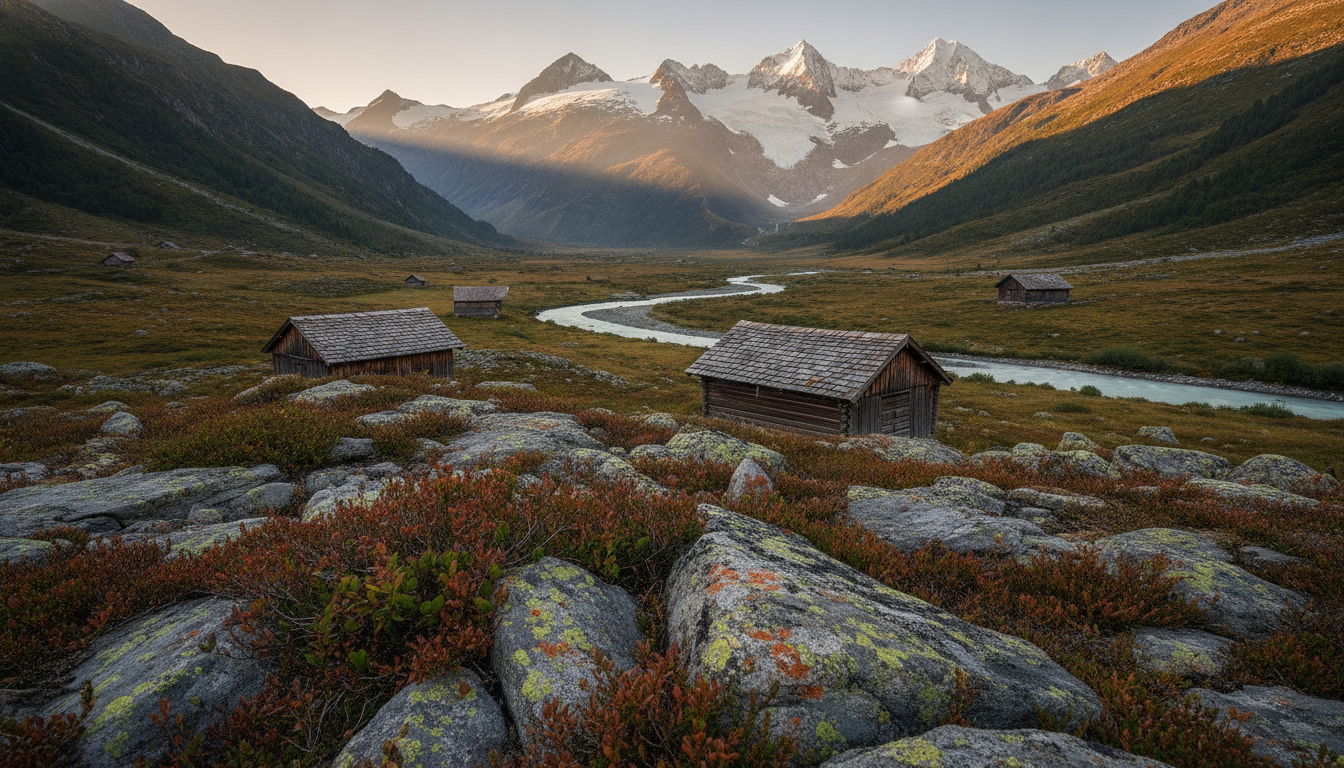
Deep Focus Held. The Middle Distance Did Not Survive the Crop.
This is the image that makes the resolution argument concrete rather than rhetorical, and it cuts both ways. Composed at 16:9 and viewed whole, it is exactly what was asked for: three clean depth layers, lichen and heather individually resolved in the foreground, huts and a braided river behind them, ridge lines and hanging glaciers at the back. Crop into the far peaks at four times magnification and they hold up, with real rock structure and a believable glacier surface. Crop into the middle distance at the same magnification and it falls apart — the second hut becomes a smear, its roof loses the shingles the near hut clearly has, and the grass turns to noise. That is the honest shape of the native resolution question. More pixels from the start buy you crop headroom in the layer you are most likely to enlarge, and if you already have the render, the AI image upscaler is the right tool rather than a bigger prompt.
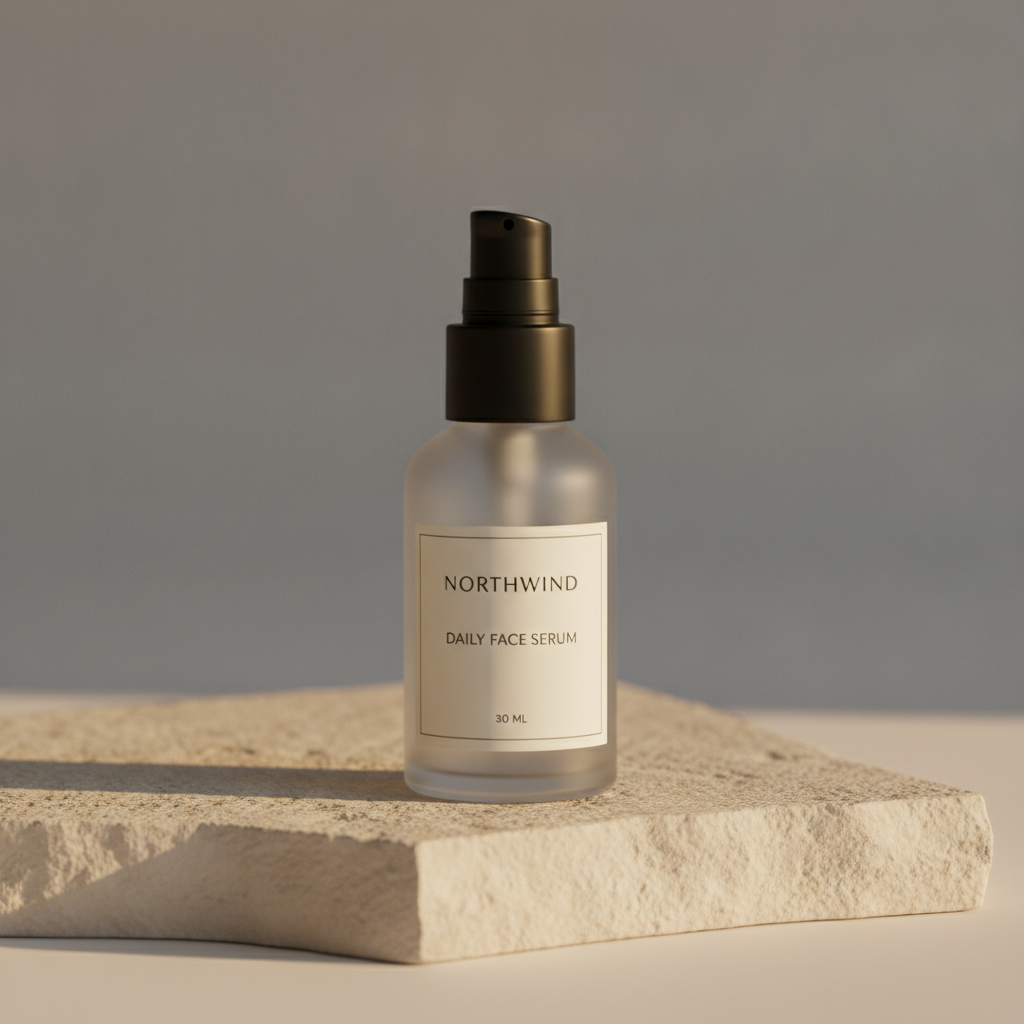
Three Lines of Small Type, Every Character Right
The label was the hard ask on this page: three separate lines at small size, a brand name, a description and a measurement, all inside a ruled box on a curved glass surface. Zoom to four times and NORTHWIND, DAILY FACE SERUM and 30 ML are all correctly spelled, evenly tracked, cleanly weighted and sitting straight on their baselines, with no doubled strokes and no invented characters. It landed first try. The one thing to notice is typographic rather than textual: the three lines are not evenly distributed down the label. The first two sit close together near the top and 30 ML drops to the bottom rule, leaving a conspicuous void through the middle of the box. The model set the words correctly and laid them out carelessly, which is the kind of flaw you fix in thirty seconds and the kind you have to see first.
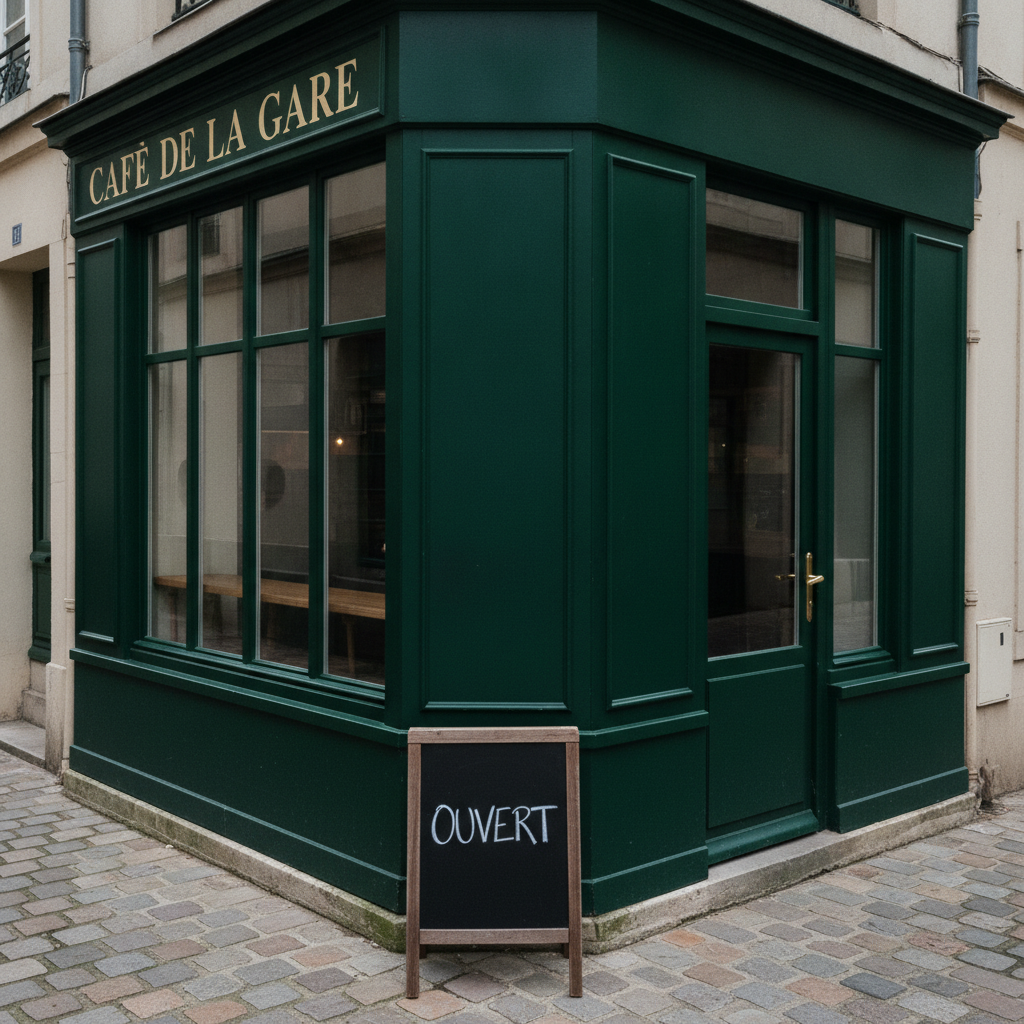
Two Accents Nobody Asked For, One of Them Backwards
This is the single most instructive image on the page. The prompt was written in plain unaccented capitals: CAFE DE LA GARE on the fascia, OUVERT on the board. The chalkboard came back perfect. The fascia came back reading CAFÈ DE LA GARE — with a grave accent the prompt never contained, leaning the wrong way, because the French word takes an acute. Look at the end of the line and there is a second mark sitting over the final E of GARE, a word that carries no accent in French at all. Every letterform around them is immaculate: evenly spaced gold serif capitals, correct spelling, confident painted texture. That is precisely why this failure is dangerous. It does not look like a glitch, it looks like deliberate typography, and it will survive a glance from anyone who is not a French speaker. Check the marks separately from the letters on any page, in any model, in any language that uses them.
Where Photorealism Genuinely Delivers
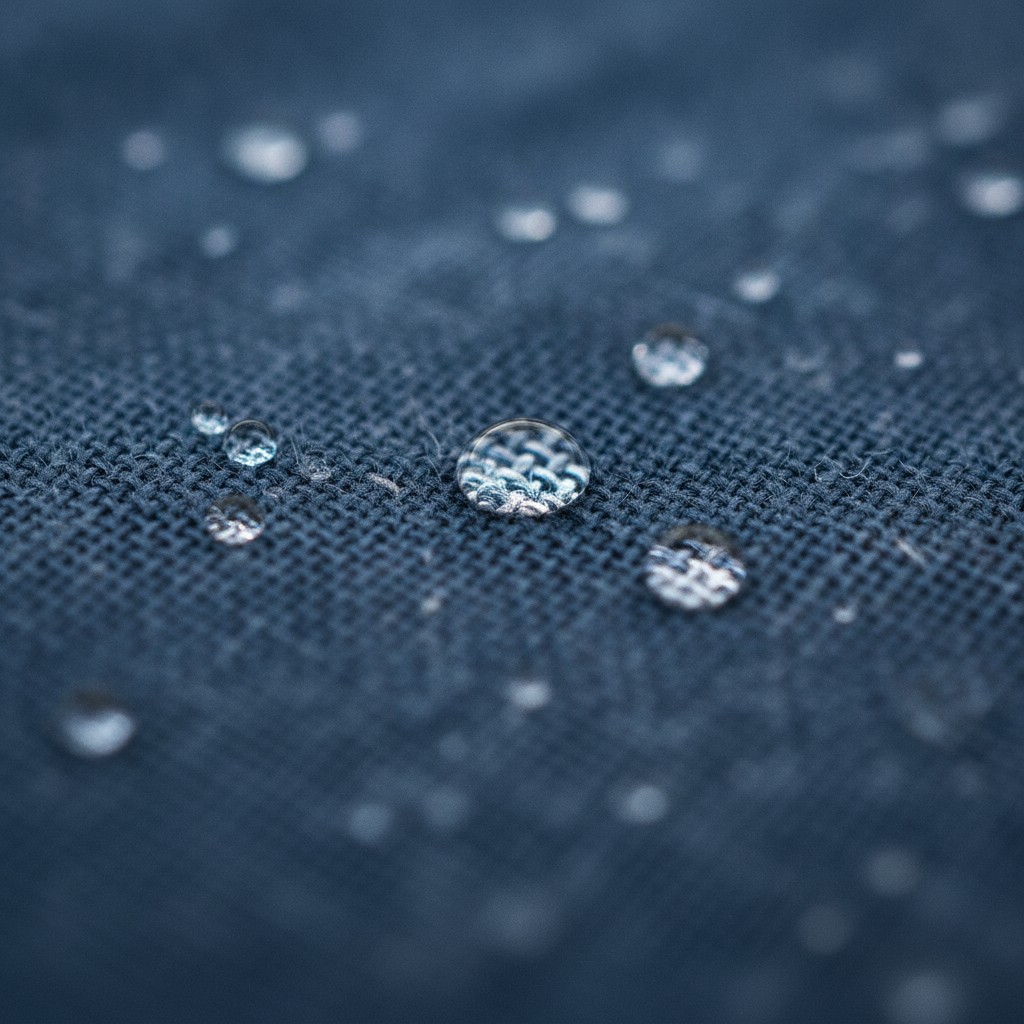
Included because a comparison page that only shows failures is as dishonest as one that only shows wins. Individual warp and weft threads are separately resolved, loose fibres stand proud of the surface, and the largest droplet does the thing that is hard to fake: it acts as a real lens, magnifying the weave underneath it rather than sitting on top as a white blob. This is the class of subject where both this model and Seedream are genuinely excellent and where you would struggle to tell two renders apart blind. The one liberty taken is the focus. The prompt asked for a shallow plane with one corner falling away, and what came back is a narrow sharp band straight across the middle with both the top and the bottom softened, which is a photographer choice nobody requested.
Beautiful Hands. Now Try to Count the Fingers.
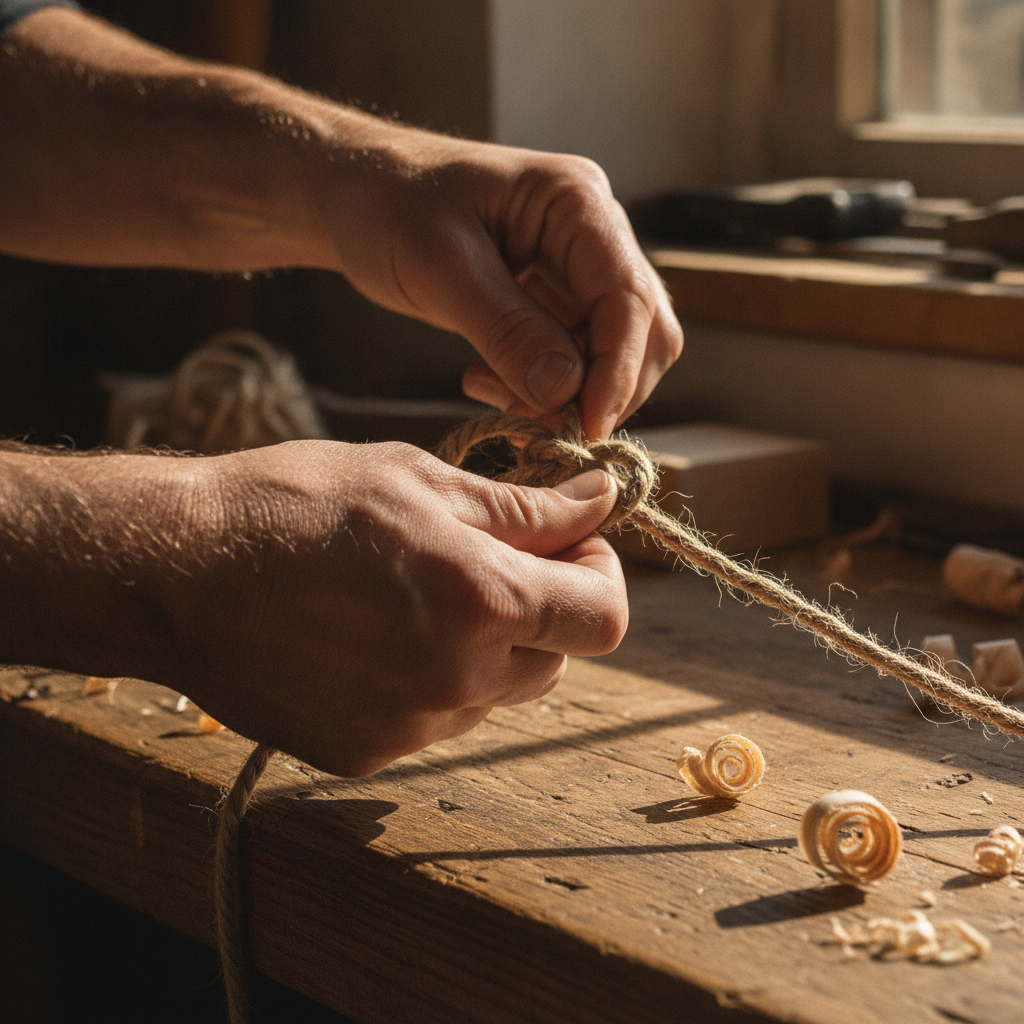
The skin is the best thing in this gallery — knuckle creases, forearm hair, a chipped nail, sawdust caught on a wrist, all of it lit by window light that falls exactly the way the prompt asked. The instruction it quietly ignored was the one that mattered: both hands fully visible, every finger unobscured, none overlapping. What came back is two pinch grips. The upper hand shows a thumb, an index and a sliver of a middle finger; the lower hand shows a thumb and an index, with the remaining fingers curled away out of sight. Five fingers are countable across two hands. Nothing here is deformed, which is genuinely new — models used to fail this subject loudly. Now they fail it quietly, by rearranging the shot so the hard part never appears, and the twine forms a convincing loop rather than a knot you could actually name.
Every Seedream Claim on This Page Has a Short Shelf Life
This model family moves faster than comparison pages do. Seedream 4.0 arrived in September 2025, 4.5 followed, and a 5.0 release landed in 2026 — three generations inside roughly a year. Every figure in the column above, the daily credit allowance, the watermark on free output, the per-image API price and the 4K ceiling, describes what has been reported about ByteDance’s apps and the aggregators hosting the model at the time of writing. None of it is guaranteed to survive the next release. Credit economies in particular get rewritten without ceremony, and a page that states a competitor’s limits as permanent fact is misleading you by the time you read it. So treat the table as a starting point and verify the one row you actually care about. If the deciding factor is the watermark, generate one free image and look at it. If it is the daily allowance, read the current help page rather than this one. And run your own prompts through both. A comparison page can show you six renders; it cannot tell you which model handles the specific thing you make every week.
The Letters Were Perfect. The Accents Were Invented.
If you take one thing from this page, take this one, because it applies to every model in this class and not just to one of them. The shopfront in the gallery was prompted in plain unaccented capitals — CAFE DE LA GARE — and came back as CAFÈ DE LA GARE, carrying a grave accent that was never requested and that leans the wrong way, since the French word takes an acute. A second invented mark sits over the final E of GARE, which takes no accent at all. Everything around those two marks is flawless. The capitals are evenly spaced, correctly spelled, confidently painted and properly perspective-matched to the fascia board. That is what makes diacritic invention the most dangerous text failure there is: a misspelling looks like a mistake, but a wrong accent looks like typography, and it will pass every reader who does not speak the language. So check the marks separately from the letters. Read the word once for spelling and once again for anything sitting above or below the line, and do it in Spanish, French, Portuguese, Vietnamese and Turkish especially. The product label in the same gallery shows the flip side — three lines of unaccented small type, correct at four times zoom, first attempt — so this is not a general weakness at text. It is a specific one, and it is worth knowing exactly where it lives. The same discipline applies to the quiet instruction drops. The hands image dropped a requirement that every finger be visible and reframed the shot so the hard part never appeared, and the macro quietly moved the focal plane. Reread your own brief against the result before you ship it, and when the thing you need changed lives in a file you already own, use the AI image editor rather than describing the change in a new prompt.
How to Test It Against Seedream
Three steps, and the third one is the one most comparison pages skip
Pick a Preset, Then Describe It
Six presets cover the shapes in the gallery: photoreal portrait, wide landscape, product with a label, painted shopfront sign, macro texture and hands. Add your own subject, wording and colours in the box underneath.
Generate Without Signing In
No Dreamina account, no app, no card. A render takes roughly fifteen seconds and comes back as a clean 1:1 PNG with no watermark and no personal-use-only string attached to it.
Zoom In Before You Ship It
Open the result at full size and crop into the part that carries the meaning — the label, the accents, the distant ridge line. Then run the identical prompt through Seedream and compare the same crop, not the thumbnails.
Three Prompts Worth Testing on Both
A fair test needs prompts that actually separate two models, and most do not — both will hand you a pretty landscape. Start with something carrying real text at small size: a product label with three short lines, spelled out in capitals in the prompt, then read the result letter by letter and check the accents separately from the letters. Next, a detail test: render a wide scene and crop into the far distance at full resolution, which is where a native resolution advantage either shows up or turns out not to matter for what you make. The text to image page has more on writing those. Finally, a two-pass job: generate something, then ask for one change, which is the pass where workflow differences appear and where the AI photo editor and the AI image generator do different jobs. If your work is photographic, run the same test on the AI realistic photo generator and the AI landscape image generator instead.
Why People Look for a Seedream Alternative
Rarely because of the renders — nearly always because of the account, the credits or the watermark
No Account, No App Install
The generator on this page runs signed out, in the browser you already have open. Seedream’s consumer route goes through Dreamina or Jimeng, and both want you signed in first — which is the most common reason people go looking for a Seedream alternative at all.
No Shared Daily Credit Pool
Dreamina’s free allowance is a daily credit grant shared across image, video and avatar generation at the time of writing, and video spends it quickly. There is no shared pool here, so an afternoon of iterating on one image does not compete with anything else.
No Watermark on the Free Tier
Free and trial output from ByteDance’s apps is watermarked, with capped resolution and personal-use licensing, at the time of writing. Every render here comes back as a clean PNG that drops straight into a slide, a mockup or a page.
Text You Can Zoom Into
The skincare bottle in the gallery carries three lines of small label type and the shopfront carries a painted sign and a chalkboard. Zoom into any of them and judge the letterforms for yourself, then rerun the same preset above with your own wording.
One Model for Generating and Editing
GPT Image 2 handles both, so refining a render does not hand it to a second system with a different sense of colour and texture. Seedream’s own multi-image input and consistent-set output are a genuine strength in the same territory — worth testing against each other.
The Failures Shown, Not Hidden
Half the gallery is here because something went wrong in it. Knowing that a model re-renders instead of adjusting, and that fine detail dissolves below a certain crop, is worth more to you than another flawless sample would be.
GOT IMAGE 2 vs Seedream FAQ
The account, the credits, the watermark, the resolution, and whether the quality gap is real
GOT IMAGE 2 vs Seedream — A Free Seedream Alternative Without the Login
Most people who go looking for a Seedream alternative are not unhappy with the renders. Seedream is ByteDance’s image model family, and at the time of writing it has shipped 4.0, 4.5 and a 5.0 release inside roughly a year — which should tell you both how fast it is moving and how quickly any specific claim on a page like this goes stale. Its reputation rests on two things that are genuinely earned: photorealism that survives close inspection, and high native output resolution rather than an upscale bolted on at the end. Neither deserves to be waved away, and this comparison does not try to. What sends people looking elsewhere is almost always the shape of the access rather than the output. The consumer route runs through Dreamina or Jimeng and wants you signed in first. The free allowance is a pool of daily credits shared with the video and avatar tools, which spend it fast. Free and trial output is reported as watermarked, resolution capped and licensed for personal use only. None of that is about the pictures.
GOT IMAGE 2 answers the access side of that specifically. There is no account, no email and no card in front of the generator on this page — it is the working product rather than a teaser, and a link to it is a link somebody can use immediately. There is no pool of daily credits being spent by a video tool in the next tab. Nothing comes back watermarked, and nothing comes back with a personal-use-only string attached, so a free render is one you can actually put in a deck. GPT Image 2 handles both generating and editing, so refining a result does not pass it to a second system with a different sense of colour and texture. Paid plans start at $2.99 and exist for volume rather than to unlock features.
The six renders in the gallery are the argument, and the most useful ones are the imperfect ones. The shopfront is the centrepiece: prompted in plain capitals as CAFE DE LA GARE, it came back with a grave accent nobody asked for, pointing the wrong way, plus a second invented mark over a word that carries no accent in French — inside otherwise immaculate gold serif lettering. The product label proves the opposite case in the same gallery, holding three lines of small unaccented type correct at four times zoom on the first attempt, so this is a specific failure mode rather than a general weakness at text. The valley render shows what native resolution actually buys, with far ridge lines that survive a four times crop and a middle distance that dissolves at the same magnification. The split portrait shows identity holding across two halves of one image while the garment underneath quietly changes. And the hands show the newest failure mode of all: nothing deformed, nothing obviously wrong, just a silent reframing that hid the fingers the prompt insisted on showing. Every one of those came out of a preset sitting at the top of this page, at the ratio a visitor actually gets.
So the honest verdict is not that one model beats the other. If you need native 4K for print, or Chinese text set correctly inside an image, or you are already living inside CapCut and Dreamina, Seedream is a strong choice and switching would gain you little. If you do not want another account, if you iterate hard enough to meet a shared daily credit ceiling, or if you need a clean unwatermarked file you can use commercially, this is the better fit — and you can confirm that in about a minute without registering for anything. Start with the presets above, then carry the same brief across the rest of the site: the AI image generator for open-ended work, the text to image page for prompt craft, the AI realistic photo generator for photographic subjects, the AI image editor and AI photo editor for changes to a file you already have, the AI image upscaler when you need more pixels than a render gives you, the AI image cropper for reshaping a square render, and the AI product mockup generator if the labelled bottle in the gallery is closer to what you actually came here to make.