
AI Photo Booth Generator
One Selfie In, a Photo Strip Out
Upload a single photo and get back a tall photo booth strip — hard flash and a curtain in black and white, faded orange 70s colour, a Y2K pink grid, or a party strip with paper props. This ai photo booth generator is free, needs no account, and the gallery below shows you at full size exactly where it loses a frame and where it swaps someone out.
Try the AI Photo Booth Generator — Free
Upload one clear front-facing photo, pick a booth look, and count the frames when it lands
AI Photo Booth Generator
Upload a clear, well-lit, front-facing photo, then choose one of the six booth looks below. Each preset already carries the strip layout, the film stock and the 9:16 shape. Two things worth knowing before you start: the frame count is unreliable, so count the frames in whatever comes back rather than assuming you got four, and small identifying details like moles, freckles and distinctive earrings are the first things the model drops, so check those rather than the overall likeness.
Upload a clear front-facing photo, choose a booth look, and click Generate
Renders at 9:16 portrait, the shape every image in the gallery below was generated at. A real booth strip is far narrower, so trim the sides with the AI image cropper if you want the exact paper proportions, or pick a different ratio on the home page generator.
AI Photo Booth Generator Examples
Six strips exactly as they came back, at the same 9:16 ratio the presets use — including the two that quietly lost a frame
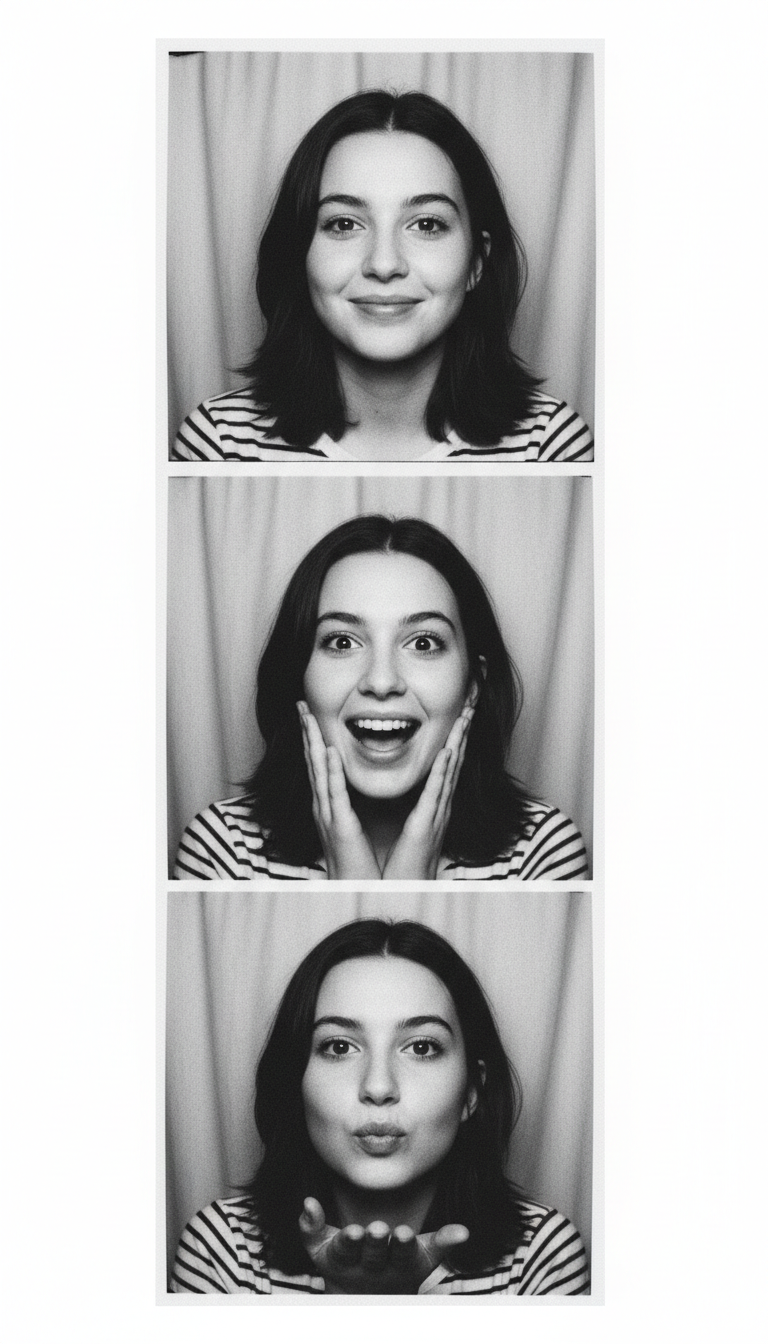
Asked for Four Frames. Counted Three.
Start here, because this is the failure that defines the tool. The prompt asked, in those words, for exactly four square photographs stacked in one vertical strip, and listed four specific poses: a smile, a laugh with the head tipped back, a surprised face and a blown kiss. What came back has three frames. One pose was simply dropped — the laugh and the surprise have been merged into a single middle frame. Everything else about it is excellent: the flash is right, the curtain is right, the grain is right, and the woman is unmistakably the same person in all three, which is the hard part. But a photo booth strip is defined by its frame count, and the model treats that number as a suggestion. Count the frames before you post it.
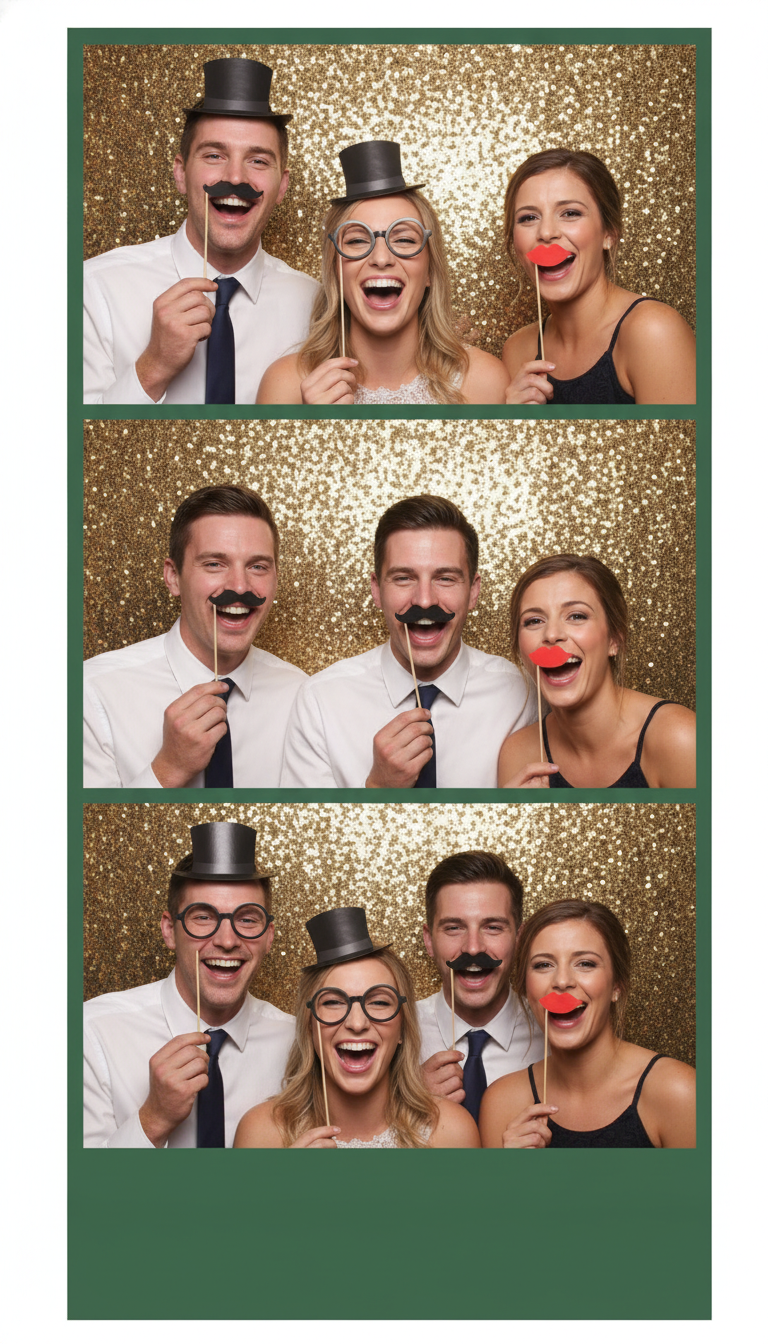
The Same Four Guests. Except One of Them Is a Different Man.
The prompt asked for the same group of four wedding guests to appear in all three photographs. Look at the strip from the top down. Frame one has three people: a man in a top hat, a blonde woman and a brunette. Frame two also has three — but the blonde has vanished and a second man, who was not in frame one at all, is standing in her place. Frame three finally has four, and the blonde is back. The cast changes between every frame of a single strip. This is the most important thing on the page for group photos, because it is invisible at thumbnail size and obvious the moment someone looks for themselves. Frame counts, props and the sequin backdrop were all delivered correctly; the people were not.
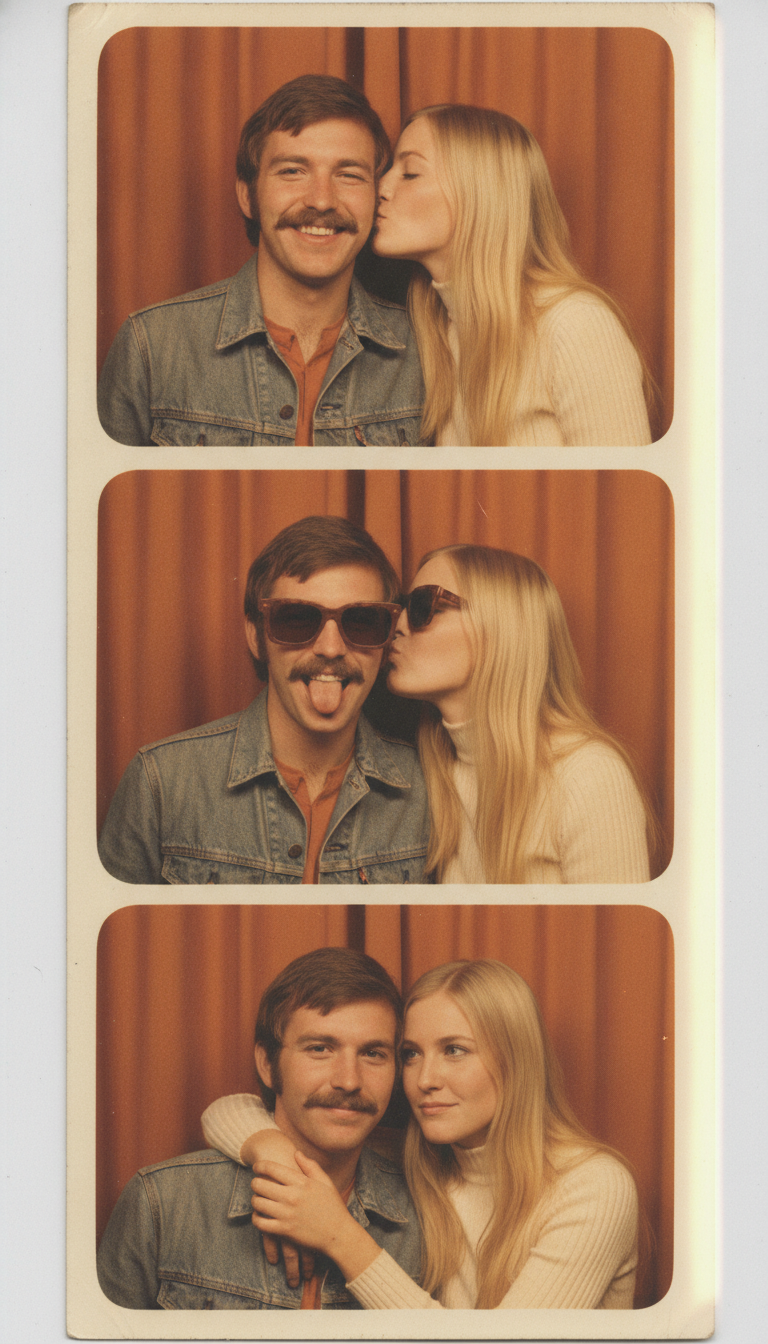
Three Frames Again — But Two Faces Held Perfectly
Same count problem, second time asking: four photographs requested, three delivered. Worth showing anyway, because of what it got right. Two people had to stay recognisable across the whole strip, and they do — the same moustache, the same jaw, the same hairline on him, the same face and the same centre parting on her, in all three frames. The faded orange cast, the light leak down the right edge, the worn paper and the rounded corners were all asked for and all arrived. It even invented sunglasses for the middle frame, which nothing in the prompt requested and which is exactly what people do in a real booth. So identity holds fine for one or two subjects. It is groups where it falls apart.
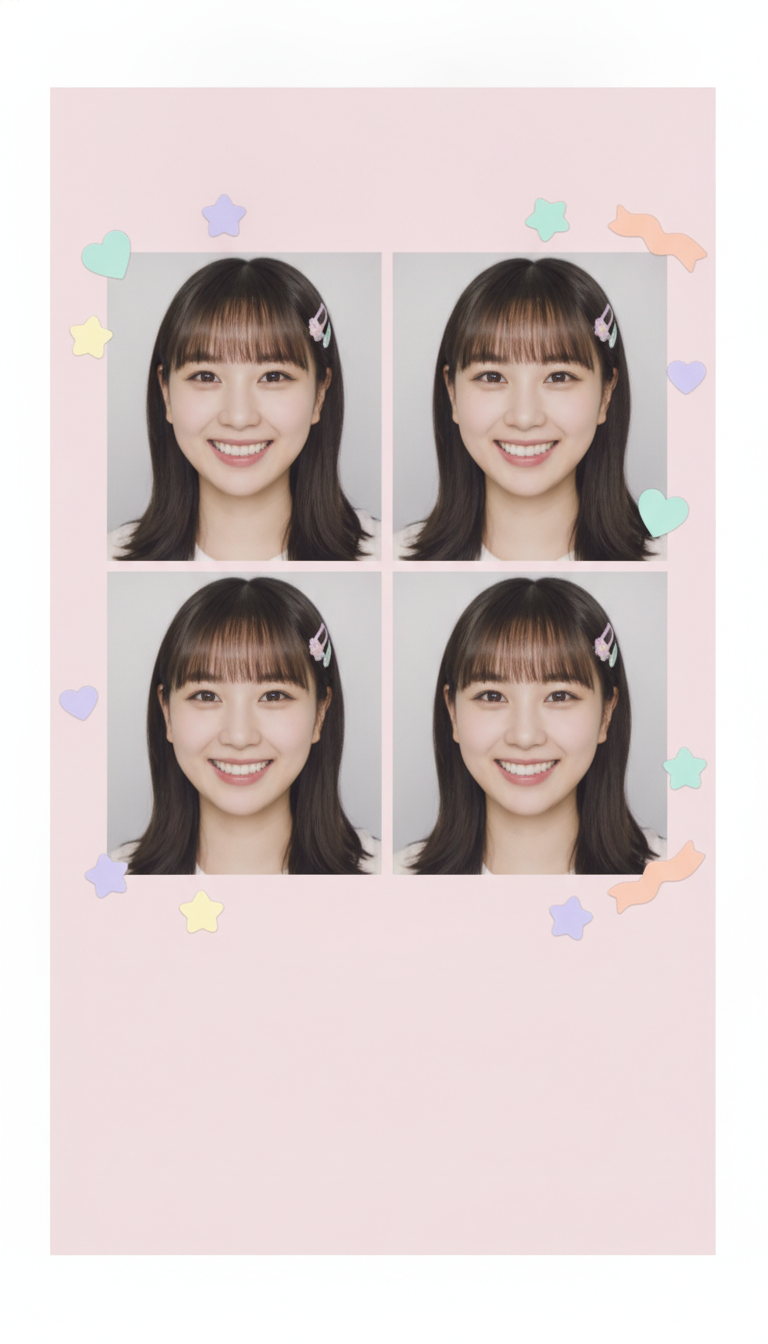
Four Frames at Last — and All Four Are the Same Photograph
The only one of the six that produced the number it was asked for: a clean two by two grid, four photographs of equal size, a wide empty pink band across the bottom for a caption, pastel stickers on the card. Then look at the faces. It is not four moments, it is one photograph repeated four times with micro-variations in the smile. That is the trade the model makes and it is worth understanding: ask for the same person and you get the same picture; ask for different poses and, as the strip at the top of this gallery shows, it starts losing frames instead. A couple of the stickers also drifted over the photograph edges after being told to stay on the card.
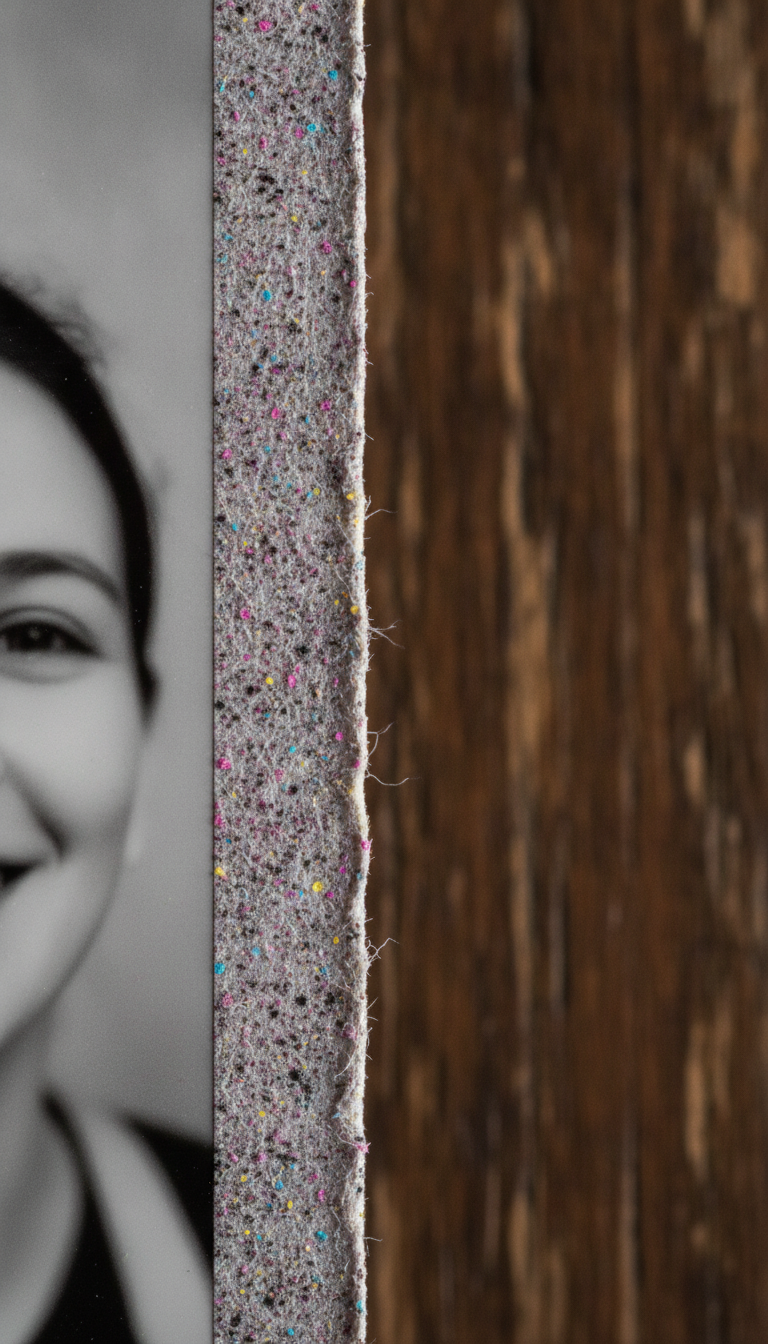
Texture It Nails. Instructions About Focus, Less So.
The best pure-rendering result of the six and genuinely hard to fault as a photograph: real paper fibres, coloured flecks through the stock, a cut edge that frays into loose threads, and a soft raking light across it. If what you want is something that looks like a physical print rather than a file, the model can do that convincingly. The two things it ignored were both instructions, not skills. It was asked to turn the strip at a slight angle — it is dead vertical. And it was asked to show only a sliver of one out-of-focus photograph along the side; instead a quarter of the frame is a sharply focused, clearly readable face. Composition notes get dropped far more often than texture does.
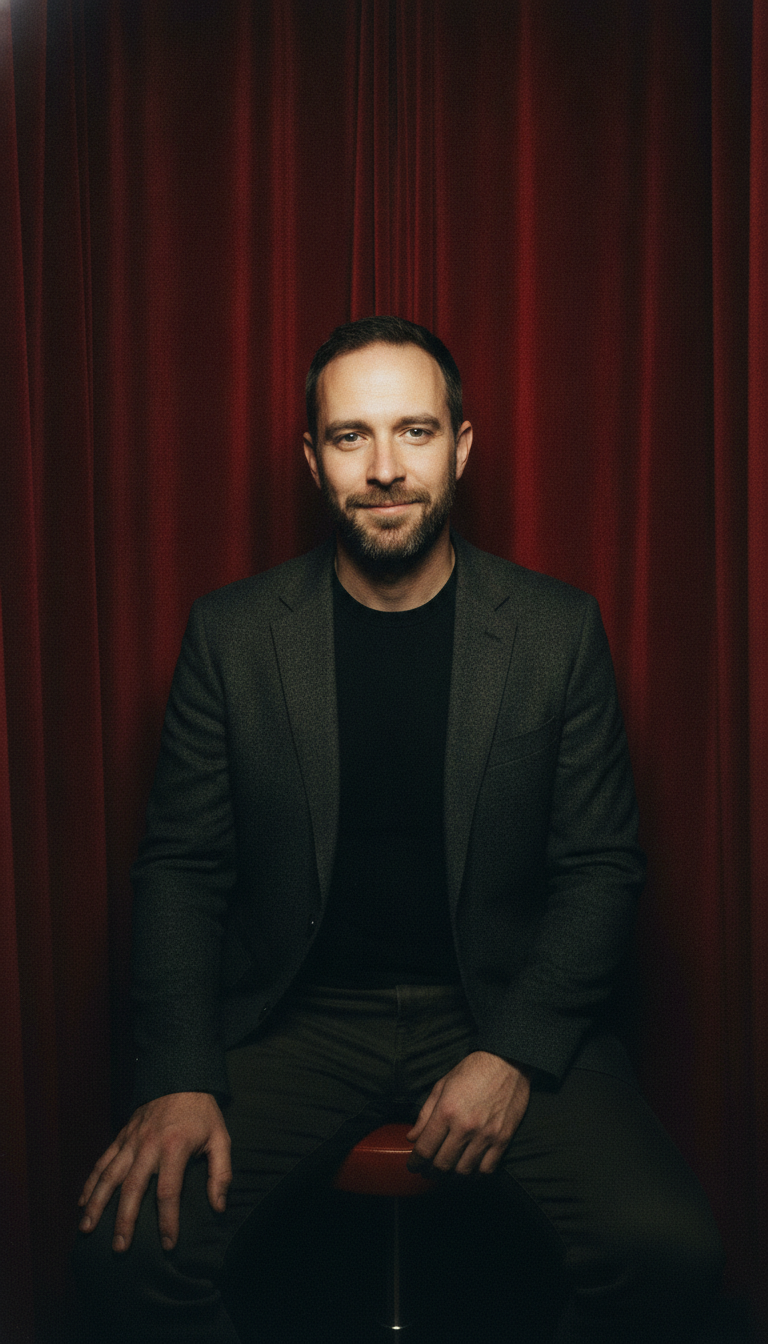
A Lovely Portrait That Is Not a Photo Booth
One frame rather than a strip, for anyone who wants a booth-styled profile picture. The red velvet curtain arrived, the little round stool arrived, and it is a flattering image. It is also not what was asked for. The prompt specified one hard direct on-camera flash with sharp fall-off, and the cramped tight framing of a real automatic booth. What came back is soft, shaped, moody studio lighting in a roomy three-quarter crop — the look of a portrait session, not of a machine in a shopping centre. If the charm you are after is specifically the unflattering flash and the too-close crop, expect to run this preset more than once before it lands.
It Does Not Count Frames, and a Strip Is Made of Frames
This is the defining limitation of every ai photo booth generator built on an image model, including this one. Two of the six gallery images asked in plain words for exactly four photographs stacked in a vertical strip. Both returned three. The black and white strip also listed four specific poses and merged two of them into one frame to make the arithmetic work. The only preset that delivered four did it by repeating a single photograph four times — the Y2K grid is four copies of one moment with a slightly different smile, not four moments. That is the trade underneath the whole tool: ask for consistency and you get duplication, ask for variety and you lose frames. No wording in the preset reliably fixes this, because the model is drawing a picture of a strip rather than assembling one from four exposures. Count the frames in every result before you post it, generate two or three when the number matters, and reach for the Y2K Grid preset when you specifically need four panels.
One Face Holds. Two Faces Hold. Four Faces Do Not.
Identity consistency is the thing this model is unexpectedly good at, right up until it is not. The black and white strip keeps the same woman across three frames convincingly, and the 70s strip keeps a whole couple — his moustache and jaw, her parting and face — across three frames without drifting. Then look at the wedding strip. The same four guests were requested in all three photographs. Frame one has three people. Frame two has three people, but the blonde woman has been replaced by a man who does not appear in frame one at all. Frame three has four. The cast is re-invented between every frame, and at thumbnail size it is completely invisible. A second, quieter failure runs through all of them: small identifying details vanish. The black and white prompt asked for a mole on the left cheek and not one frame has it. Moles, freckle patterns, scars, a distinctive pair of earrings — the overall likeness survives and the specifics do not. Check the details that make the face yours, and for any group larger than two, check that everybody who was in the room is still in the strip. One last thing to look at: the edges. Four of the six ignored a full-bleed instruction and returned a photographed print floating on a white or grey surface, so there is usually a margin to trim.
How the AI Photo Booth Generator Works
Three steps, and the third one is the one people skip
Upload One Clear Photo
Front-facing, well lit, face unobstructed. The better the source, the better the model holds your features across the frames — and the less it invents to fill the gaps.
Pick a Booth Look
Black and white, 70s colour, Y2K grid, party props, neon or a single portrait. Each preset already carries the strip framing and the 9:16 shape, so you only choose the era.
Count the Frames and Check the Faces
The step people skip. Confirm you got the number of frames you wanted, then check that every frame contains the same person — and in a group, the same people.
Strip, Collage or Portrait — Picking the Right Page
This page invents the other frames from one photo. If you already have the photographs and just want them arranged, the AI photo collage maker and the AI photo montage maker are the right tools, because they compose rather than imagine. For a single booth-styled image to use as an avatar, the AI profile picture maker is more direct, and the AI yearbook photo generator covers the other great retro-portrait format. For the faded film look on its own, try the AI vintage photo generator, and trim any margin the model adds with the AI image cropper.
Why Use This Photo Booth Generator
Because the booth is three towns away and gives you exactly one strip
Six Booth Looks
Classic black and white, faded 70s colour, Y2K pink grid, wedding and party props, neon night, and a single booth portrait. Each preset carries its own film stock, lighting and paper.
Identity That Holds for One or Two
The gallery strips keep the same face across every frame, and the same couple across a whole strip. That is the hard part of a photo strip and the model does it well.
Honest About the Frame Count
Asked for four frames twice and got three both times. We put that at the top of the gallery rather than let you find it after posting. Count them before you share.
Weddings, Parties and Reunions
Props, sequin backdrops and a caption panel for a date or a couple’s names. Generate a strip per guest instead of hiring a booth for the evening.
As Many Strips As You Like
A real booth gives you one strip for a few pounds. Generate six, keep the two where the frames and the faces both landed, and post them the same evening.
Free, No Sign Up
About fifteen seconds a strip, no account, no queue, no watermark. Upload once and work through the presets to find the look you want.
Who Uses It
People who want the strip, not the queue outside the machine
Anyone Posting the Trend
The four-frame strip is one of the most shared formats there is, and 9:16 is exactly the shape a story wants. Upload once, run all six looks, and post the one where the frames landed.
Couples
Two faces is where the model is strongest — the 70s strip in the gallery holds both people across the whole strip. An anniversary post, a save-the-date, or a print for the fridge.
Weddings and Parties
Props, sequin backdrops and a blank panel for names or a date. Worth reading the gallery note on the wedding strip first, because groups are exactly where the cast starts changing between frames.
Profile Pictures With Character
The Single Portrait preset gives one booth-styled image instead of a strip — red curtain, stool, direct flash. More personality than a plain headshot, and it crops square without losing anything.
AI Photo Booth Generator FAQ
Frames, faces, groups, sizes and what it costs
Free AI Photo Booth Generator — Strips, Grids and Booth Portraits
The photo booth strip survives because of its constraints rather than in spite of them. Four frames, a few seconds between each, a curtain, a flash nobody can adjust and a piece of paper that comes out of a slot still damp. Nothing about it is flattering, which is exactly why people have been sticking them in wallets for eighty years and why the format refuses to die on social media. The problem is supply: a real booth costs a few pounds a go, lives in one or two places in any given city, and hands you a single strip you cannot reprint. A free ai photo booth generator removes that bottleneck entirely. You upload one photograph, pick an era, and about fifteen seconds later there is a tall strip on your screen that you can regenerate as many times as you like.
The six presets on this photo booth generator are built around how the format is actually used. Classic B&W is the archetype: hard on-camera flash, a pale curtain, silver gelatin grain and four expressions. 70s Colour is the faded orange strip with a light leak down one edge and corners worn soft from being carried around. Y2K Pink Grid is the modern Korean-style print, a two by two layout on a pink card with pastel stickers and an empty band at the bottom for a caption. Party Props puts paper hats, glasses and moustaches on sticks against a gold sequin backdrop, with a solid panel underneath for a date or a pair of names. Neon Night is the contemporary club look, magenta and cyan gels raking across the face. Single Portrait drops the strip entirely and gives you one booth-framed image for use as an avatar. Every preset already carries the strip layout and the 9:16 portrait shape, so all you supply is the photograph.
Two limits, demonstrated in the gallery rather than asserted, because between them they decide whether this fits your job. The first is that it cannot count. Four photographs were requested in a vertical strip, twice, and three came back both times — and in one of them two of the four requested poses were quietly merged into one frame to make the numbers work. The only preset that produced four panels did so by repeating a single photograph four times. The second is that groups do not survive the strip. The wedding example asked for the same four guests in all three frames and delivered three people, then three people with one of them replaced by a man who was not in the first frame, then four. Against that, identity for one or two subjects is genuinely strong: the same woman and the same couple hold across whole strips without drifting. Small identifying details are the exception — a mole specified on the left cheek is absent from every frame it was asked for.
For most of what people want a photo strip for, none of that is a blocker. A story post, an anniversary picture, a profile picture with more personality than a headshot, or a print for the side of a fridge only ever needed a convincing image, and this makes one in seconds with no account and no watermark. It matters when the strip has to contain a specific number of frames or a specific set of people, in which case generate it a few times, count the frames, and check that everyone who should be in it still is. The neighbouring tools finish the job: real photographs arranged rather than invented at the AI photo collage maker and the AI photo montage maker, avatars at the AI profile picture maker, the other great retro-portrait format at the AI yearbook photo generator, faded film treatments at the AI vintage photo generator, colour brought back to old prints at the AI photo colorizer, and any white margin trimmed off at the AI image cropper. Everything here is free to try, nothing is watermarked, strips come back at 9:16 portrait, and paid plans start at $2.99. Scroll back up and make one.