
AI Pregnancy Announcement Generator
It Draws. It Does Not Lay Out.
Six announcement styles — botanical flat lay, an empty frame on a shelf, three pairs of shoes, a golden-hour bump photograph, a chalkboard, an autumn flat lay. This ai pregnancy announcement generator is free, needs no account and adds no watermark. Every preset deliberately leaves you a blank space for the name and the date, and the gallery below shows, at full size, exactly why.
Try the AI Pregnancy Announcement Generator — Free
Pick a style, generate a square scene with room left for your words, then set the name and the date yourself
AI Pregnancy Announcement Generator
Choose one of the six announcement styles below and generate. Each one is a complete scene on its own, so there is nothing you have to type — but the box underneath will take a line if you want a different season, colour palette or prop. One thing to know before you start: every style here deliberately returns a blank card face, frame or panel rather than lettering. That is on purpose. This model spells beautifully and lays out badly, so the reliable workflow is to let it build the setting and to set your surname and your due date yourself afterwards, in a typeface you chose, spelled the way your family spells it.
Renders square at 1:1, which is the shape these get posted in and prints cleanly as a 5x5 or 6x6 card. There is no ratio picker on this page — for a portrait card, a wide header, or to trim a drop shadow the model has added around a flat lay, use the AI image cropper or pick a ratio on the home page generator.
AI Pregnancy Announcement Generator Examples
Six squares exactly as they came back — enlarge the borders, and follow every arm
Every Letter Correct, Including the French Surname. Now Look at What It Added.
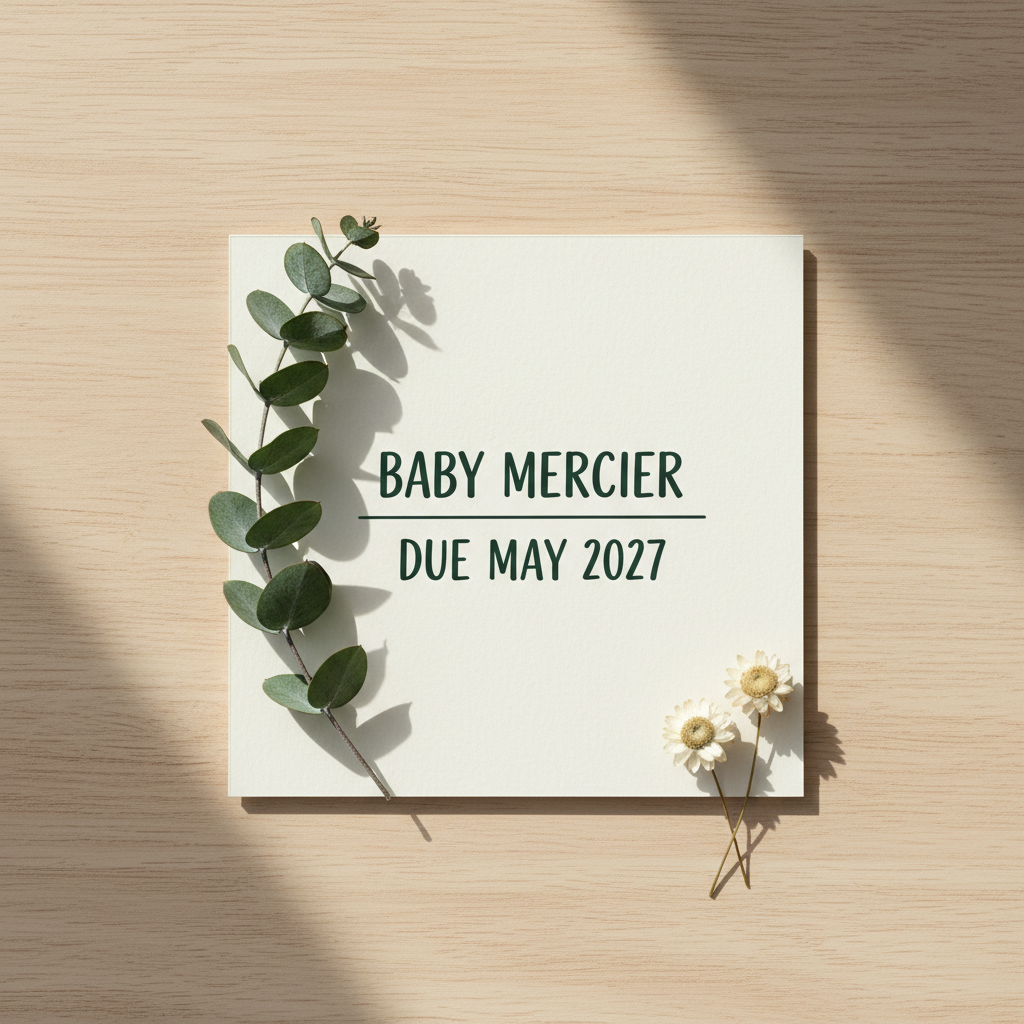
Start here, because it is the opposite of what this site usually reports. The prompt asked for BABY MERCIER on one line and DUE MAY 2027 on the next, in plain unaccented capitals. That is exactly what came back: both lines spelled correctly, the numerals right, the letterforms clean and evenly weighted — and no invented accent on MERCIER, which is the failure that fires on almost every French or Spanish word this model is given. Then read the rest of the instruction. It asked for both lines to be the same width; line two is visibly narrower than line one. It did not ask for a horizontal rule between them, and there is one. And it asked for a full-bleed square with no drop shadow and no border, and what arrived is a photograph of a card lying on a table, casting its own shadow, reaching none of the four edges. The spelling is the easy part. The layout is where it stops listening.
Three Pairs Asked For, Three Pairs Delivered. The Pairs Themselves Are Not Pairs.
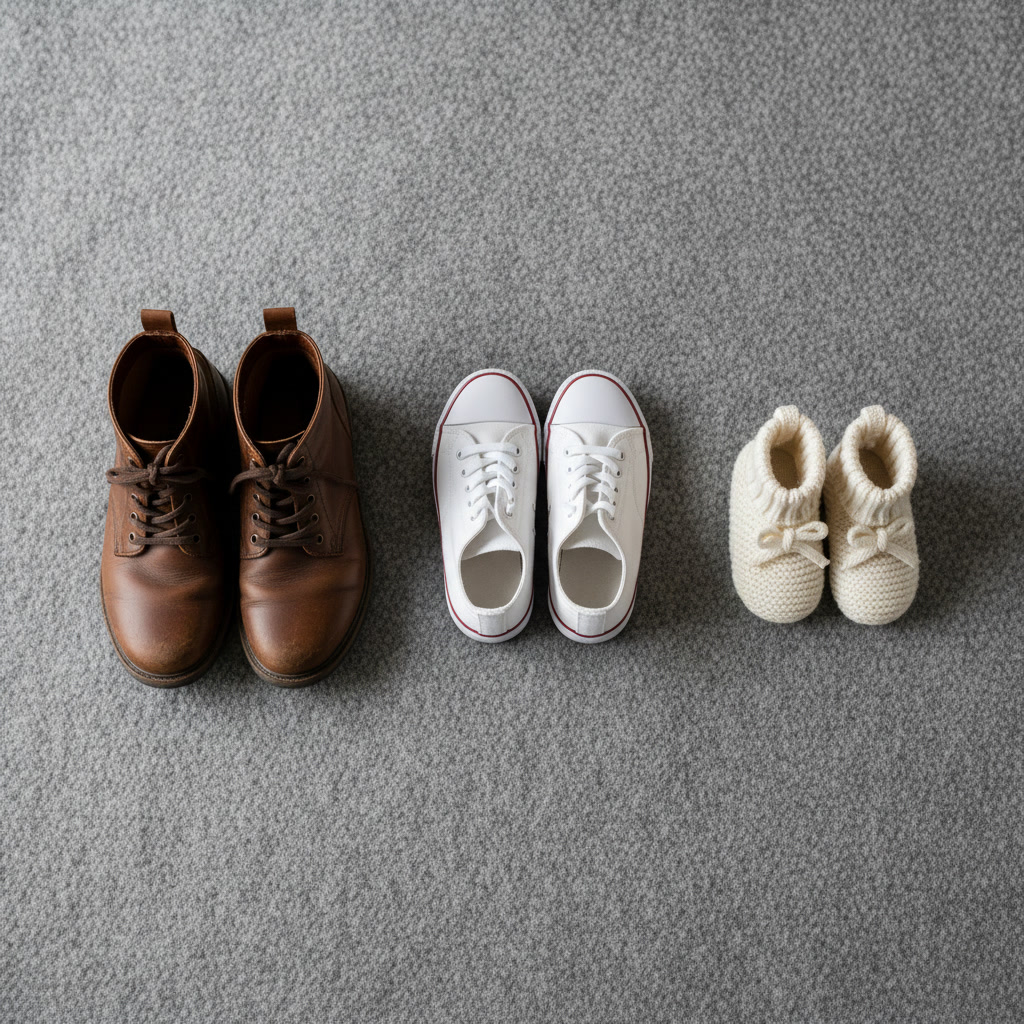
The count is right, which on this model is worth saying out loud: three pairs, six shoes, all facing the same way on roughly one baseline, and nothing else on the blanket. This is the most reliable announcement image of the six and the one most people actually want. The failure is one level down. Crop into the brown boots and they are not mirror images of each other — the right boot carries a long diagonal seam from the lace row to the sole that the left boot simply does not have, and their collars are different shapes and widths. Crop into the booties and the two bows are plainly different: one is a fat, roughly even bow sitting near the centre, the other is lopsided with one loop much larger than the other, and neither tie passes through an eyelet or a channel — both cords emerge from the knitting and go nowhere. Nobody notices this at thumbnail size. It is the same defect as the border below, in a gentler form.
Asked to Leave the Frame Empty, It Left the Frame Genuinely Empty
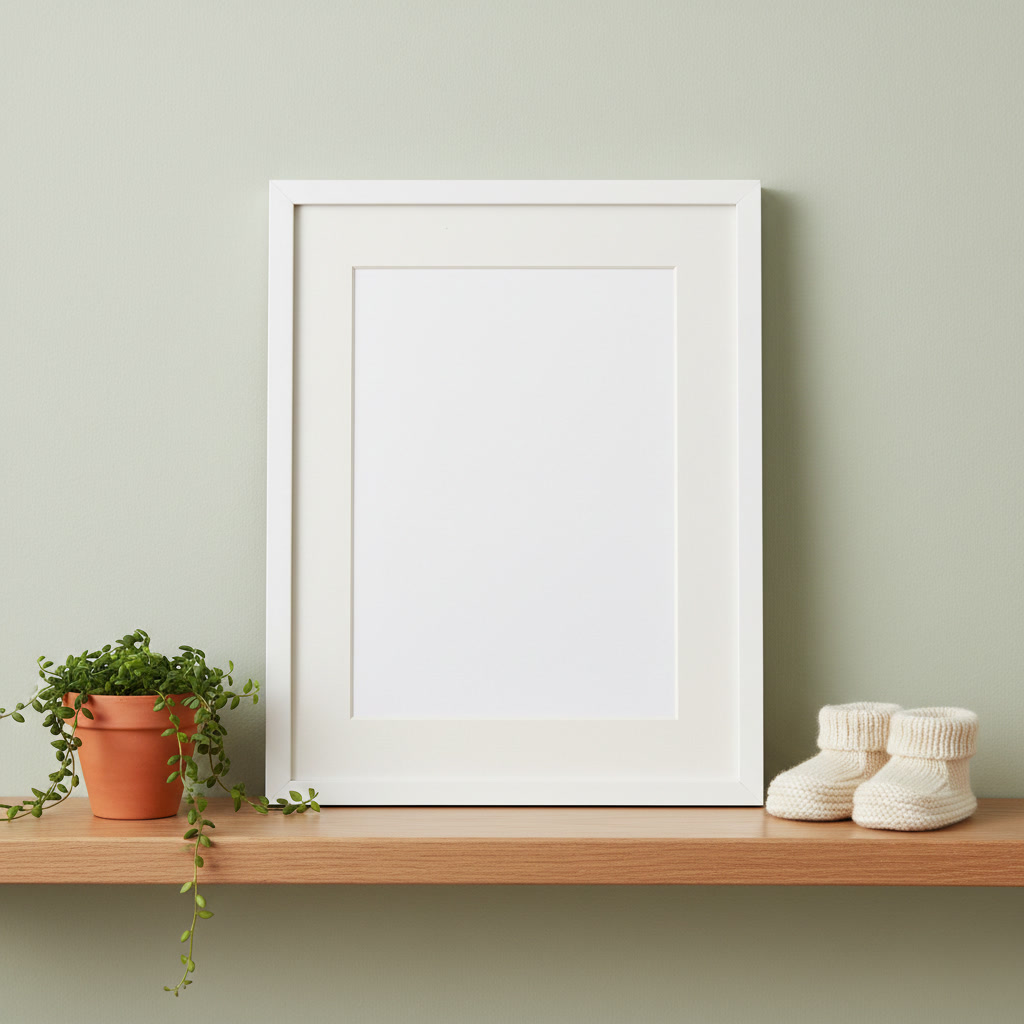
This is the most useful image on the page and the reason the presets above are built the way they are. The prompt asked for the entire inside of the frame to be left completely plain and empty, with no picture, no pattern, no shading and no text of any kind — and that is precisely what it did, first try, right down to adding a clean white mount. Compositional constraints like this one are the instructions this model obeys most reliably, which is why every preset here deliberately leaves you a blank area rather than trying to write in it. Drop your scan, your bump photo or your own lettering into that space afterwards and you get the spelling your family actually uses. One flaw to note, in the usual place: look at the shelf just in front of the bottom-left corner of the frame and there is a small sprig of five leaves lying there, joined to no stem and belonging to no plant. The trailing vine from the pot is a separate thing entirely.
One Border, Asked to Repeat Identically. It Never Repeats Once.
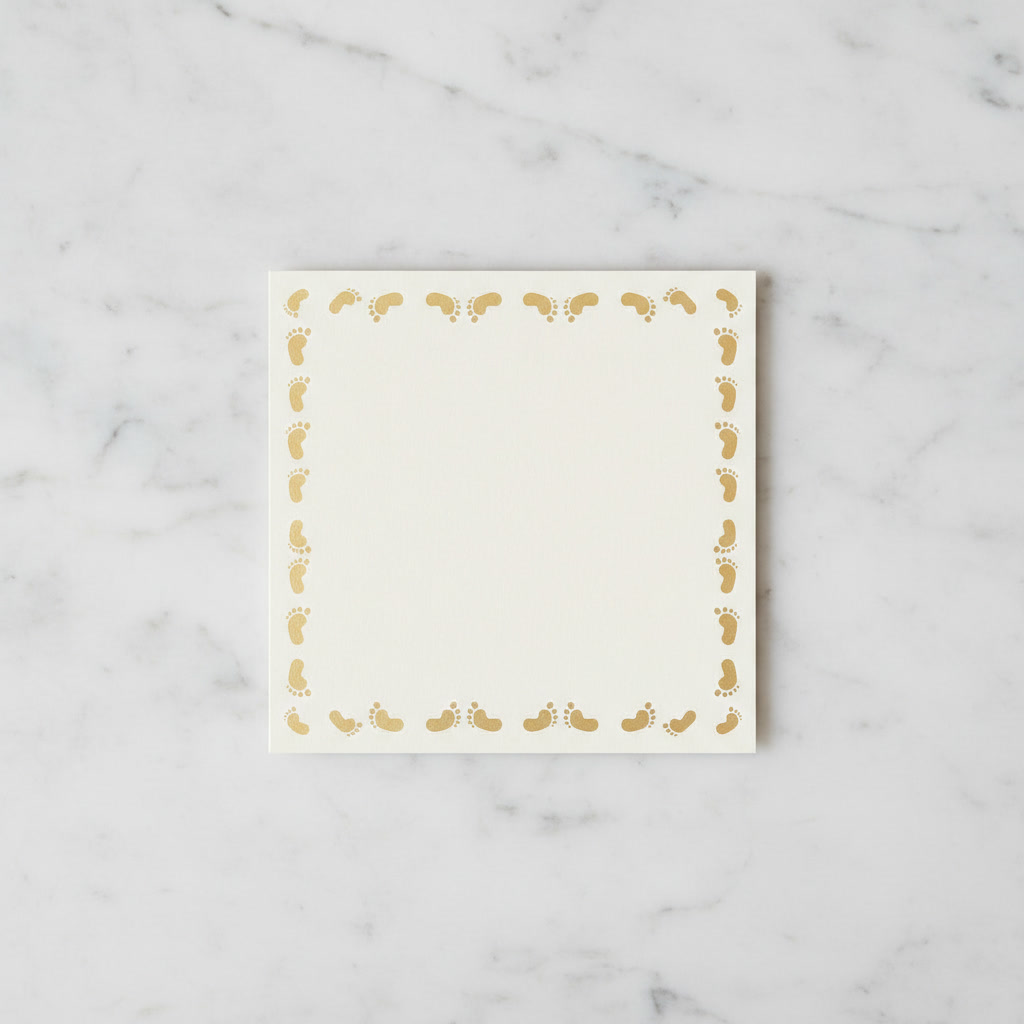
This is the single most important image here, and it is invisible until you enlarge it. The prompt could not have been plainer: every footprint exactly the same size, the same shape and the same orientation as every other one, spaced at identical intervals the whole way round. At full size it looks like a tasteful gold border. Crop the top edge and the prints are lying on their sides with their heels gone, reduced to kidney beans with a scatter of toe dots beside them — four dots on some, five on others — at three different sizes and with gaps that run from almost touching to twice that. The two corner prints, meanwhile, are upright and fully formed, so the border does not even keep one rule. Crop the left edge and the prints do stand upright, but two of the nine are flipped so their toes point downwards while the other seven point up. A printed border is a repeat. This model draws every instance from scratch.
Ten Fingers, Two Thumbs, All Correctly Separated
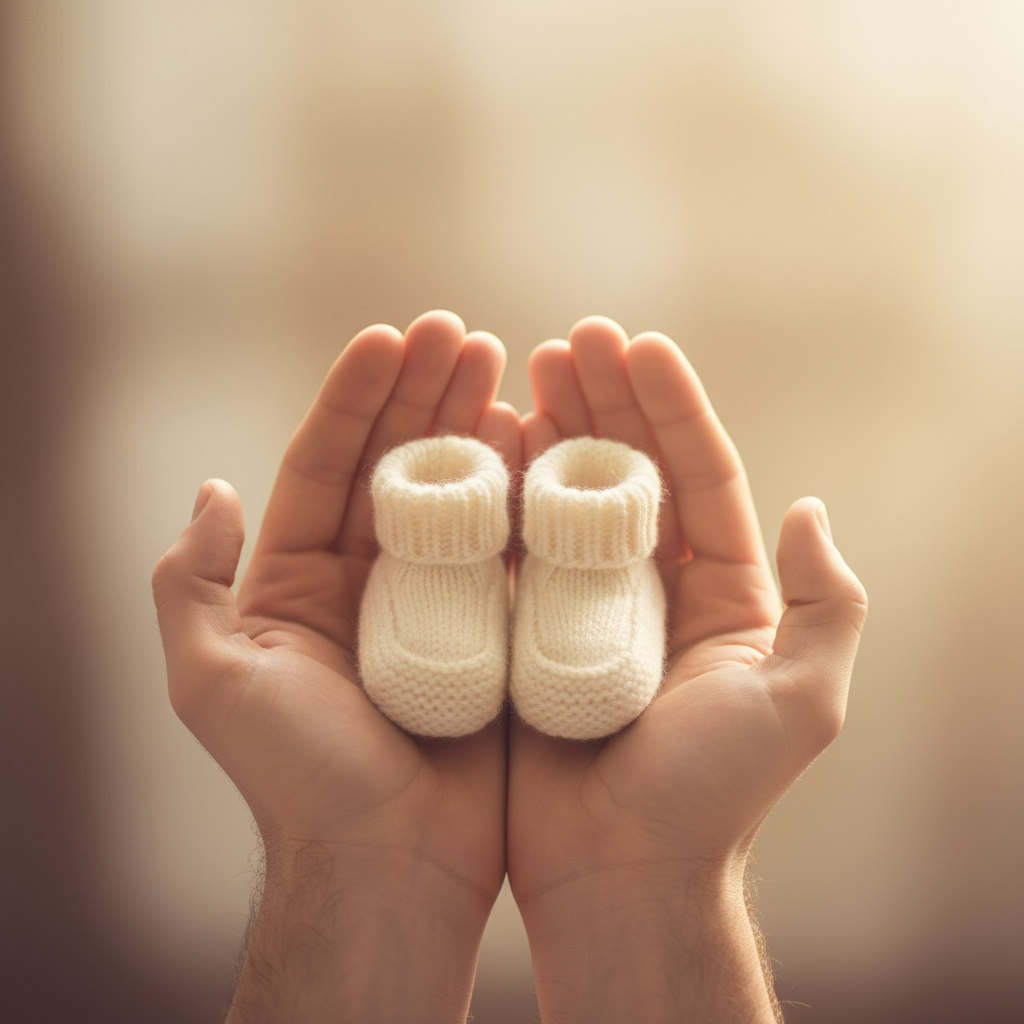
Worth including precisely because it goes right. Hands are this model’s most notorious weakness, and asked for two of them with every finger visible and clearly separated, it delivered exactly that: four fingers and a thumb per hand, each one distinct, none fused, none doubled, none with an extra joint, and the knit texture on the booties is genuinely lovely. So the warnings elsewhere on this page are about specific failures, not about a tool that cannot be trusted with anything. The one thing it quietly sidestepped is worth naming, though, because it is a pattern: the prompt asked for both palms facing up, cupped side by side, with no finger hidden behind the booties. What arrived is two hands standing vertically, fingers pointing up, with the booties sitting squarely in front of the fingers. It did not fail the difficult instruction. It rearranged the picture so the instruction stopped applying.
A Beautiful Photograph. The Upper Hand Has No Arm Behind It.
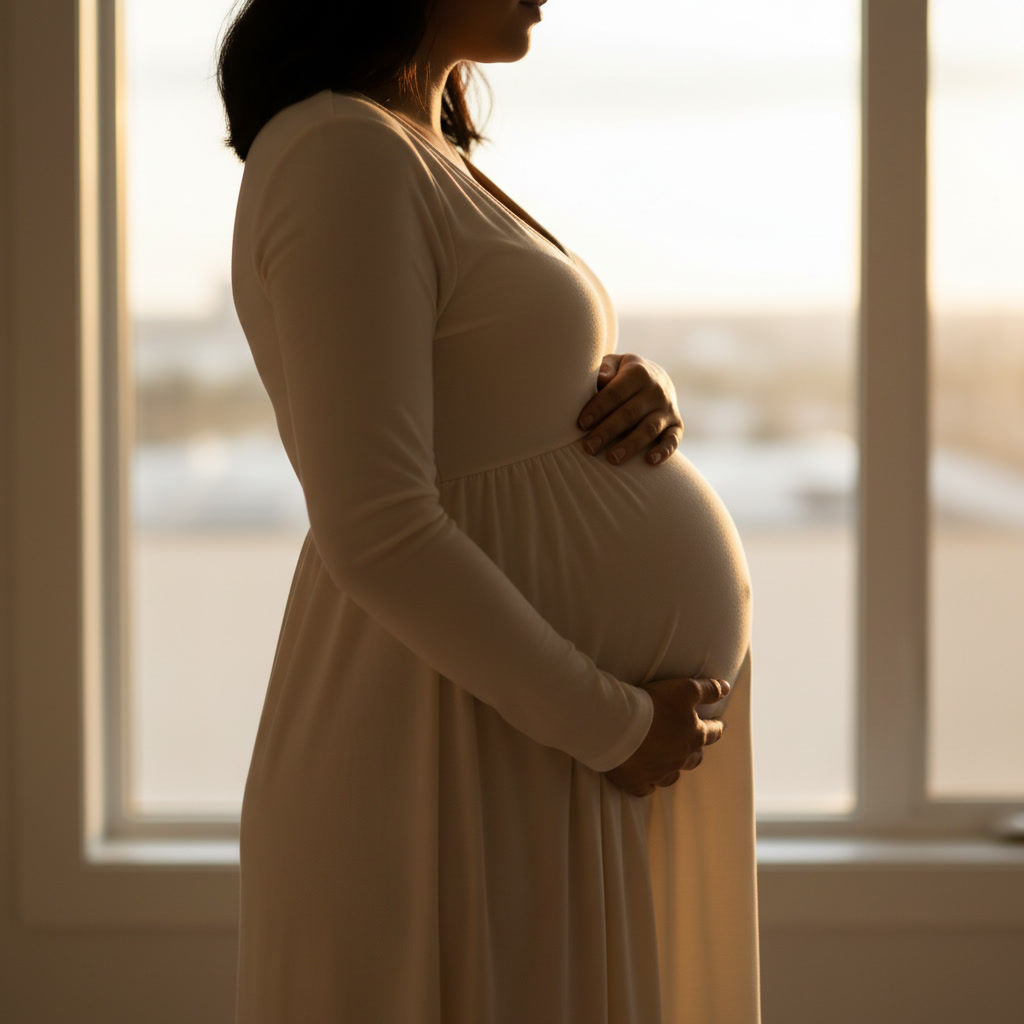
Look at it once and it is the maternity shot people pay a photographer for: warm rim light, a clean silhouette, the dress falling well. Look at the hand resting on the top of the bump and follow it back towards her shoulder. There is nothing there. The wrist ends and behind it is blurred window — no forearm, no sleeve, no upper arm, no shoulder it could belong to. The only complete arm in the picture is the near one, and it runs all the way down to the lower hand. The hand itself is anatomically fine, five digits, correctly shaped; it is simply attached to no one. Two smaller things in the same frame: the brief asked for the crop to start at the shoulders so that no face is shown, and it came back including the chin, mouth, nose and hair; and the window ledge behind her resumes noticeably higher on the right of her dress than it sits on the left. Follow every arm from a hand back to a shoulder before you send a photograph like this to anybody.
All six were generated at 1:1 — the same model and the same ratio the tool above is locked to — so these are what the presets actually produce, not a showreel shot at a different size. Two of them were deliberately asked to carry lettering, which the presets do not, so that the spelling and the layout could be tested separately.
It Draws Every Motif From Scratch, So Nothing Ever Repeats
This is the most important thing on the page, and it is completely invisible until you enlarge the image. The footprint card in the gallery was given an instruction with no wriggle room in it: a border of footprints, every one exactly the same size, the same shape and the same orientation as every other, spaced at identical intervals the whole way round. At card size it looks like a tasteful gold border and you would print it without a second thought. Crop the top edge and the footprints are lying on their sides with the heels gone entirely — kidney beans with a scatter of toe dots beside them, four dots on some and five on others, at three clearly different sizes, with gaps running from almost-touching to twice that. The two corner prints break even that rule and stand upright, fully formed. Crop the left edge and the prints do stand upright, and then two of the nine are flipped so their toes point downwards. The same defect, gentler, is in the shoes image: the two boots in one pair are not mirror images — one carries a long diagonal seam the other does not have — and the two bootie bows are different sizes with ties that pass through no eyelet at all. A real printed repeat comes from one drawing used many times. This model has no concept of the second time.
It Spelled Every Word Correctly and Then Ignored the Layout
Most pages on this site warn you that this model cannot spell. On announcement cards it spelled everything perfectly, and that is the more useful finding, because it tells you where the real risk actually sits. Asked for BABY MERCIER on one line and DUE MAY 2027 on the next, it returned both lines correctly spelled with the numerals right, clean even letterforms, and — notably — no invented accent on MERCIER, which is the single most reproducible failure this model has on any French, Spanish or Portuguese word. It left the surname exactly as written. Then it disregarded almost everything else in the same instruction. Both lines were to be the same width; the second is visibly narrower. No rule was requested between them, and there is one. The image was to be full bleed with no drop shadow and no border, and it returned a photograph of a card lying on a table, casting its own shadow and touching none of the four edges — a framing it also applied to the footprint card, so twice out of two. Spelling and layout are separate abilities and this model has only the first. That is exactly why every preset on this page generates a blank card and leaves the sentence to you.
Check Every Arm, Because One of Them Belongs to Nobody
The golden-hour maternity photograph is the loveliest image on this page and it contains a limb that does not exist. Both hands rest on the bump, which is what was asked for. Follow the upper one back towards the shoulder and there is no forearm, no sleeve, no upper arm and no shoulder for it to join — the wrist simply ends and behind it is blurred window. The only complete arm in the picture runs down to the lower hand. The hand itself is anatomically correct, five properly shaped digits, which is precisely why nobody catches it: the error is not in the hand, it is in what is missing behind it. Two smaller lapses sit in the same frame. The crop was specified to start at the shoulders so that no face appeared, and the chin, mouth, nose and hair all came back anyway — worth knowing if anonymity is the point of your photograph. And the window ledge behind her resumes noticeably higher on the right of her dress than it sits on the left. The counterweight matters too: asked separately for two cupped hands with every finger separated, it produced four fingers and a thumb on each, none fused and none doubled. Hands are not hopeless here. Arms are the thing to check.
Generate the Setting. Write the Sentence Yourself.
Everything above points at one working method, and the empty-frame example is the proof that it works. Asked to leave the entire inside of a picture frame completely plain and empty, with no picture, no pattern, no shading and no text, this model did exactly that on the first attempt and even added a clean white mount. Compositional constraints are the instructions it obeys most reliably — leave this area empty, put nothing in that corner, keep this third clear — which is the opposite of how it treats layout instructions about type. So all six presets here are built to hand you a blank card face, a blank board or a clear panel, and you add the surname, the due date or the scan afterwards in any app with a text box. There is a reason beyond tidiness. A pregnancy announcement is not decoration; it is a fact going to people who will believe it. A due date is a month that has to be the right month. Typing it yourself takes a minute and removes the only part of the picture where being wrong actually matters. One honest caveat on that frame: look at the shelf in front of it and there is a sprig of five leaves lying there attached to no stem and belonging to no plant. Even the image that obeys best still invents something.
How the AI Pregnancy Announcement Generator Works
Three steps, and the third one is what keeps the date right
Pick a Style
Six presets, each a complete scene on its own. Add a line in the box if you want a season, a colour or a prop changed — the preset handles everything else.
Get a Scene With Space In It
Each style returns a square image with a deliberately blank card face, frame or panel. That empty area is the point, not an oversight — it is where your words go.
Enlarge It, Then Add Your Words
Follow every arm back to a shoulder and enlarge any repeated motif. Then set the name and the due date yourself, in your own typeface, spelled the way your family spells it.
Announcement, Card or Photograph — Picking the Right Page
This page builds the scene you announce against. For a card with a folded format and a written greeting, the AI greeting card maker is the better fit, and once the baby has arrived the AI birthday card generator takes over. To assemble several photographs into one image rather than generate a scene, use the AI photo collage maker. For pictures of people rather than flat lays, the AI family portrait generator and the AI couple generator are the right pages, and the AI baby generator is the one people mean when they ask what the baby might look like. If the photograph you want to use is old or damaged, run it through AI photo restoration first, set your own lettering with the AI typography generator, and trim any border the model adds with the AI image cropper.
Why Use This Pregnancy Announcement Maker
Because a template costs money and a photographer costs a Saturday
Every Preset Leaves You Room
All six styles deliberately generate a clean empty panel, card face or frame interior. That is the one instruction this model obeys perfectly, and it is where your name, your date or your scan goes afterwards.
Honest About Lettering
It spelled BABY MERCIER and DUE MAY 2027 flawlessly, accent and all, and then ignored the instruction that both lines match in width and added a rule nobody asked for. Spelling and layout are two different abilities.
Honest About Repeats
A border of supposedly identical footprints came back with the heels missing on one edge, two prints upside down on another, and toe counts varying between four and five. Shown cropped rather than left for you to find.
Honest About Arms
The hand on top of the bump in our maternity shot has no forearm, no sleeve and no shoulder behind it. The picture is beautiful and the limb belongs to nobody. Check every arm before you send one.
Six Announcement Styles
Botanical flat lay, empty frame on a shelf, three pairs of shoes, golden-hour bump photograph, chalkboard and wreath, and an autumn flat lay for a spring due date.
Free, No Sign Up, No Watermark
About fifteen seconds an image, square at 1:1, no account and nothing stamped across the corner. Generate as many as you need until one survives being enlarged.
Who Uses It
Parents announcing, grandparents-to-be, and the friend who always gets asked to design it
Parents Announcing
The three-pairs-of-shoes flat lay is the most reliable thing this tool makes and the one people recognise instantly. Generate it, check that the two shoes in each pair actually match, then add your line underneath.
Scan Framers
The empty-frame style exists for exactly this. It returns a genuinely blank frame interior on a styled shelf, so you can drop your own scan into the white and keep the real image real rather than letting a model invent one.
Seasonal Announcers
Autumn flat lay for a spring due date, botanical for summer, chalkboard for anything. Add a season or a palette in the box and the preset handles the rest, which is the one kind of instruction it follows willingly.
The Designated Designer
Every family has one, and they get asked at short notice. Six styles at about fifteen seconds each means you can hand over four options before dinner — as long as you enlarge each one before you do.
AI Pregnancy Announcement Generator FAQ
Lettering, borders, your own photos, printing and what it costs
Free AI Pregnancy Announcement Generator — Your Scene in Fifteen Seconds
Telling people is the easy part. Finding a picture to tell them with is where most of an afternoon goes: template sites want a subscription for a layout you will use once, a photographer wants a Saturday and a fee, and the flat lay you had in mind needs props you do not own. An ai pregnancy announcement generator removes that whole step. Pick one of six styles, wait about fifteen seconds, and you have a square image built around the news — a botanical flat lay on pale oak, an empty frame on a styled shelf, three pairs of shoes in a row, a golden-hour bump photograph, a blank chalkboard against whitewashed brick, an autumn flat lay for a spring due date. No account, no watermark, and as many attempts as you want.
Every preset on this pregnancy announcement maker does one deliberate thing: it leaves you a blank space. A clear card face, an empty frame interior, an unwritten chalkboard, a clean panel of blanket in the middle of the props. That is not the tool running out of ideas. It is the finding from the gallery above turned into a design decision, and the empty-frame example is the evidence that it works — asked to leave the inside of a picture frame completely plain, this model did exactly that on the first attempt, mount and all. Instructions about what to leave out are the ones it follows most faithfully.
Three findings sit behind that decision, all demonstrated in the images rather than asserted. The first is that it cannot repeat anything. A gold footprint border specified as identical in size, shape, orientation and spacing came back with the prints lying on their sides and their heels missing along the top edge, four toe dots on some and five on others, and two of the nine prints on the left edge flipped upside down. The second is that spelling and layout are different skills. BABY MERCIER and DUE MAY 2027 were rendered flawlessly, with no invented accent on a French surname — and in the same image the two lines are different widths when they were told to match, an unrequested rule appeared between them, and the full-bleed instruction was dropped in favour of a photograph of a card on a table. The third is that arms go missing while hands come out fine. The maternity photograph has both hands correctly on the bump and no forearm, sleeve or shoulder at all behind the upper one.
So the method is short: let the model build the setting, enlarge anything that repeats, follow every arm back to a shoulder, and set the surname and the due date yourself. A due date is a fact going to people who will believe it, and typing it takes a minute. The neighbouring pages finish the job — a folded card at the AI greeting card maker, several photographs combined at the AI photo collage maker, people rather than props at the AI family portrait generator and the AI couple generator, your lettering at the AI typography generator, the post itself at the AI social media content creator, and any unwanted border trimmed at the AI image cropper. Everything here is free to try, nothing is watermarked, images come back square at 1:1, and paid plans start at $2.99. Scroll back up, make one, and enlarge the border before you send it.