
AI Calendar Generator
It Spells the Month. It Cannot Count the Days.
Six styles — minimal wall page, photo calendar, watercolour botanical, classroom poster, bold desk card and retro print. This ai calendar generator is free, needs no account and adds no watermark. Every preset returns a blank date panel for you to fill, and the gallery below shows, at full size, exactly why.
Try the AI Calendar Generator — Free
Pick a style, generate a square calendar page with a clean empty grid, then lay the real dates in yourself
AI Calendar Generator
Choose one of the six calendar styles below and generate. Each one is a complete page on its own, so there is nothing you have to type — but the box underneath will take a line if you want a particular month, subject or palette. One thing to know before you start: every preset here deliberately asks for empty date cells rather than printed numbers. That is on purpose. This model spells month names perfectly and cannot count days, so the reliable workflow is to let it build the design and to lay the real grid in yourself.
Every preset returns a square 1:1 page with an empty grid. Lay the real dates in afterwards in any layout or drawing app — the gallery below is the full argument for why that step is yours and not the model’s.
AI Calendar Generator Examples
Six squares exactly as they came back — count the day columns, then count the dates
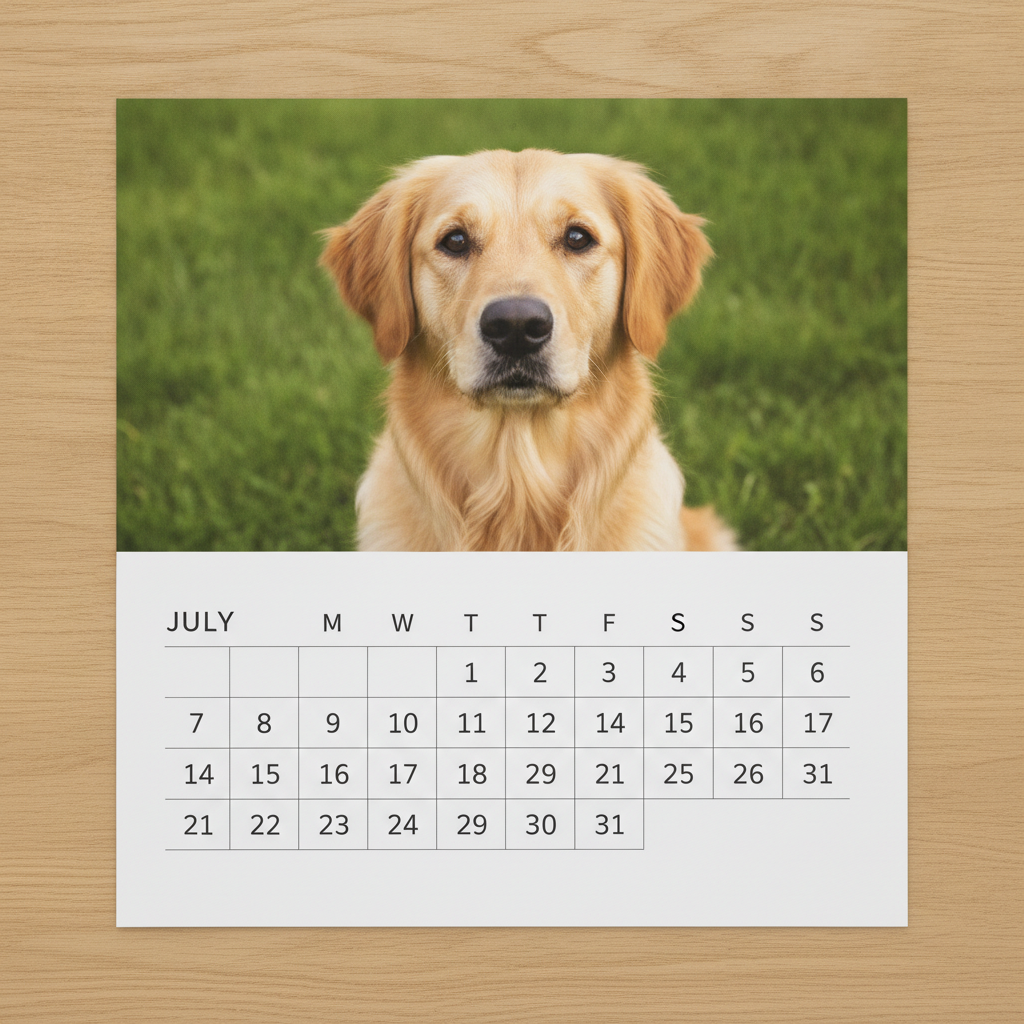
A Flawless Dog, Sitting Above a Week With Ten Days In It
Start with this one, because it is the whole page in a single image. The photograph is genuinely good — a golden retriever head on in summer grass, two eyes level with each other, one nose, two ears, clean summer light, exactly the picture somebody would want on their July page. The word JULY is spelled correctly. Now read the grid underneath. The instruction was seven columns headed M T W T F S S; what came back has ten columns, headed M W T T F S S S, with the Tuesday missing and three separate Saturdays and Sundays tacked onto the right. Follow the numerals and the second row runs 7, 8, 9, 10, 11, 12, 14 — the 13th of July does not exist on this calendar. The third row contains a 29 sitting between an 18 and a 21, and a 31 that then turns up again four cells later. Everything a camera would have captured is right. Everything that had to be counted is wrong.
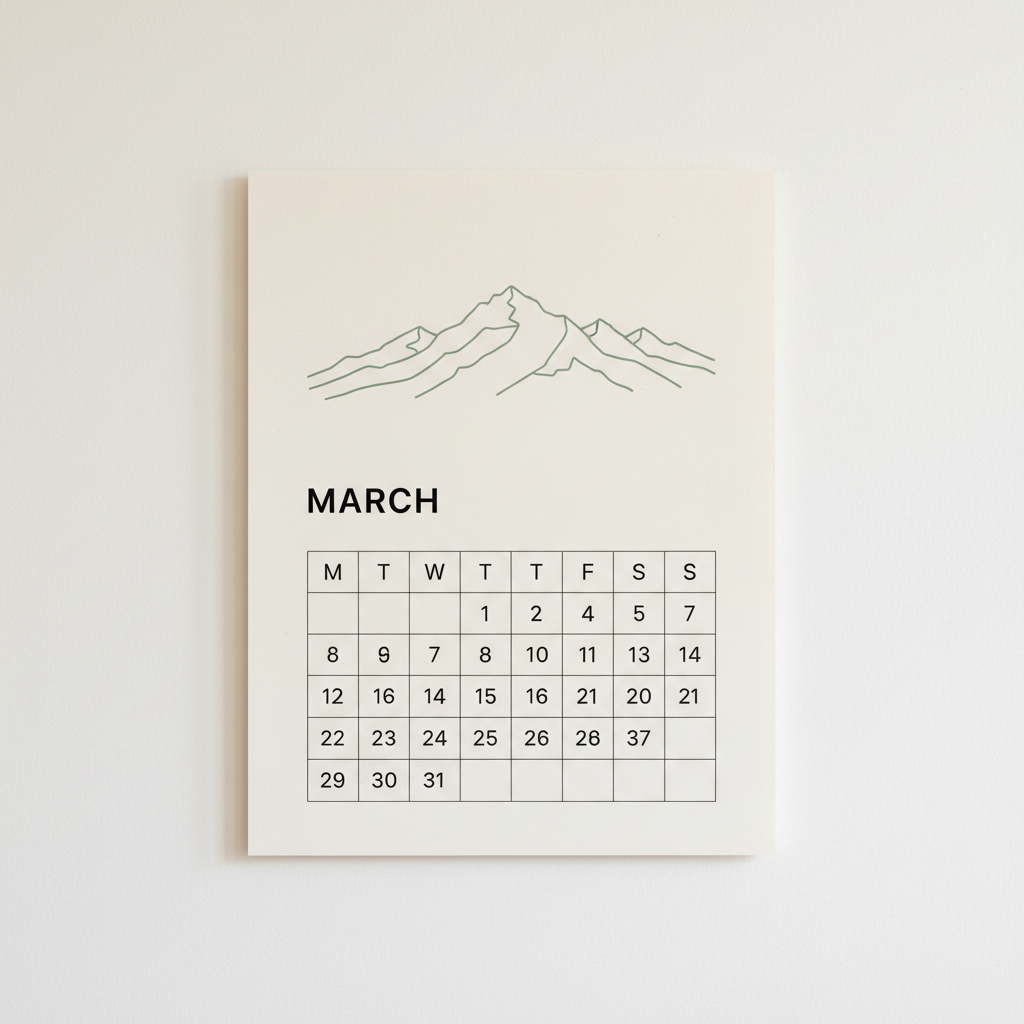
The Nicest Design Here, and It Contains a 37th of March
As a piece of design this is the best thing the tool produced. Cream card hanging flat against a warm white wall, one sage green single-line mountain range with the kind of restraint a human designer would charge for, MARCH set in clean black capitals underneath, hairline grid below. It is a print-shop product. Then enlarge the grid. There are eight day columns instead of seven, headed M T W T T F S S, with Thursday appearing twice and Wednesday appearing once. The first row skips the 3rd and the 6th. The second row runs 8, 9, 7, 8, 10 — going backwards into numbers the row above already used. And in the fourth row, two cells from the right, there is a 37. Not a badly drawn 31, not a smudged 27: a clean, crisp, correctly kerned 37, on a month that has 31 days. The artwork is worth keeping. The dates are decoration.
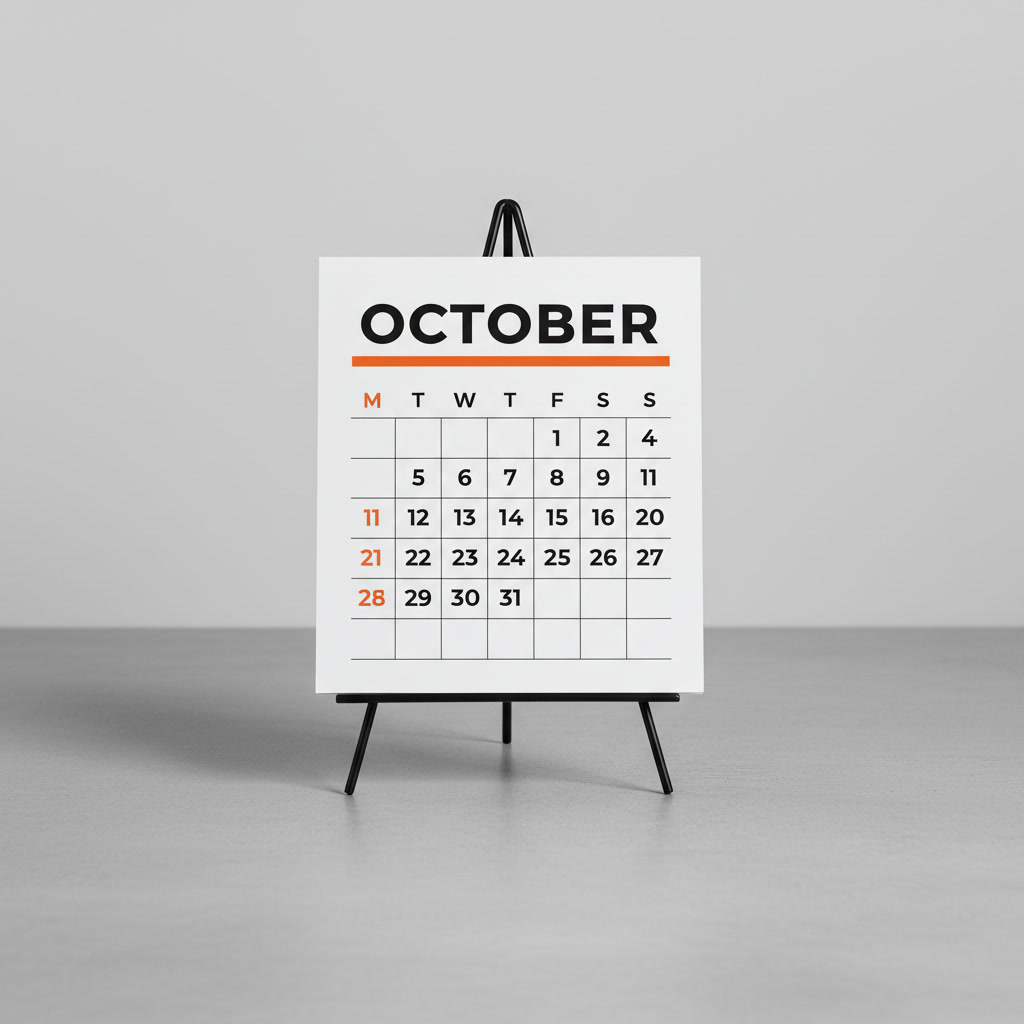
The Closest to Correct: Seven Real Columns, and Still No 3rd or 10th
This is the one you would ship, and it is worth being precise about why. It is the only render of the six that got the week right: seven columns, headed M T W T F S S, in the correct order, no duplicates, no extras. The card is a clean piece of bold modern layout — heavy black OCTOBER across the top, one thick orange rule under it, grid filling the rest, standing on a wire easel with a soft shadow. Even the styling decision is sensible: it tinted a column orange to mark the weekend. It tinted the leftmost one, which is Monday. And in the grid, the first row ends 1, 2, 4 and the second row runs 5, 6, 7, 8, 9, 11, so the 3rd and the 10th of October are simply absent, while the 11th is printed twice in two different rows. Seven correct columns out of six attempts, and it still loses two days out of a month.
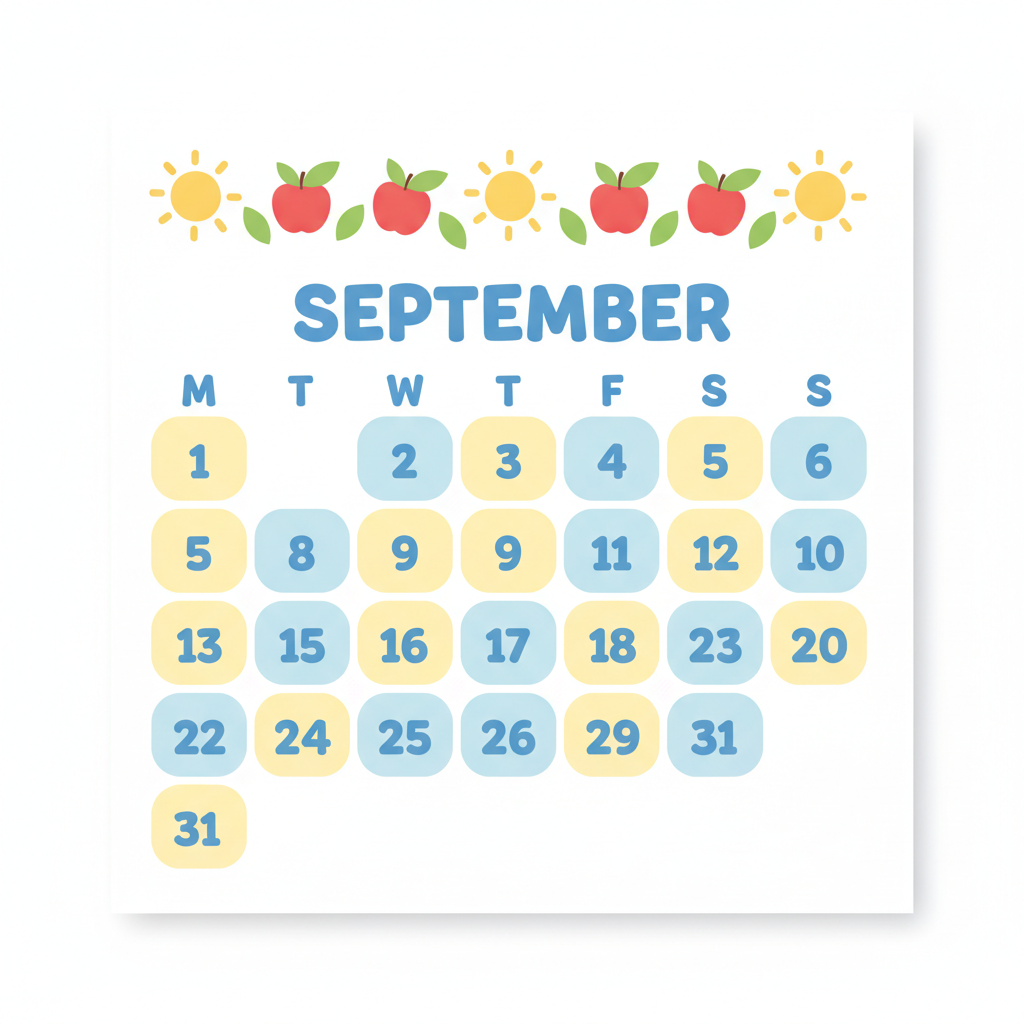
September Given Thirty-One Days, Twice
The classroom styling is exactly right for the brief: a cheerful border of flat vector suns and red apples across the top, SEPTEMBER in chunky rounded blue capitals, and date cells as soft rounded squares alternating yellow and blue, which is precisely how an infant classroom wall calendar looks. It is also the render that fails hardest on arithmetic. September has thirty days. This one ends on a 31 in the fourth row, and then a second 31 sits alone in a fifth row underneath it — the same non-existent date, printed twice, on the poster most likely to be pinned up in front of children learning what dates are. There are eight columns rather than seven. The second row reads 5, 8, 9, 9, 11, 12, 10. The teacher-facing lesson is the same as everywhere else on this page: keep the border, keep the typography, and put the real month grid in yourself.
Seven Correct Columns, and the 31st Arrives Before the 29th
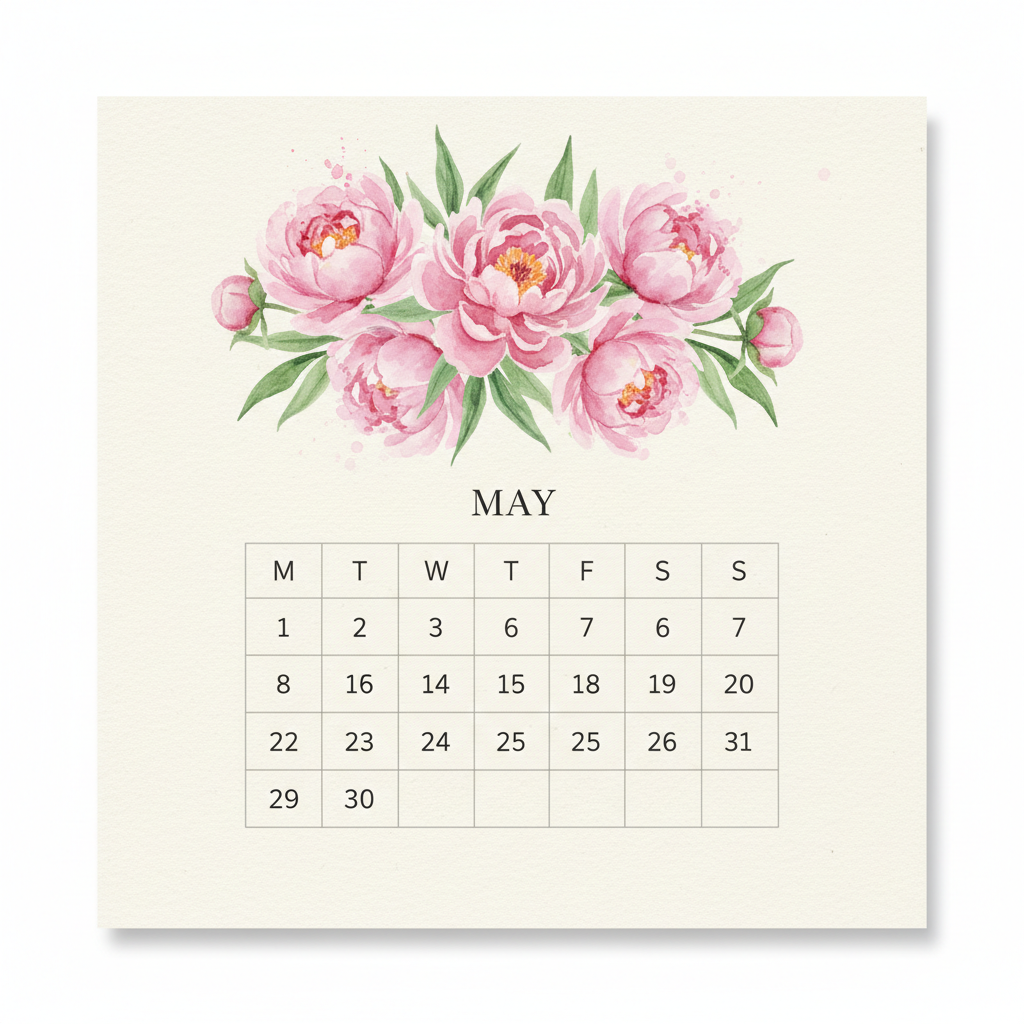
The painting is lovely and reproducible: loose watercolour peonies with soft bleeding edges on textured cream, MAY in a delicate serif, fine grey hairline grid. This is the second of two renders that got the week structure right — seven columns, M T W T F S S, correctly ordered. The dates are the usual story with an interesting twist. The first row reads 1, 2, 3, 6, 7, 6, 7: the 4th and 5th vanish, and the 6th and 7th are each printed twice inside a single week. In the third row a 25 sits next to another 25, and the row finishes on the 31st — after which a fourth row begins with 29 and 30. The month ends, then carries on for two more days. Note what stayed reliable across all six images though: the month name. MARCH, JULY, MAY, SEPTEMBER, OCTOBER, AUGUST, every one of them spelled correctly on the first attempt.
It Invented a Weekday Order, and Then a Date Called Zero
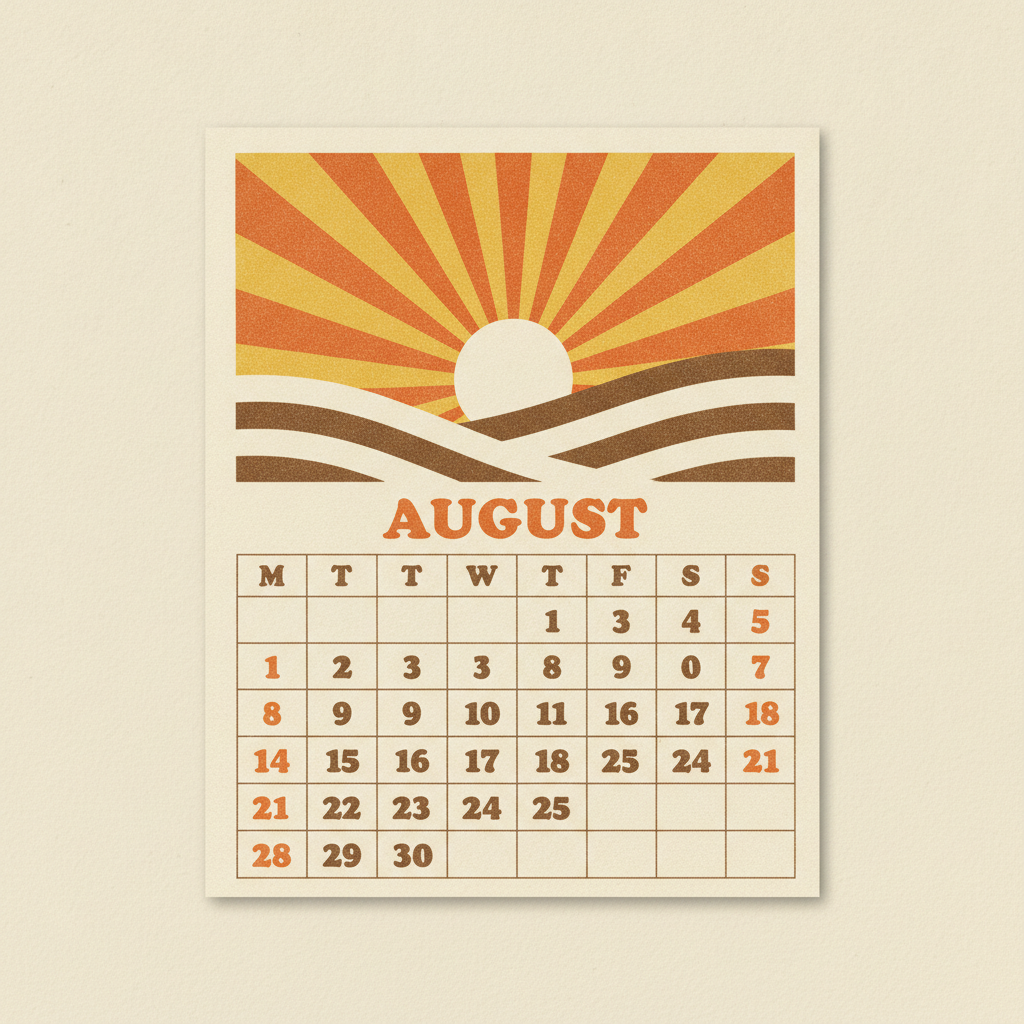
The retro print job is excellent — mustard, burnt orange and brown sunburst over rolling hills, offset grain in the ink, AUGUST in a fat rounded seventies display face, brown numerals on cream. If you were selling a risograph calendar, this is the top half of it. The bottom half invents things. The column headings read M T T W T F S S: eight columns, and the week itself reordered, with Wednesday demoted to fourth place behind two Tuesdays. The second numbered row runs 8, 9, 0, 7 — a zero, printed as a date, in a grid where zero cannot occur. The month stops at 30, so the 31st of August never happens, and the 21st appears in two different rows. Three separate failure modes in one card: a wrong week, an impossible numeral, and a missing day.
All six were generated at 1:1 — the same model and the same ratio the tool above is locked to — so these are what the presets actually produce, not a showreel shot at a different size. Each one was deliberately asked to print a full numbered month, which the presets do not, so that the design and the counting could be judged separately.
Every Numeral Is Beautiful. Almost None Of Them Are Right.
This is the most important thing on the page, and for a calendar generator specifically it is the defect that matters most. Each of the six images was given the same unambiguous instruction: print the numerals 1 through 31 in order, one per cell, none repeated, none skipped, none out of sequence. Not one of the six did it. March produced a 37. September, a thirty day month, produced two separate 31sts. August produced a date printed as 0. July lost the 13th. October lost the 3rd and the 10th and then printed the 11th twice. May printed the 25th twice in a single week and then ran 31, 29, 30 across a row break, ending the month and carrying on afterwards. What makes this dangerous rather than merely funny is the quality of the glyphs. Every one of those numerals is crisp, evenly weighted and correctly kerned, so the grid reads as authoritative at a glance and nobody checks it. Drawing a numeral and running a month sequence are separate abilities, and this model only has the first.
It Does Not Reliably Know the Week Has Seven Days
This is the fault people notice last, because a grid with too many columns still looks like a grid. All six renders asked for seven columns headed M T W T F S S. Two delivered seven — the bold desk card and the watercolour botanical. March came back with eight, with Thursday appearing twice and Wednesday once. September came back with eight. August came back with eight and reordered the week itself into M T T W T F S S, demoting Wednesday behind two Tuesdays. July came back with ten, dropping Tuesday entirely and adding three extra weekend columns on the right, which is a week 43 percent longer than a week. The practical rule is that column count is the first thing to check on any render and the easiest to fix, because the week structure is the part you were going to redraw anyway.
The Month Name and the Artwork Are Reliably Excellent
It would be easy to read the two panels above as a verdict against the tool, and that is not what the images show. Six renders, six correctly spelled month names, first attempt, every one set in a typeface appropriate to its style: heavy black capitals on the desk card, a delicate serif on the watercolour page, chunky rounded blue on the classroom poster, a fat seventies display face on the retro print. The artwork above the grid was just as strong. A single-line sage mountain range with real restraint. A photorealistic golden retriever with both eyes level and correctly lit. Loose peonies with genuine watercolour bleed on textured paper. A flat vector border of suns and apples that would pass in a published classroom resource. A mustard sunburst with convincing offset grain. Headline type and illustration are what GPT Image 2 is unusually good at, and a calendar page is mostly headline type and illustration with one table at the bottom. Use it for the nine tenths it does well.
Generate the Design. Lay the Dates In Yourself.
Everything above points at one working method. All six presets in the tool ask for a ruled grid with completely empty cells rather than a numbered one, because instructions about what to leave out are the ones this model honours most faithfully — the exact opposite of how it handles instructions about counting. You get the artwork, the month name and the layout, and you put the real grid over the blank panel in whatever app you already use. There is a reason beyond tidiness. A calendar is not decoration; it is a reference someone will trust for a year. A missing 13th is a birthday nobody is reminded of, a duplicated 25th is a double booking, and a September the 31st is a deadline that never arrives. Laying a correct month grid over a finished design takes about two minutes and removes the only part of the page where being wrong costs anybody anything. Do that, and the ten seconds of generation buys you the part that would actually have taken an afternoon.
How the AI Calendar Generator Works
Three steps, and the third one is what makes the calendar usable
Pick a Calendar Style
Six presets: minimal wall page, photo calendar, watercolour botanical, classroom poster, bold desk card and seventies retro print. Type a subject, a month or a palette in the box if you want one — the presets work with nothing typed at all.
Generate and Check the Week
About fifteen seconds for a square render. Before you keep it, count the day columns across the top. Two of six test renders had seven; the rest had eight or ten, and that is the fault you notice last.
Lay In the Real Dates
The step that makes the page usable. Drop the design into any layout or drawing app and put a correct month grid over the blank panel — it is the one part of a calendar where being wrong actually costs somebody a missed appointment.
Calendar, Poster or Card — Picking the Right Page
This page designs dated wall, desk and photo calendar pages. For a single undated print to hang instead, the AI poster maker and the AI wall art generator are the better fit. For something you send rather than hang, use the AI greeting card maker or the AI Christmas card generator, which share the same gifting season as this one. Pet calendars are the best selling photo calendar there is and the AI pet portrait generator is tuned for the top panel. To set your own month names or overlay the dates as crisp type, use the AI typography generator and the AI vector art generator. For a tall wall page rather than a square one, extend the canvas with the AI image extender or trim it with the AI image cropper, and enlarge it for print with the AI image upscaler.
Why Use This Calendar Generator
Because twelve month designs in a layout app is a weekend
Month Names It Spells Right
Six renders, six correctly spelled months, each in a typeface that matched its style. Headline type is the strongest thing GPT Image 2 does on a calendar page, and every preset here is built around that strength.
Six Styles That Look Like a Set
Minimal, photographic, watercolour, classroom, bold modern and retro print. Run the same preset twelve times with a different subject each month and you get a coherent twelve page calendar rather than twelve unrelated pictures.
Blank Date Panels On Purpose
Every preset asks for empty ruled cells rather than printed numerals. That is not a missing feature — it is the finding from the gallery turned into a design decision, because instructions about what to leave out are the ones this model honours.
Square 1:1, Print Ready
Each render comes back square, which drops straight into a desk calendar card, a marketplace thumbnail or a 20x20cm print without cropping. Extend or crop it if you need a tall wall page.
Built For Q4 Gift Season
Photo calendars are an October to December business. Twelve designs at about fifteen seconds each means a full year of pages in an afternoon instead of a weekend in a layout app.
Free, No Sign Up, No Watermark
Generate as many calendar pages as you like without an account, and nothing is stamped on the result. Paid plans start at $2.99 and buy volume rather than features.
Who Uses It
Print-on-demand sellers, teachers, small businesses and gift makers
Print-on-Demand Sellers
Twelve coherent month designs is the hard part of a calendar listing, and one preset run twelve times with a different subject gives you a set rather than a scrapbook. You were laying the dates in yourself anyway.
Teachers and Childminders
A classroom wall calendar in fifteen seconds beats an hour of hunting for a printable. Generate the border and the month heading, print it at A3, and write the dates in by hand — the render in the gallery gave September thirty-one days, twice.
Gift and Photo Calendar Makers
October to December is photo calendar season. The photo preset builds the whole frame — picture panel, month heading, empty grid — so all you do is drop your own photograph into the top panel and print it.
Small Business Client Gifts
A branded desk calendar is the client gift that sits on a desk for a year. The bold desk card preset is the strongest render of the six and the only one that got the seven day week right first time.
AI Calendar Generator FAQ
Dates, month names, sizes, your own photos and what it costs
Free AI Calendar Generator — A Month Page in Fifteen Seconds
Designing a calendar has always been two jobs pretending to be one. There is the design — twelve pieces of artwork, twelve month headings, a layout that holds together across a year — and there is the grid, which is arithmetic. An ai calendar generator collapses the first job from a weekend in a layout app into about fifteen seconds a page. Pick one of six styles, wait, and you have a square calendar design: a minimal wall page, a photo calendar, a watercolour botanical, a classroom poster, a bold desk card or a seventies retro print. No account, no watermark, and as many attempts as you want.
Every preset on this calendar maker does one deliberate thing: it leaves the date cells empty. No numerals, no dates, no year. That is not the tool running short, it is the finding from the gallery above turned into a design decision. Instructions about what to leave out are the ones this model follows most faithfully, and instructions about counting are the ones it fails most reliably, so the presets are written to exploit the first and avoid the second. You get the picture, the month name and the layout. The two minutes of grid work stays with you.
Three findings sit behind that, all demonstrated in the images rather than asserted. The first is that it cannot count days. Six renders asked for 1 through 31 in order; March produced a 37, September produced two 31sts in a thirty day month, August printed a date as 0, July lost the 13th, October lost the 3rd and the 10th, and May printed the 25th twice and then ran 31, 29, 30 across a row break. The second is that it does not reliably know a week has seven days. Two of six got seven columns; the rest came back with eight or ten, one of them with Tuesday deleted and three extra weekend columns bolted on, another with Wednesday demoted behind two Tuesdays. The third is the good news, and it is why this page exists. All six spelled their month correctly, first attempt, in a typeface that suited the style, and the artwork above each grid — the line drawn mountain, the photoreal retriever, the bleeding peonies, the vector suns and apples, the grained sunburst — was consistently publishable.
So the method is short: let the model design the page, check the column count, and lay the real dates in yourself. A calendar is a reference somebody trusts for a year, and a missing 13th is a birthday nobody gets reminded of. The neighbouring pages finish the job — an undated print to hang at the AI poster maker and the AI wall art generator, something to send rather than hang at the AI greeting card maker, the best selling photo calendar subject at the AI pet portrait generator, your own dates set as crisp type at the AI typography generator, scalable shapes at the AI vector art generator, a tall wall page at the AI image extender, and a print sized file at the AI image upscaler. Everything here is free to try, nothing is watermarked, images come back square at 1:1, and paid plans start at $2.99. Scroll back up, make one, and count the columns before you print twelve.