
AI Real Estate Photo Editor
Brighten, Declutter, Replace the Sky
Upload the listing photo you already took on your phone and fix the one thing that is wrong with it — the burnt-out window, the flat grey sky, the orange ceiling light, the clutter on the worktop. Free, in about fifteen seconds, with a straight answer about which edits a portal will accept.
Try the AI Real Estate Photo Editor — Free
Upload one listing photo, pick the single thing that is wrong with it, and compare the result against your original
AI Real Estate Photo Editor
Upload a property photo and choose one preset below. Each preset does one job rather than a general improve — pick the fault you actually have. Everything comes back at 4:3 landscape, the shape most portals expect. Then open your original alongside the result and check the details before you publish: this re-renders the photo rather than adjusting it, so things can drift.
Upload your listing photo, pick one preset, then compare the result against the original before it goes live
Everything here comes back at 4:3 landscape. To reshape a result for a particular portal, use the AI image cropper; to take it up to brochure print size, the AI image upscaler. Empty room that needs furniture in it rather than a photo that needs correcting? That is AI virtual staging. One object to take out of an otherwise perfect frame? The AI object remover is more surgical.
AI Real Estate Photo Editor Examples
All six presets exactly as they came back — including the two that changed something nobody asked them to
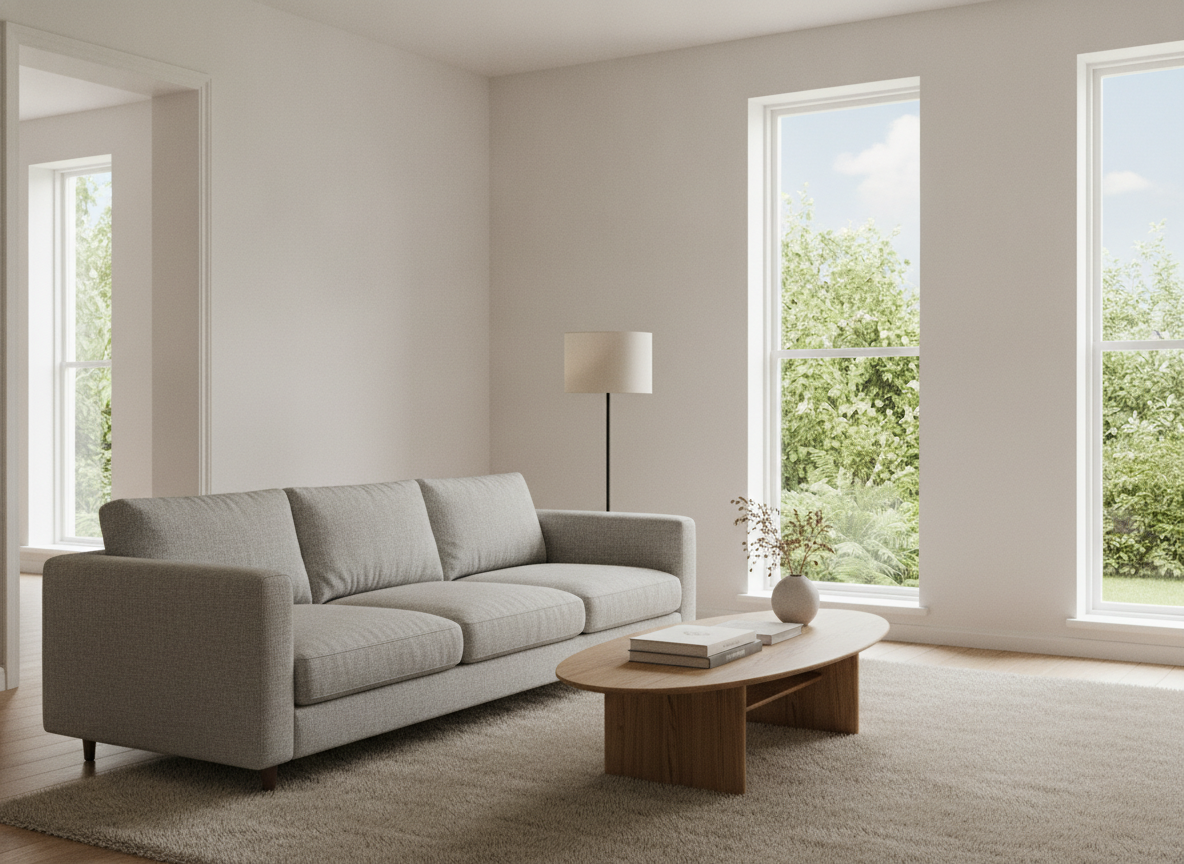
Windows Exposed, Not Blown Out
The hardest thing to get right in a listing photo: the room is evenly lit and you can still see the garden through the glass. Every vertical in the frame is dead straight.
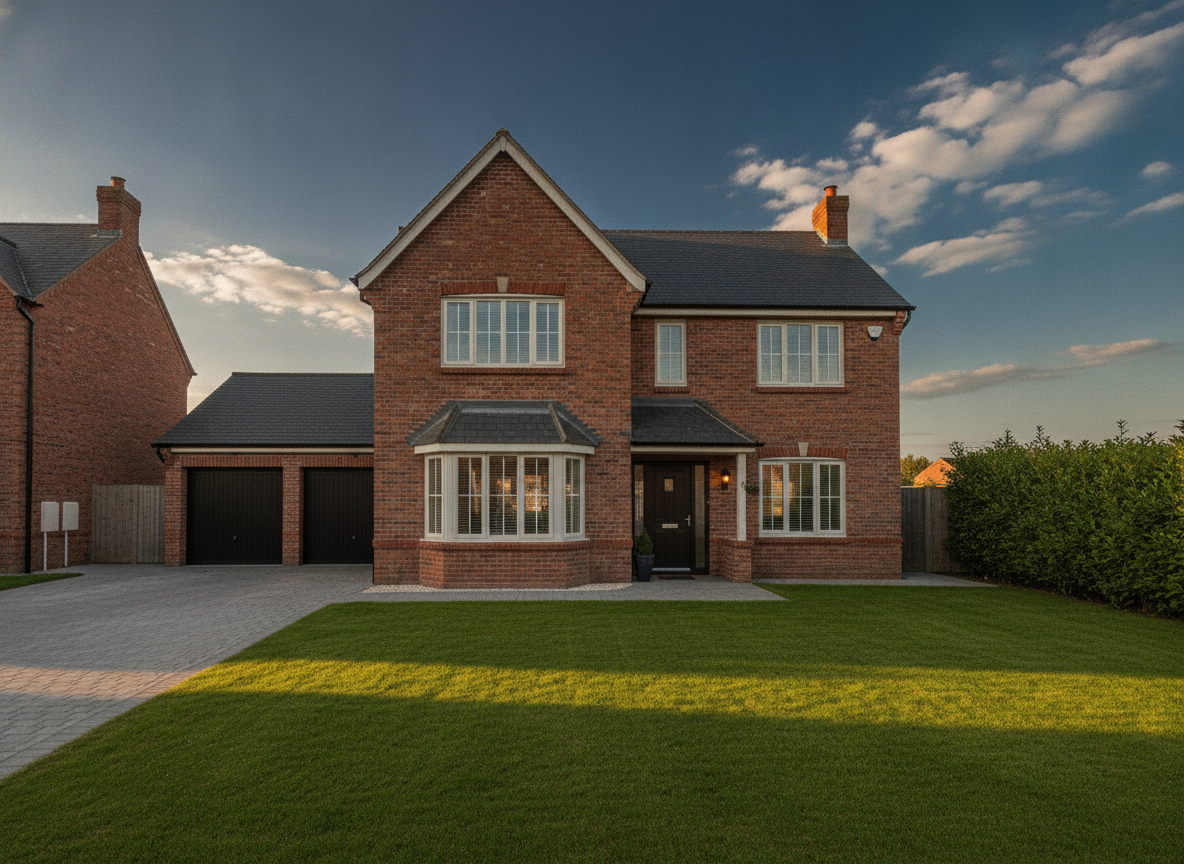
Golden Hour Facade, Blue Sky, No Bins
Warm low sun on the brick, a real sky rather than flat grey, an empty driveway. The roofline stays parallel to the top of the frame — no leaning walls.
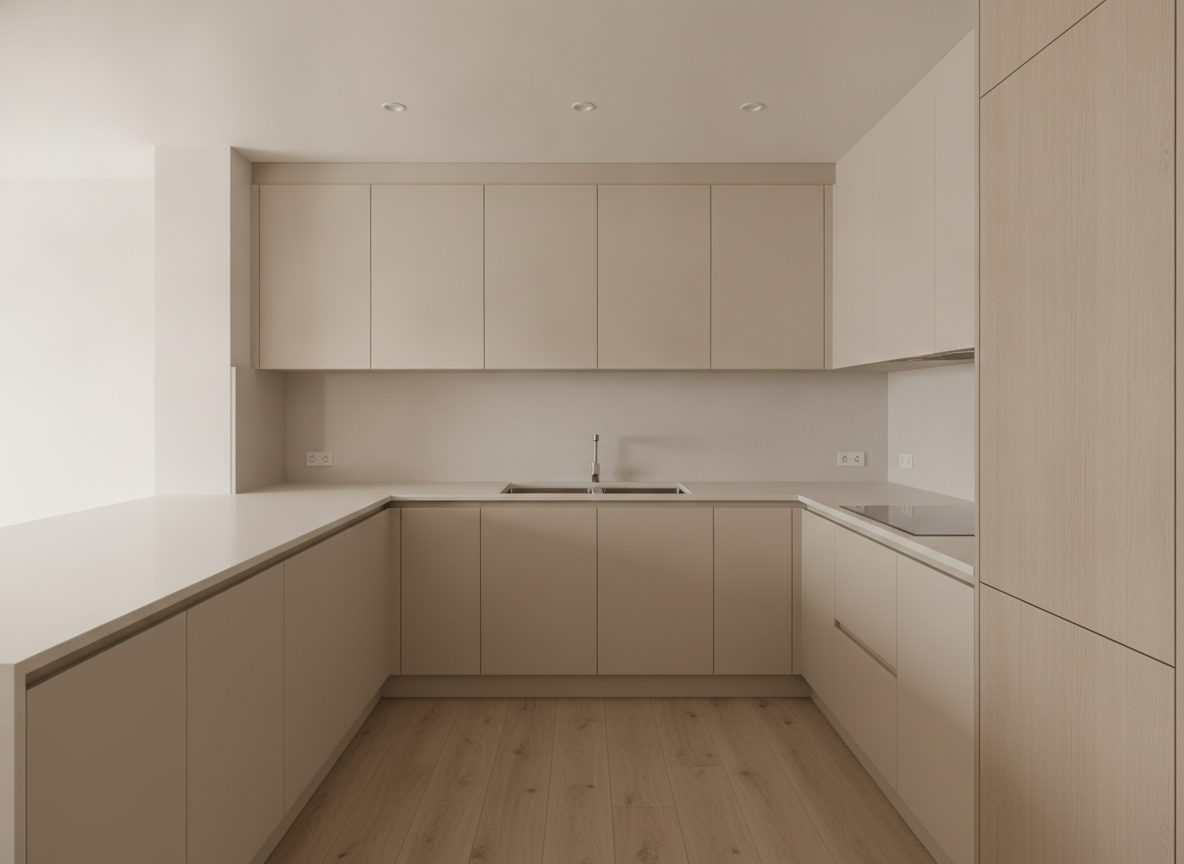
Worktops Completely Clear
Nothing on the counters at all, and the light is even from one end of the run to the other with no hotspot and no dark band under the wall units.
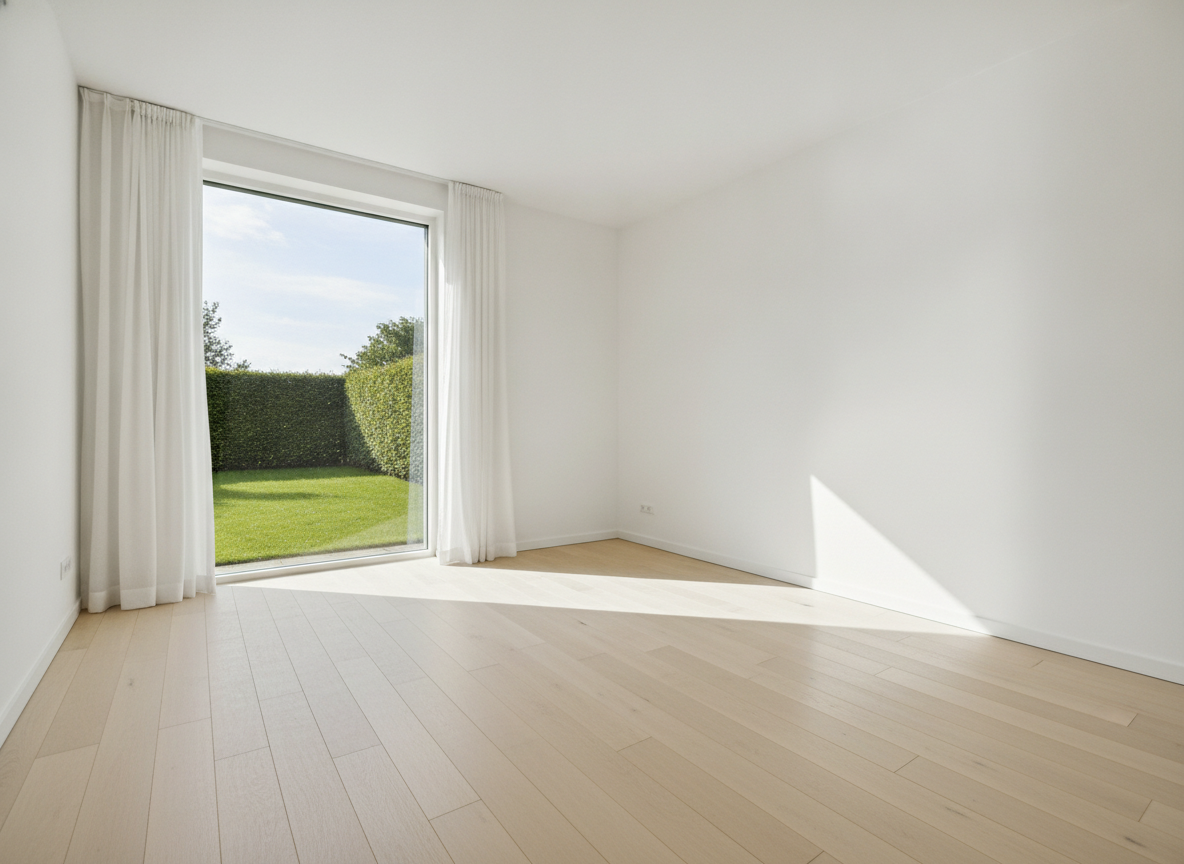
Empty Room, Garden Readable Through the Glass
A hard one for a camera: bright sun indoors and a correctly exposed garden outside in the same frame, with the white walls staying white rather than going grey or blue.
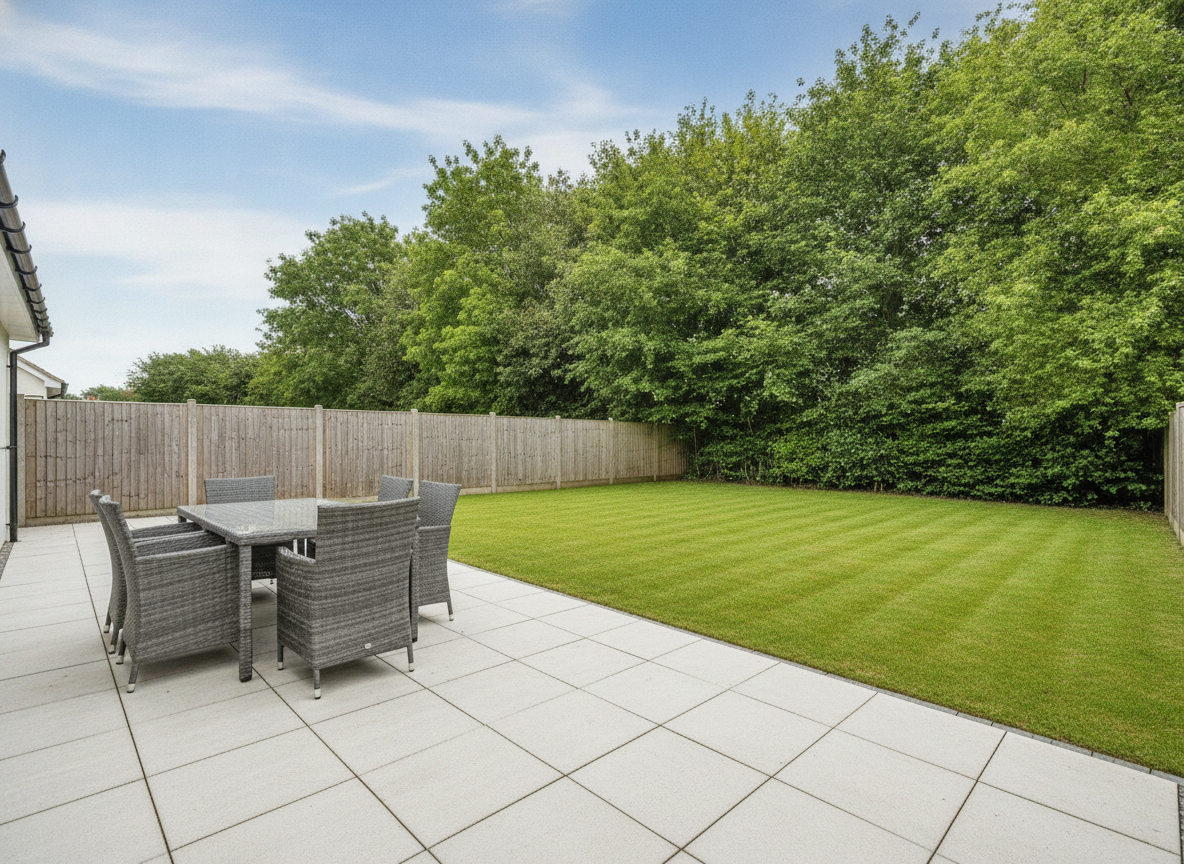
Four Chairs Asked For — Six Came Back
The most important image on this page. The paving, the striped lawn and the sky are excellent. The furniture is not: two extra chairs appeared, and the pair on the left have merged into each other.
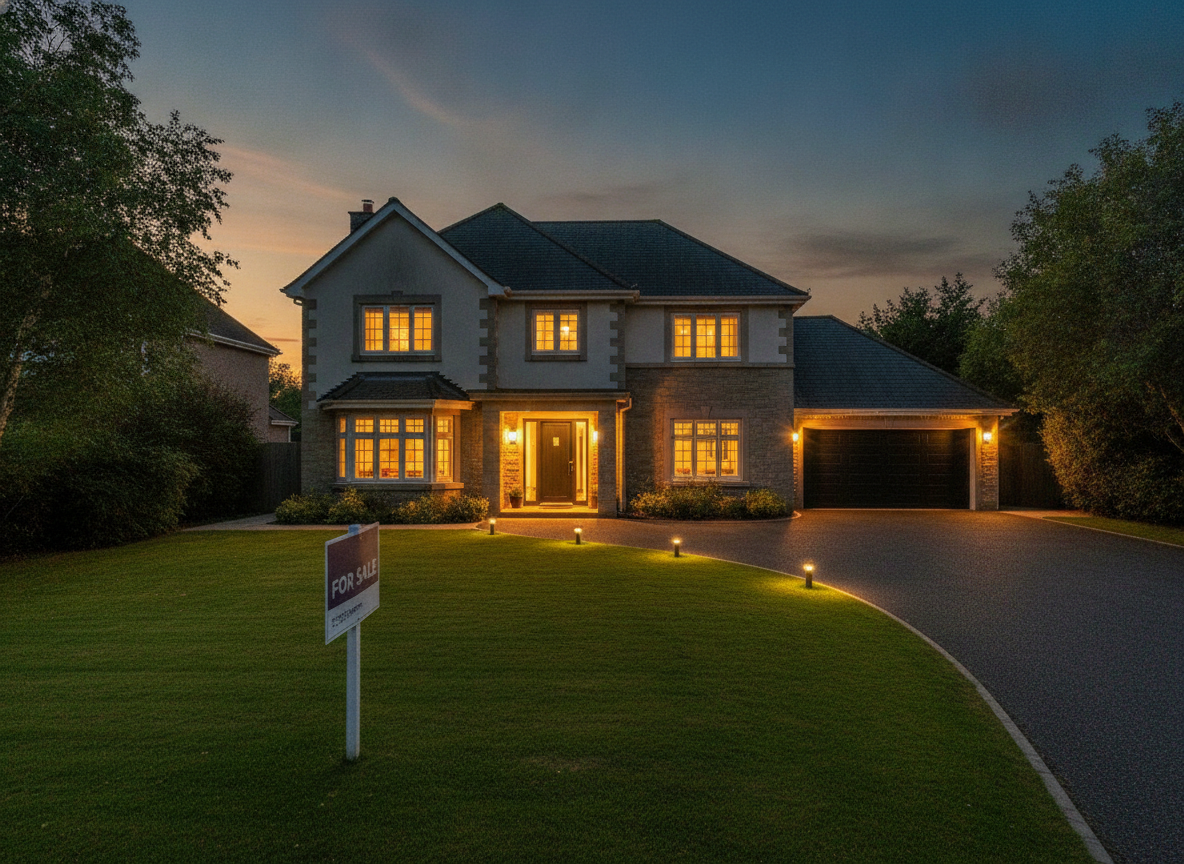
FOR SALE Spelled Right, Agency Details Invented
The twilight itself is the best shot here. But the board was asked for the words FOR SALE and nothing else, and came back with two lines of convincing, completely illegible agency details underneath.
What You May Edit, What You Must Disclose, What You Must Not Touch
Correcting the photograph is fine. Exposure, white balance, straightening leaning verticals and clearing away movable clutter are all things a property photographer would have done in camera or in Lightroom, and nobody objects to them. They change the picture, not the property. Sky replacement sits one step out and is usually a disclosure question. It is extremely common and generally accepted, and a number of MLSs and portals ask for it to be labelled the way virtual staging is. Rules differ by board, by portal and by country and they change, so check your own rather than treating this page as permission. Editing out a defect is misrepresentation, whatever tool you use. A damp patch, a crack in the render, a boarded window, a pylon behind the garden, a neighbouring extension. This editor cannot tell the difference between a wheelie bin and a pylon and will remove either one just as happily, so the judgement is entirely yours. The working rule that keeps you out of trouble: if a buyer would be annoyed to discover the difference at the viewing, leave it in the photo.
How the AI Real Estate Photo Editor Works
Upload, pick the one fault, then check the result against the original
Upload the Photo You Have
A phone shot is fine — that is the point. Shoot from a corner at chest height with the phone held level, get as much of the room in as you can, and let the editor deal with the light.
Pick the One Thing That Is Wrong
Brighten, sky, declutter, straighten, twilight or garden tidy. Each preset is a single job rather than a general improve button, so choose the fault you actually have and run it once.
Compare Against the Original
Open both photos side by side and check what is claimed: sockets, appliances, doorways, what is outside the window. The model re-renders rather than adjusts, so drift is the thing to look for.
It Re-Renders Your Photo, It Does Not Adjust It
This is the difference between an AI real estate photo editor and Lightroom, and it is worth thirty seconds of your attention. Lightroom moves the values of the pixels you photographed. GPT Image 2 reads your photograph and paints a new one that resembles it. Usually the resemblance is very close indeed. Sometimes it is not, and the gallery above has both failures in it: a patio asked for four chairs came back with six, two of them fused together, and a For Sale board asked for two words came back carrying two extra lines of invented, illegible agency details. On a birthday card that is a curiosity. On a listing photo it is a factual claim about a property, so open the original alongside every result and check the things a buyer would count — sockets, appliances, doorways, what is visible through the window.
Why Use an AI Real Estate Photo Editor
Because listings with good photographs get clicked, and most bad listing photos are a lighting problem rather than a property problem
The Window Problem, Solved
The one thing phone cameras cannot do: a properly lit room and a visible view through the glass in the same frame. Two of the six examples above are exactly that shot, garden readable and walls still white.
Sky Replacement for Grey Days
A flat white sky makes a good house look like a repossession. Swap it for blue with light cloud, or take the whole facade to golden hour, without waiting three weeks for the weather.
Declutter What Leaves With the Seller
Kettles, post, bin bags, hoses, recycling boxes. Movable things that are not part of what is being sold — and nothing fixed, which is a line the tool cannot draw for you.
Straight Verticals, Honest Colour
Leaning walls from shooting a room corner-on, and the orange cast every tungsten bulb leaves behind. Both are camera artefacts rather than facts about the property, so both are safe to correct.
An Ethics Section, Not a Buried Disclaimer
Which edits portals accept, which need disclosing and which cross into misrepresentation, stated on the page in plain terms. Read it before your first listing, not after your first complaint.
Free, No Sign Up, No Watermark
About fifteen seconds per photo and nothing stamped on the download. Run three presets on the same room before deciding which version goes on the portal.
Who Uses It
Agents, landlords, hosts and photographers working with the photos they actually have
Estate and Letting Agents
The rental that does not justify a photographer, and the twelve phone photos the landlord emailed over on a grey Tuesday. Brighten, straighten, swap the sky, and the listing stops looking like an afterthought.
Airbnb and Short-Let Hosts
Listing photos age badly and guests scroll fast. A seasonal refresh of the same rooms costs nothing here, and the garden tidy preset earns its keep every spring.
Property Photographers
Not a replacement for bracketed exposures and a tripod, but a quick way to show a client what a twilight or a sky swap would look like before quoting for the reshoot.
Landlords Selling Privately
No agent, no photographer, one phone and a listing to write this weekend. Six presets covers most of what separates a private listing from an agency one.
AI Real Estate Photo Editor FAQ
Portal rules, what drifts on a re-render, virtual staging, sizes and pricing
Free AI Real Estate Photo Editor — Correct the Photograph, Not the Property
Almost every bad listing photo is a lighting problem rather than a property problem. The room was fine; the phone metered for the window and left the walls in shadow, or metered for the walls and turned the window into a white rectangle. The house was fine; it was photographed on a grey Tuesday in February when the sky read as flat paper. The kitchen was fine; the kettle, the toaster and three days of post were still on the worktop. Those four faults account for most of what makes an amateur listing look amateur, and none of them says anything true about the property. That is the whole remit of this AI real estate photo editor: six presets, each aimed at one of those faults, each fixing the photograph and leaving the house alone.
It is deliberately a narrower tool than it could be, and the boundaries are worth knowing because they tell you which page you want. AI virtual staging starts from an empty room and puts furniture into it — the opposite starting point and the opposite job, and always something to disclose. The AI interior design tool and the AI exterior design tool restyle a property into something it is not yet, which is a renovation daydream rather than a listing photo. The AI object remover takes one thing out of a frame while leaving the rest identical, which is the better choice when precision matters more than a general clean-up. The AI image enhancement tool does the same sharpening and clarity work for any photo, without property-specific presets. And a floor plan is the other half of a listing that photos cannot do at all.
Now the part most pages in this category skip, and the reason to read the gallery above rather than scroll past it. GPT Image 2 does not adjust your photograph — it looks at it and renders a new one that resembles it. That is what makes the good results as good as they are: two of the six examples pull off the shot a phone genuinely cannot take, a room evenly lit with the garden still readable through the glass. It is also why the two failures on this page are the kind they are. The patio was asked for a table and four chairs and returned six, with the pair on the left fused into one another. The twilight shot was asked for a board reading FOR SALE and nothing else, and produced exactly that headline with two lines of completely invented, illegible agency details set underneath it. Neither is a filter misbehaving; both are the model filling in what it expects to see. On a listing photo, invented content is not a cosmetic flaw, it is a claim about a property, so the workflow has to end with you opening the original alongside the result and counting the things a buyer would count.
Which brings the whole thing back to the ethics section, because it is not a disclaimer bolted on at the end — it is the operating manual. Correcting exposure, neutralising a tungsten colour cast, straightening the leaning verticals of a handheld wide-angle shot and clearing away movable clutter are all things a professional would have done, and they change the picture rather than the property. Sky replacement is accepted almost everywhere and asked to be disclosed in a good many places, alongside virtual staging; check your own MLS rules or portal terms, because they differ by board and by country and they change. And editing out anything permanent — a damp patch, a crack, a boarded window, a pylon behind the fence — is misrepresentation regardless of which software did it. This editor cannot tell a wheelie bin from a pylon, so that judgement stays with you. Everything comes back at 4:3 landscape to match what portals expect; the AI image cropper reshapes it for anything that wants a different frame, and the AI image upscaler takes it up to brochure print size. Scroll back up, upload the photo you already have, and fix the light.