
AI Santa Photo Generator
No Queue, No Grotto. Count the Hands.
Upload a photo you already have and get one back with Santa Claus in it — the living room sofa, the studio knee portrait, the fireplace at midnight, the sleigh outside the workshop. This ai santa photo generator is free, needs no account and adds no watermark. It also, as the gallery below shows at full size, has a habit of drawing an extra arm that belongs to nobody in the room.
Try the AI Santa Photo Generator — Free
Upload your photo, pick a scene, and count the hands when it lands
AI Santa Photo Generator
Upload a family photo, a photo of the children, or a photo of the dog, then choose one of the six Santa scenes below. Each scene is a complete instruction on its own, so there is nothing to type — pick one and generate. Two things to know before you do. This tool re-renders your photograph rather than pasting Santa onto it, so faces come back as a close likeness rather than a copy and clothing and background will drift. And whatever is countable in the result is worth counting, because the six examples below turned six presents into eight and four reindeer into three. Choose a photo where everyone faces the camera and hands are visible, and look at the arms in the result before you send it.
Upload a family photo, pick a Santa scene, and generate — no typing needed
Renders at 3:4 portrait, close to a folded card or a 5x7 print. There is no ratio picker on this page, so the square and widescreen examples in the gallery below cannot be produced from here — for those, or to trim a border the model has added, use the AI image cropper or pick a ratio on the home page generator.
AI Santa Photo Generator Examples
Six scenes exactly as they came back — count the arms, the presents and the reindeer
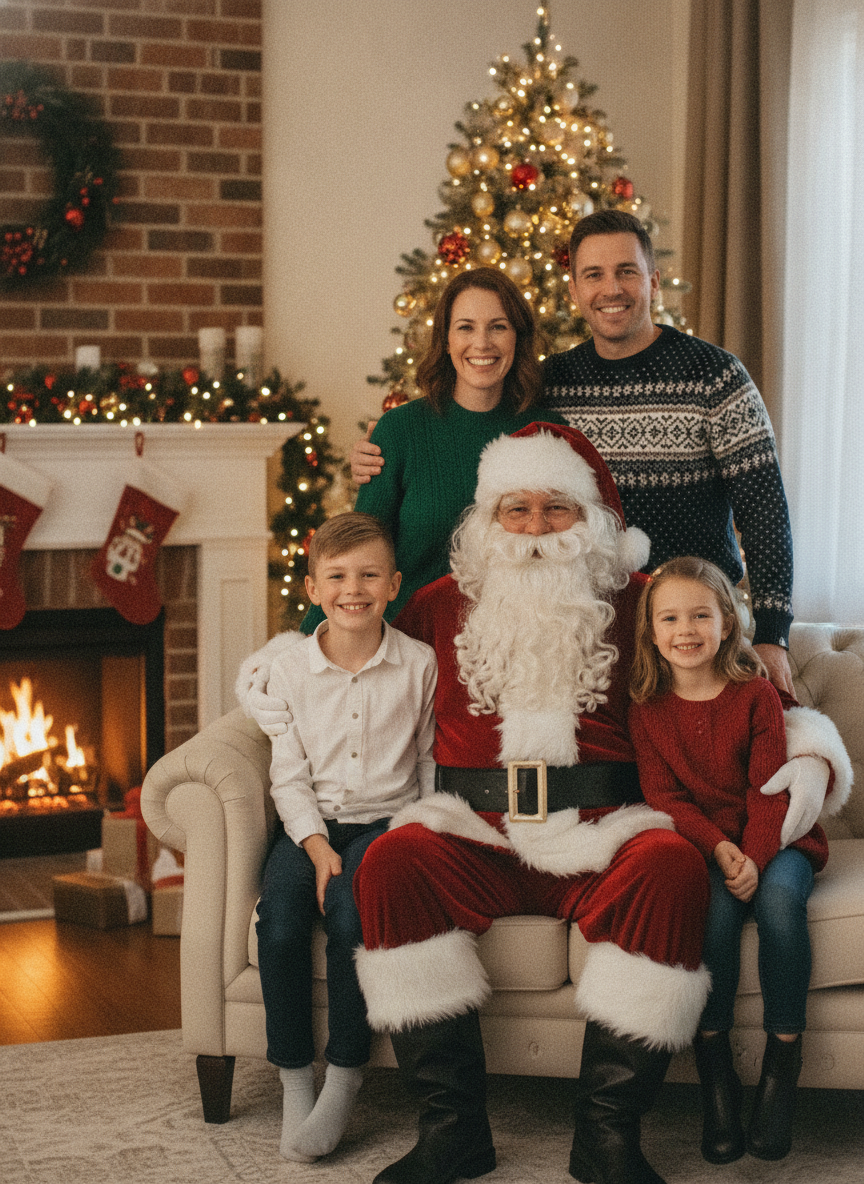
Five People, Exactly As Asked. Then Count the Arms.
Start here, because this is the failure the whole page is built on. The prompt asked for four family members plus Santa, five people in total, and five people is exactly what arrived — mother and father standing behind the sofa, a boy on one side, a girl on the other, Santa in the middle. The room is lovely: real firelight, a tree that is actually lit rather than glowing, stockings on the mantel, a wreath on the brick. Now look at the mother’s left shoulder. There is a bare forearm and hand resting on it, entering from behind the Christmas tree, and it belongs to nobody in the photograph. The mother is in a long-sleeved green sweater, the father in a long-sleeved Fair Isle, and Santa is in red velvet with white gloves — no one in the frame has a bare arm. The model counted the people correctly and then added a sixth limb it never counted at all. Santa’s own glove, down on the girl’s arm at the bottom right, has no separated fingers in it either; it is a mitten shape with a thumb.
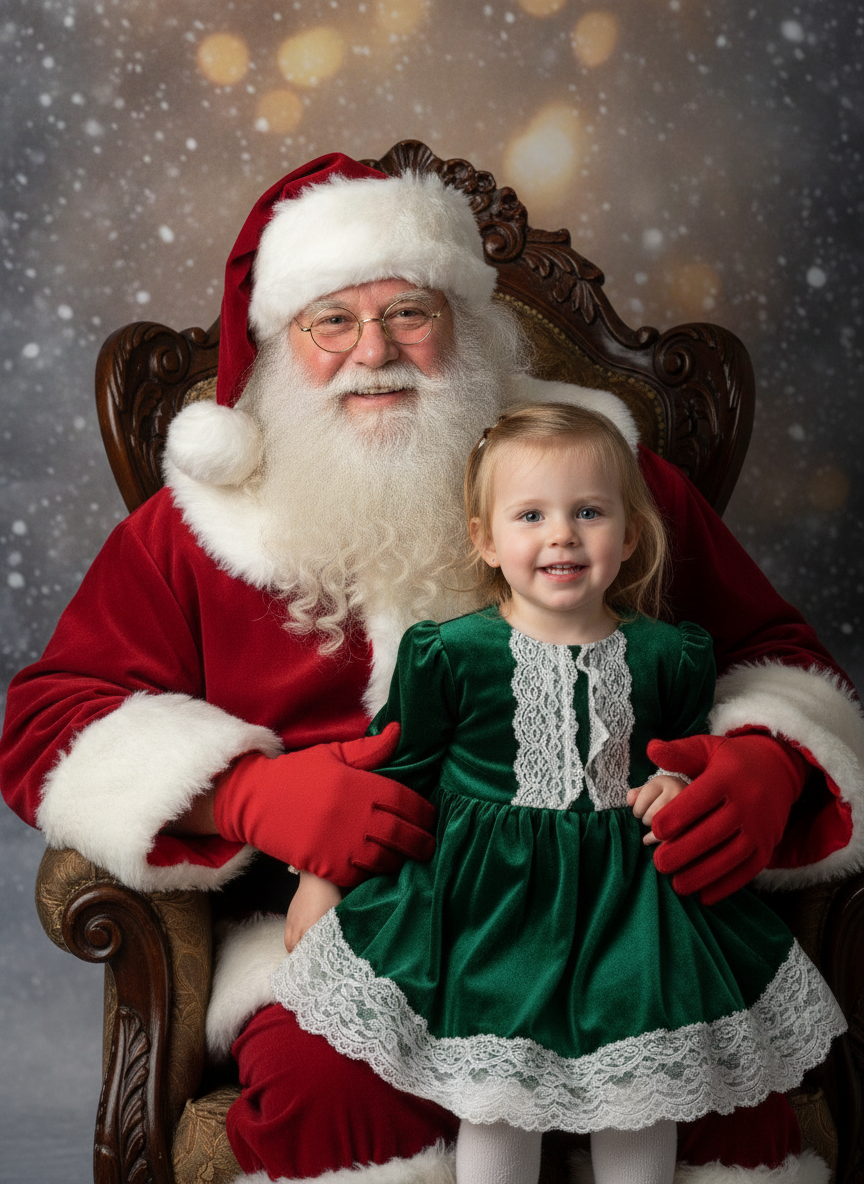
It Was Asked For a Bare Hand With Five Separated Fingers. It Put Gloves On.
The prompt for this one was deliberately hard. It asked for Santa’s near hand to rest openly on the arm of the chair, fully visible, with exactly five fingers, four fingers and one thumb, each finger a normal length and clearly separated — the single thing image models are worst at. What came back is a beautiful studio portrait in which Santa is wearing red gloves and both hands are folded around the child, nowhere near the arm of the chair. It did not attempt the hard thing and fail. It quietly removed the need to attempt it, which is a failure mode you will not notice because there is nothing wrong on the surface. Crop into the right glove and the glove itself is fine, five digits, properly shaped — but the child’s own small hand underneath it fuses into the fabric at the wrist and you cannot tell where she ends and the glove begins. Everything else here is genuinely excellent: the carved chair, the painted snow backdrop, the soft key light from the left.
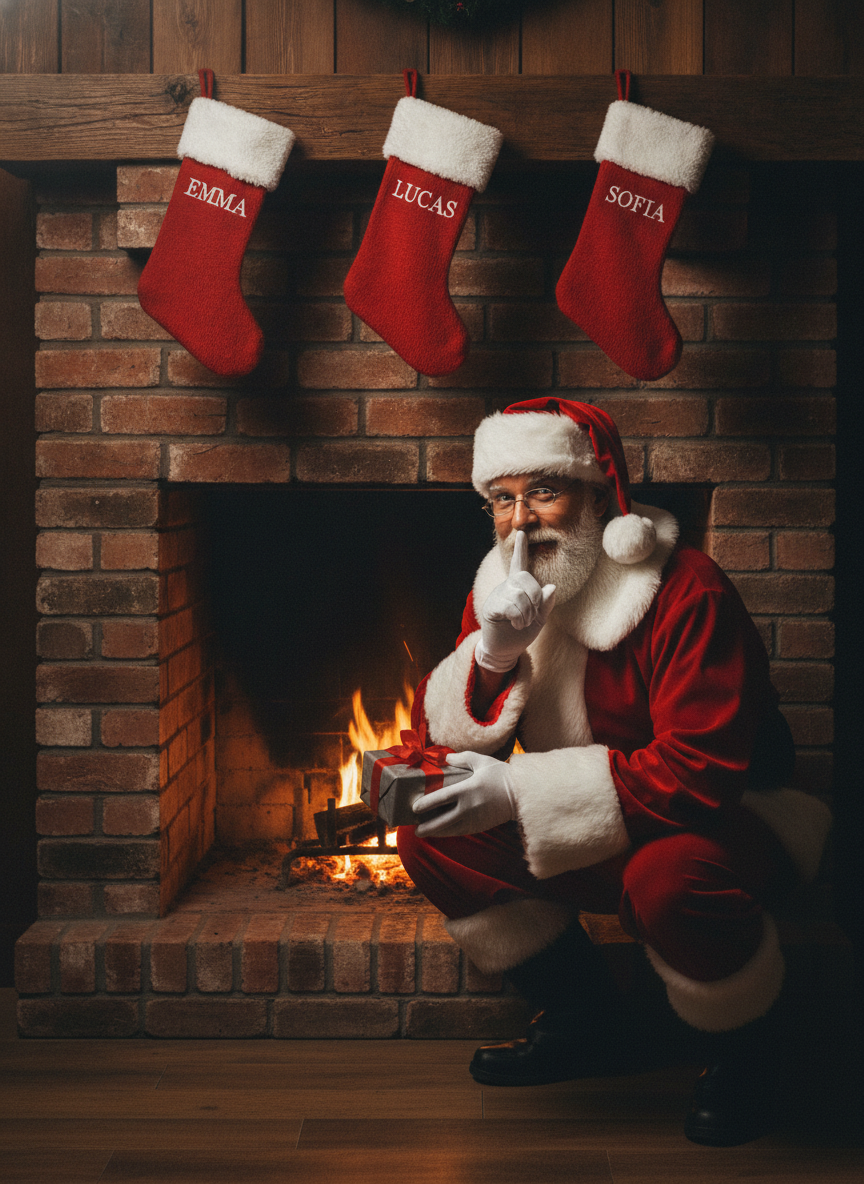
EMMA, LUCAS and SOFIA — All Three Spelled Perfectly, All Three in the Wrong Place
This is the good news and it is worth saying plainly, because most pages on this site are about text coming back wrong. Three names were named in order, left to right, and three names came back correct: EMMA, LUCAS, SOFIA. No invented accent on the O, no doubled letter, no mangled glyph, clean even serif capitals. Text fidelity was flawless. Text placement was not. The prompt asked for each name embroidered across the white fur cuff; every name is on the red body of the stocking instead, below the cuff, and each of the three is set at a different size and a different height, so there is no shared baseline across the row. The stockings were asked to be three the same size and the third is visibly wider. And look at what they hang from: three little red loops pinned flat against the timber with no hook, no nail and no clip under any of them. The fireplace is also worth a second look, since Santa is kneeling in the hearth holding a wrapped present about a hand’s width from an open fire.
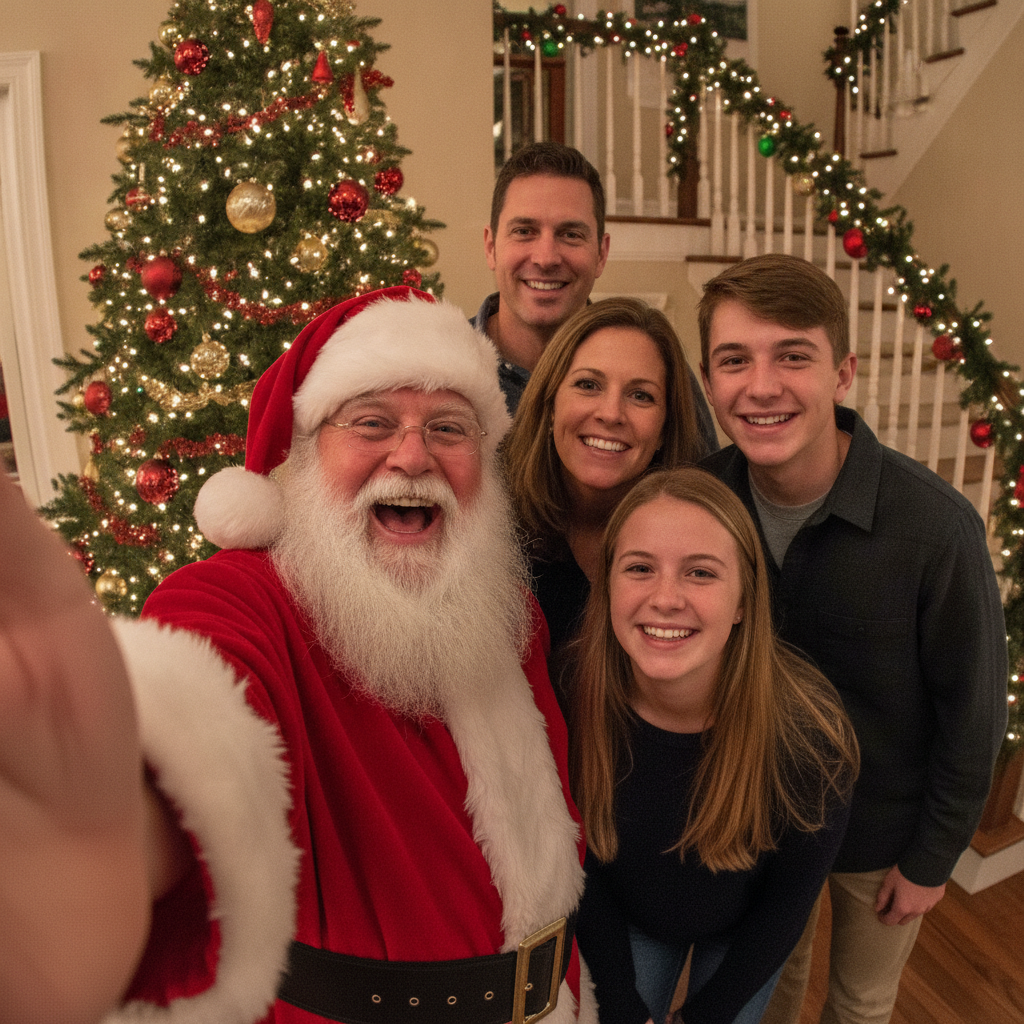
The Second Photo Where the Headcount Is Right and the Arm Count Is Not
Five faces were asked for — Santa plus two adults and two teenagers — and five faces arrived, correctly sorted into two adults and two teenagers, every face complete and unobstructed, all five looking up into the lens. As a photograph it is convincing: the slight wide-angle stretch at the edges, the flat direct flash, the garlanded staircase behind. Then look at the bottom left corner. There is a large soft pink mass there, which is meant to be the arm holding the phone, and beside it, clearly separate, is Santa’s red sleeve with its white fur cuff. So the arm taking the picture is bare, and the only person it could belong to is wearing a sleeve. Enlarge it and it has no fingers and no phone in it at all, just a suggestion of a thumb. Exactly as in the living room photo above, the model got the number of people right and then produced a limb that cannot be assigned to any of them.
Six Presents Were Requested. Count Them.
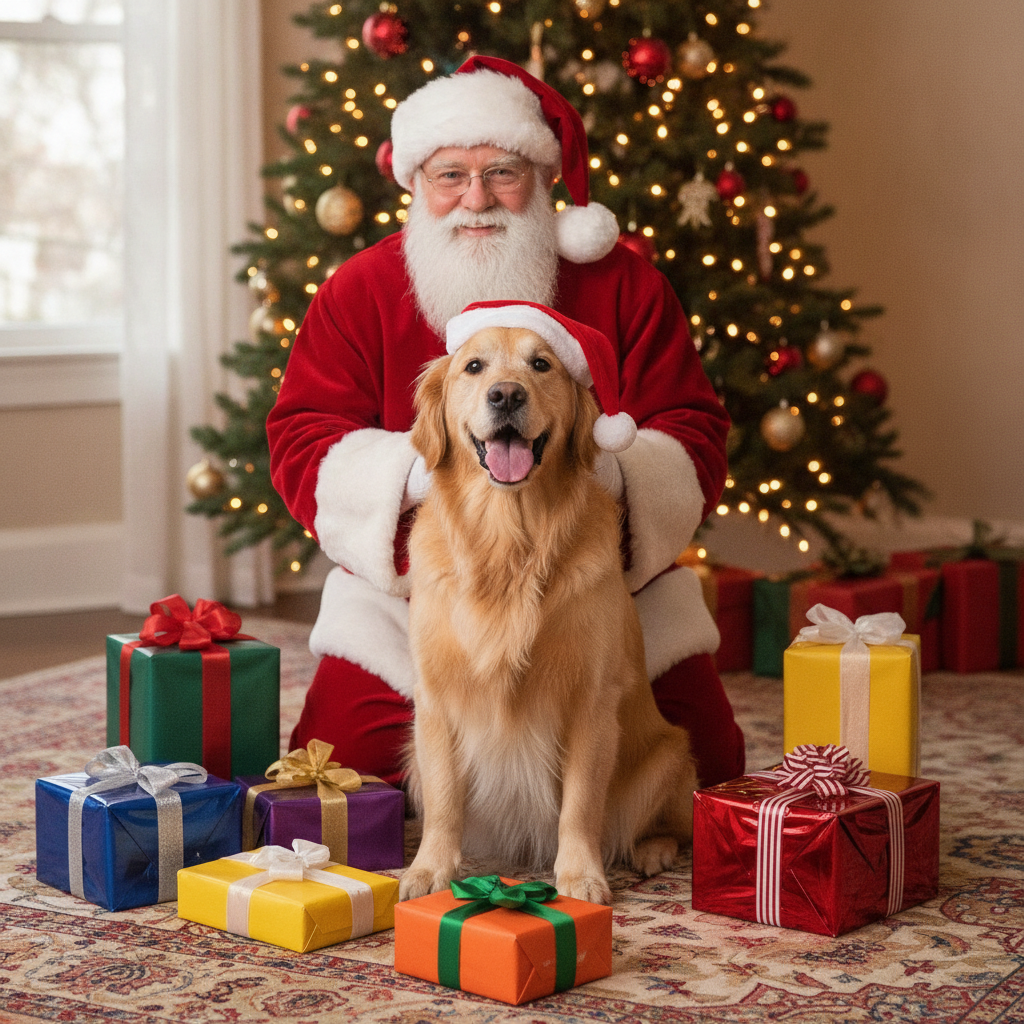
The prompt could not have been more specific: exactly six small wrapped presents, each a different colour of paper, all six clearly separate from one another and none of them stacked or overlapping. In the foreground alone there are eight — green, blue, purple, flat yellow, orange, tall yellow, red foil, and a second dark box tucked behind the red one — and there are three or four more scattered under the tree behind Santa’s shoulder. The tall yellow box and the red foil box are both overlapping the boxes behind them, which was the one arrangement the prompt explicitly ruled out. This is the counting failure that shows up on every page here where a number carries meaning, and it is worth knowing that it did not fail alone: Santa was asked to be scratching the dog behind one ear and instead has both gloved hands flat on the dog’s chest, with the right glove dissolving into the fur. The dog itself is perfect, which is the pattern — fur, light and texture are safe, arithmetic is not.
Four Reindeer Were Asked For. Three Arrived, and One Spare Set of Antlers.
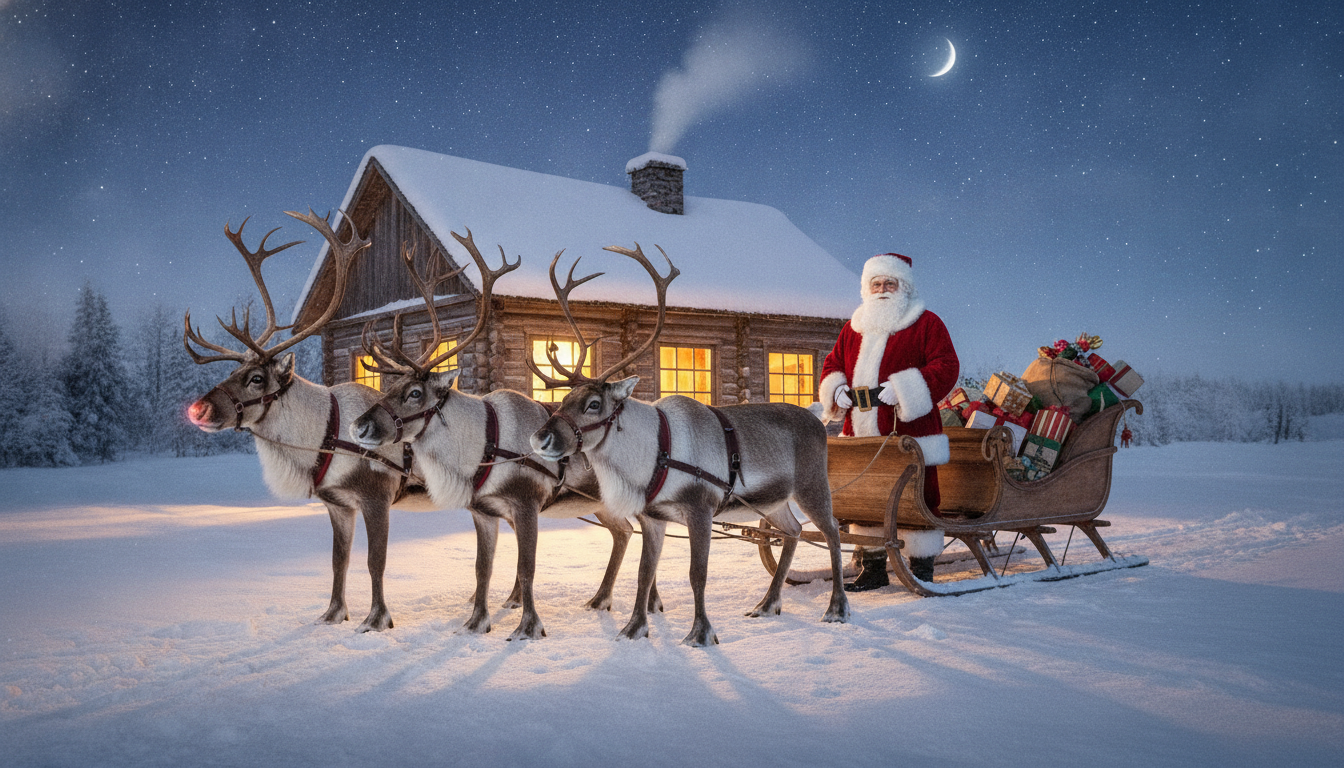
The prompt named the number three separate ways — four reindeer, harnessed in a single straight line one behind the other, all four with full branching antlers, count them, four reindeer, no more and no fewer. There are three reindeer. Crop into the team and you can count three heads, three muzzles, three harnessed chests — and at least four distinct sets of antlers, with one pair rising between the second and third animal that has no head underneath it. They are also standing abreast in a rough row rather than in file, and their traces run back and simply stop before they reach the sleigh, so nothing in the picture is actually pulling anything. As a night photograph it is the best of the six: the moon, the star field, the amber window light pooling on the snow, the long soft shadows. The wide shape here is 16:9, not the 3:4 the tool on this page renders at, and it came back full bleed with no white bars.
These six were generated from written descriptions rather than from an uploaded photo, so that each scene could be requested precisely enough to test. The tool above starts from your picture instead — same model, same scenes, same failure modes.
It Will Count the People Correctly and Then Draw an Arm That Belongs to Nobody
This is the single most important thing on the page, and it happened in both group photographs. In the living room image the prompt asked for four family members plus Santa; four family members plus Santa is what arrived, correctly arranged. Then there is a bare forearm and hand resting on the mother’s shoulder, entering from behind the Christmas tree, belonging to no one in the frame — the mother is in a long-sleeved sweater, the father is in a long-sleeved sweater, and Santa is in red velvet with white gloves. In the selfie the prompt asked for Santa plus two adults and two teenagers; exactly that arrived, every face complete. Then the arm holding the camera in the bottom left corner is bare skin, while Santa’s red sleeve and white fur cuff sit clearly beside it as a separate limb, and the bare arm has no fingers and no phone in it. The headcount is not the thing to check. The arm count is. For each person in the result, follow both of their arms from the shoulder to the hand, and count the hands touching anybody. Santa’s gloves are worth the same look: in the living room photo his glove on the girl’s arm is a mitten shape with a thumb and no separated fingers in it at all.
Anything You Can Count, It Will Get Wrong
Six presents were requested, each a different colour, all separate and none stacked. Eight arrived in the foreground alone, with three or four more under the tree behind, and two of the eight are overlapping the boxes behind them — the one arrangement that was explicitly ruled out. Four reindeer were requested, in a single line, all four with antlers, and the prompt said “count them, four reindeer, no more and no fewer”. Three reindeer arrived, standing abreast rather than in file, with at least four sets of antlers between them — one pair rises between the second and third animal with no head underneath it. Their harness traces run backwards and stop in mid-air before reaching the sleigh, so nothing in the photograph is pulling anything. Even the stockings, where the count of three was correct, came back at different widths. The practical rule is that the model draws the idea of a quantity rather than the quantity. If the number matters to you — three children, two dogs, four stockings, five candles — count it in the output every single time, and be ready to generate again. It costs fifteen seconds.
The Names Were Spelled Perfectly and Put in the Wrong Place
This one is mostly good news, which is rarer on this site than it should be. The fireplace image asked for three stockings with one name each, reading left to right: EMMA, then LUCAS, then SOFIA. All three came back correctly spelled, in clean even serif capitals, with no invented accent, no doubled letter and no mangled glyph. On other pages here this model has added a grave to a French sign and swapped a vowel mark in Hindi; here it simply did as it was told. What it did not do was put them where they were asked to go. Every name was requested on the white fur cuff and every name landed on the red body below it, at three different sizes and three different heights, with no shared baseline across the row. And look at how the stockings hang: three little red loops pinned flat against the timber, with no hook, nail or clip under any of them. So if the lettering matters, generate the scene clean and add the words yourself in any app with a text box — you get the position, the size and the typeface you chose, and you get your children’s names spelled the way your family spells them.
It Re-Renders Your Photograph. It Does Not Paste Santa Into It.
Everything above follows from this one fact, so it is worth stating plainly. When you upload a picture, the model does not cut Santa Claus out and composite him over your living room. It reads your photograph and paints a new one that resembles it. Faces come back as a close likeness — brow, eye spacing, hairline and the shape of a smile survive well — while clothing, hands, jewellery, furniture and background detail are redrawn from scratch and drift. That is why an extra arm can appear, why a sweater changes its knit, why the room gains a side table nobody owns. The two consequences that matter: give it as little to guess at as possible, and check what it guessed. Choose a photo where everybody is facing the camera with their hands visible, because half-hidden hands are precisely where it invents. Then look at the result at full size before you send it to forty people. And say what it is. A photograph of your family with Santa Claus is a lovely thing to put on a card and a strange thing to present as a record of an afternoon that happened. It is a picture, not evidence.
How the AI Santa Photo Generator Works
Three steps, and the third is the one everybody skips
Upload the Photo You Already Have
Pick one where everybody faces the camera and hands are visible. Half-hidden hands are exactly where this model invents, so give it as little to guess at as possible.
Choose the Scene
Six presets, from the classic studio knee portrait to the sleigh at night. Each one is a complete instruction on its own — there is no text box on this page to add to it.
Count Hands, Then Everything Else
The step nobody does. Count the people, count the arms attached to them, then count the presents, stockings and pets. Generating again costs fifteen seconds.
Photo, Card or Portrait — Picking the Right Page
This page is for putting Santa Claus into a photograph you already have. If what you want is a card design rather than a photograph, the AI Christmas card generator builds the layout and the artwork instead, and the AI greeting card maker covers every other occasion. For a family photograph with no Santa in it, use the AI family portrait generator; for the dog on its own, the AI pet portrait generator. The rest of the season has its own pages too — the AI ugly Christmas sweater generator, the AI Christmas decoration generator and the AI photo booth generator for the party strip. If the photo you want to use is old or damaged, run it through AI photo restoration first, and trim any border the model adds with the AI image cropper.
Why Use This Santa Photo Maker
Because the grotto queue is forty minutes and the print is twenty five pounds
Six Santa Scenes
The living room sofa, the classic studio knee portrait, the fireplace caught in the act, a handheld group selfie, one with the dog, and the sleigh outside the workshop at night.
Honest About Hands and Arms
Two of the six examples above contain a limb belonging to nobody in the frame, shown at full size and cropped, rather than left for you to find on a card that is already printed.
Honest About Counting
Six presents became eight. Four reindeer became three with a spare set of antlers. If a number in your photo matters, this page tells you to check it rather than pretending it will be right.
Cards, Prints and the Group Chat
A 3:4 render sits naturally on a folded card or a 5x7 print, and drops straight into the family group chat without anybody having to queue at a grotto on a wet Saturday.
Pets Welcome
Fur, light and texture are what this model is genuinely excellent at, so the dog in the example above is the most convincing thing in it. Upload the pet photo you already like.
Free, No Sign Up, No Watermark
About fifteen seconds an image, no account, no queue and nothing stamped across the corner. Christmas 2026 is on a Friday, so there is time to generate a few and pick.
Who Uses It
People who missed the grotto, and people whose children would never sit still in one
Parents and Grandparents
A photo with Santa without the car park, the queue and the forty pound print package. Upload the picture from the tree-decorating afternoon you already took, and pick the studio knee portrait for the version that looks like the one your own parents have in a frame.
Families Sending Cards
The 3:4 render sits straight on a folded card or a 5x7 print. Generate the photo here with nothing written in it, then set the greeting and the names yourself, because the stocking image above shows exactly how this model handles lettering it was trusted with.
Pet Owners
Very few grottos will photograph a golden retriever on a Saturday in December. Fur and warm light are the two things this model is genuinely excellent at, so the pet scene is the most convincing of the six — just count the presents afterwards.
Families Apart at Christmas
A photograph of the grandchildren with Santa, sent to a grandparent who lives four time zones away, costs fifteen seconds instead of a day out. Say what it is when you send it, and it is a gift rather than a small confusion.
AI Santa Photo Generator FAQ
Likeness, counting, names on stockings, printing and what it costs
Free AI Santa Photo Generator — A Photo With Santa Without the Queue
The photograph with Santa is one of the small fixed rituals of December, and it is also a forty minute queue in a shopping centre, a child who will not look at the camera in the eleven seconds you are given, and a print package that costs more than the presents in the sack behind him. An ai santa photo generator changes that arithmetic completely. Upload a picture you already have — the four of you on the sofa, the children in front of the tree, the dog in a hat looking mildly betrayed — choose one of six scenes, and about fifteen seconds later you have a 3:4 portrait photograph with Santa Claus in it. No account, no queue, no watermark, and as many attempts as you like until one of them looks right.
The six scenes on this Santa photo maker cover the versions people actually want. Living Room Sofa is the family group shot, everyone around Santa on a cream sofa with the tree lit behind and a fire going. Studio Knee Portrait is the formal one, the carved chair and the painted snow backdrop, the shot your own parents have in a frame somewhere. Fireplace at Midnight puts your family at the top of the stairs catching Santa in the act with a finger to his lips. Group Selfie is the raised-arm, flash-lit, slightly badly framed one that looks like it came off a phone. With the Pet is for the animal who will never be admitted to a grotto. Sleigh at Night is the outdoor scene, the loaded sleigh, the reindeer and the workshop windows glowing behind.
Three limits, all of them demonstrated in the gallery above rather than asserted. The first is arms. In both of the group photographs the model counted the people exactly right and then drew a limb belonging to nobody — a bare forearm on a shoulder in one, a bare selfie arm beside Santa’s sleeved one in the other. The second is counting. Six presents became eight, two of them stacked when stacking was forbidden; four reindeer became three animals sharing four sets of antlers. The third is placement rather than spelling. Three children’s names on three stockings came back spelled perfectly — EMMA, LUCAS, SOFIA, no invented accents, clean letterforms — and every one of them landed on the wrong part of the stocking at a different size. None of these is a reason to avoid the tool. All of them are reasons to spend ten seconds looking at the result before it goes anywhere.
The working method that follows is simple: upload a photo where everybody faces the camera with their hands visible, generate the scene with no lettering in it, then count the arms and add the words yourself. That gets you the likeness this model is good at and keeps you clear of the three things it is not. For the rest of the season the neighbouring tools finish the job — card designs at the AI Christmas card generator, a plain family photograph at the AI family portrait generator, the dog on its own at the AI pet portrait generator, the jumper at the AI ugly Christmas sweater generator, the tree and the mantel at the AI Christmas decoration generator, the party strip at the AI photo booth generator, an old photo brought back at AI photo restoration, and any unwanted border trimmed at the AI image cropper. Everything here is free to try, nothing is watermarked, photos come back at 3:4 portrait, and paid plans start at $2.99. Scroll back up and make one — then count the hands.