
AI Discord Banner Generator
Wide Enough for the Server Slot. Count the Hexagons Yourself.
Pick a style, add your server name, and get a wide banner back in about fifteen seconds — a neon city, a lettered wordmark, a cosy lo-fi room, a badge row, a flat gradient or a misty forest. Every render is 1344×768, which is twelve pixels of height away from an exact 16:9 and drops straight into Discord’s 960×540 server banner. This ai discord banner generator is free, needs no account and adds no watermark, and the gallery below shows all six test banners exactly as they came back — including the one that drew a grey box over the road.
Try the AI Discord Banner Generator — Free
Pick a style, type your server name, and upload it at 960×540
AI Discord Banner Generator
Choose one of the six styles below, then type your server name, your game or your colours into the details box. Every banner comes back at 1344x768 — trim 12 pixels of height for an exact 16:9 and it scales straight down to the 960x540 Discord wants for a server banner.
Every style returns a 1344×768 banner. Whatever you type in the details box is lettered into it — so give it the real server name, then count the repeats and check the corners before you upload.
AI Discord Banner Generator Examples
Six banners exactly as they came back — with the measurements next to them
Six Hexagons Asked For. Seven Arrived. All Seven Are Perfect.
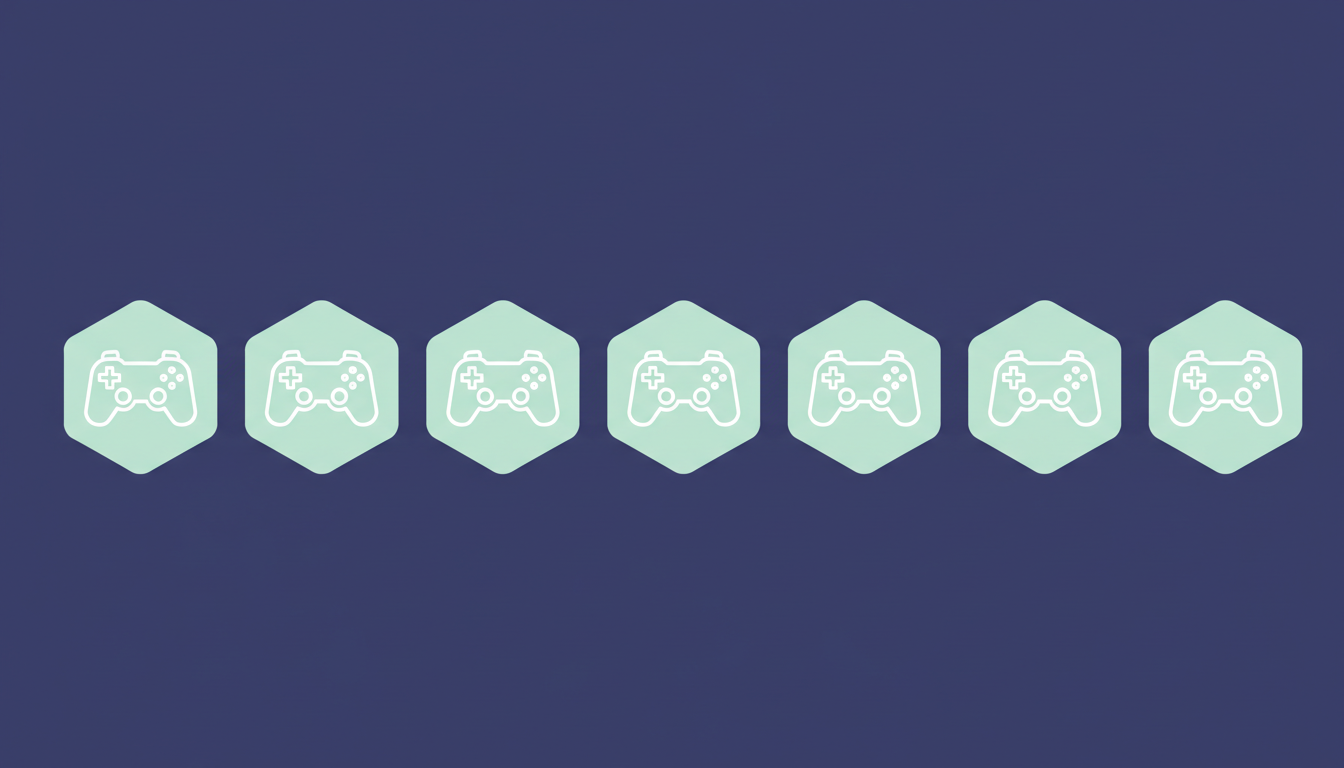
Measure this one rather than trusting your eye. The brief asked for exactly six identical hexagonal badges in one straight row. Seven came back — and they are flawless. Each badge measures 153 by 174 pixels, the seven areas fall between 20,620 and 20,691 pixels (a spread of one third of one percent), every centroid sits at y=386.6, and the gaps run 28, 28, 28, 28, 27, 28 pixels. That is better repeat accuracy than most people would draw by hand. It simply drew one too many. This inverts the usual failure: on other subjects this model gets the count right and the congruence wrong, and here it got the congruence perfect and the count wrong. The row is also 64 pixels from the left edge and 42 from the right, so it is not quite centred either.
It Drew the Safe Zone. Literally, as a Grey Box, Over the Road.
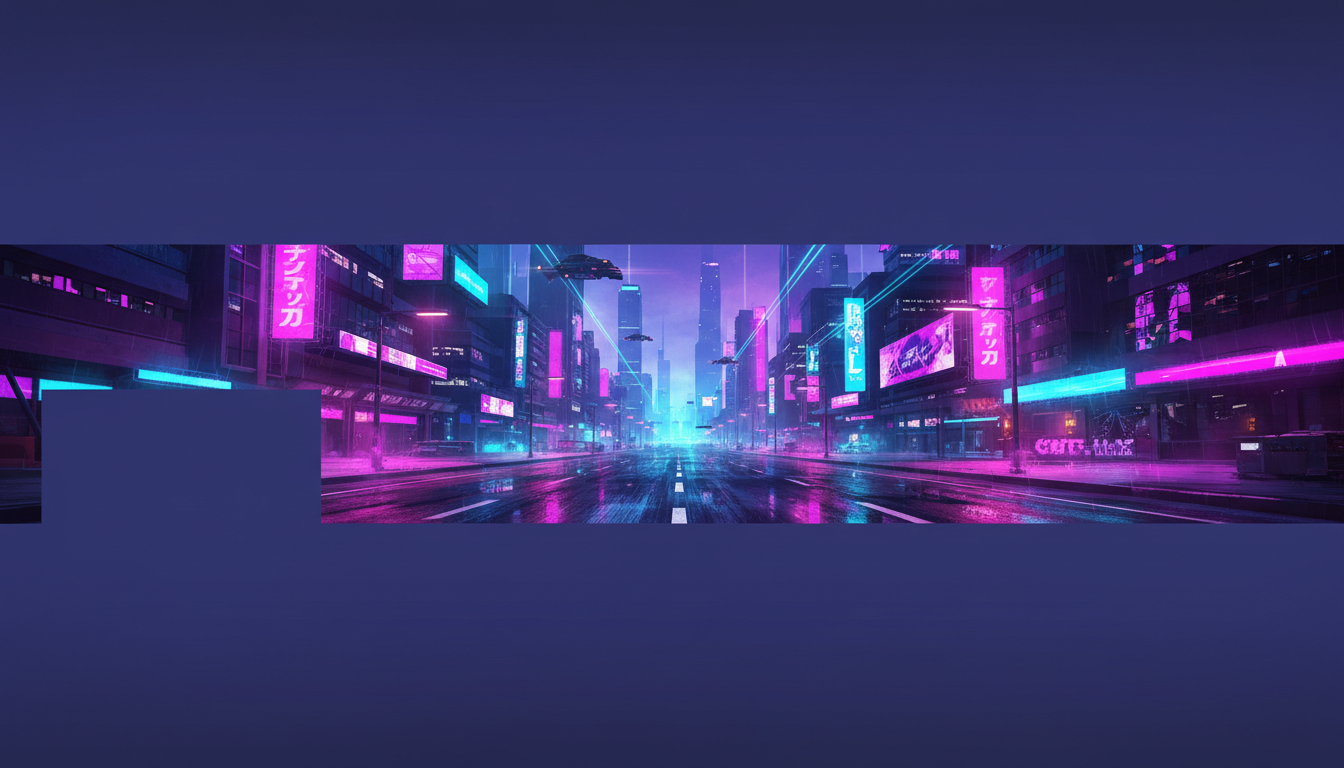
Two instructions, both taken at their word, both disastrous. The brief said keep the composition inside the central seventy percent of the height — so instead of composing within that band it letterboxed the picture, and the street scene runs only from y=242 to y=522, a strip 280 pixels tall out of 768. That is 36 percent of the frame, with flat indigo filling everything above and below. Then the brief said leave the lower left as a plain flat area of unbroken background with nothing drawn inside it, and it drew that. There is a solid rectangle of flat colour, roughly 273 by 132 pixels, sampling at an unvarying rgb(48, 52, 109) right across its width, pasted over the pavement where a building should be. The city itself is genuinely good. The layout note became part of the picture.
A Lovely Illustration Occupying 28 Percent of Its Own Banner
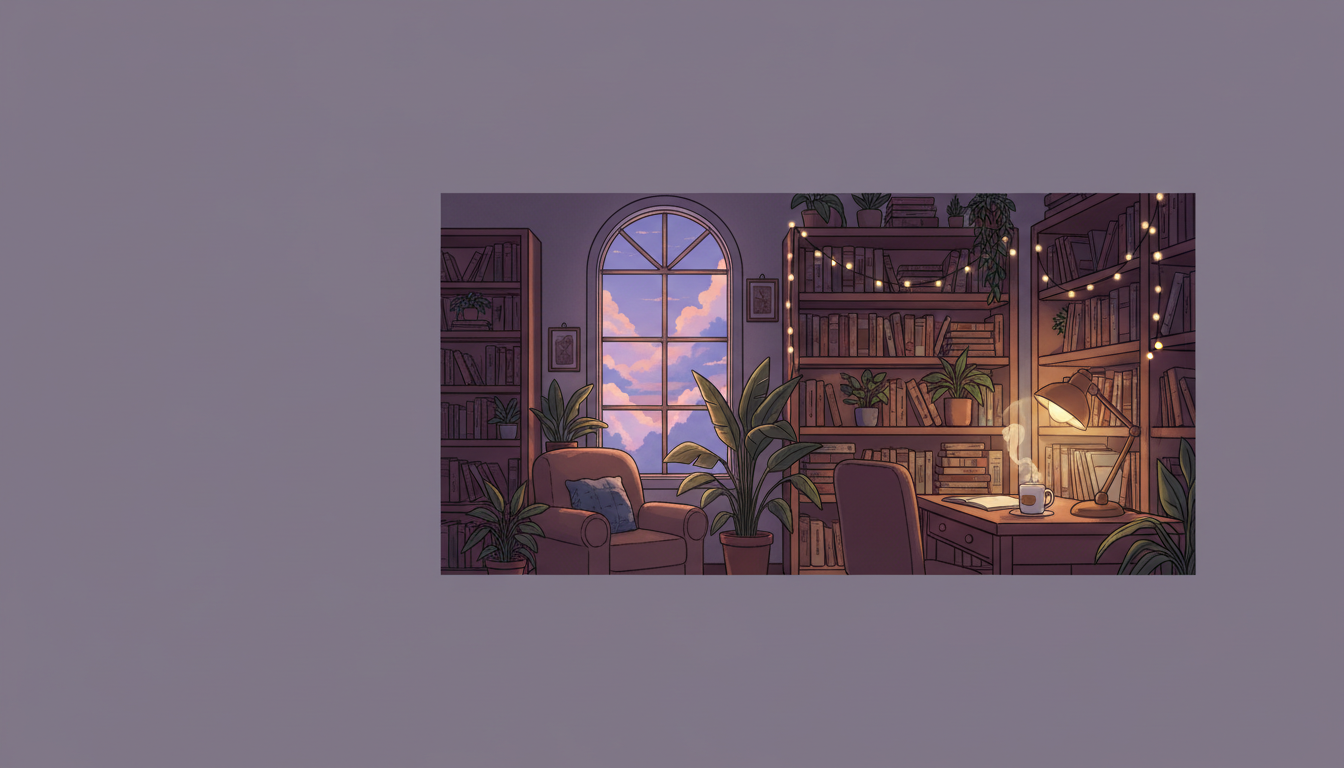
Everything inside the picture is right. The desk lamp and the steaming mug are on the right where they were asked for, the arched window sits centre right with a lavender evening sky behind it, and the plants, bookshelves and string lights fill the middle exactly as briefed. The problem is that the picture is a picture inside a picture. Measured off the file the illustration occupies 756 by 384 pixels at an offset of 440, 192 — 56.2 percent of the width, 50.0 percent of the height, 28.1 percent of the image area. It is also pushed right of centre, which is the empty-corner instruction leaking out into the whole composition. Uploaded to Discord as-is you would get a postage stamp on a lilac wall.
A Circumflex Was Requested, by Name and by Letter. A Grave Arrived.
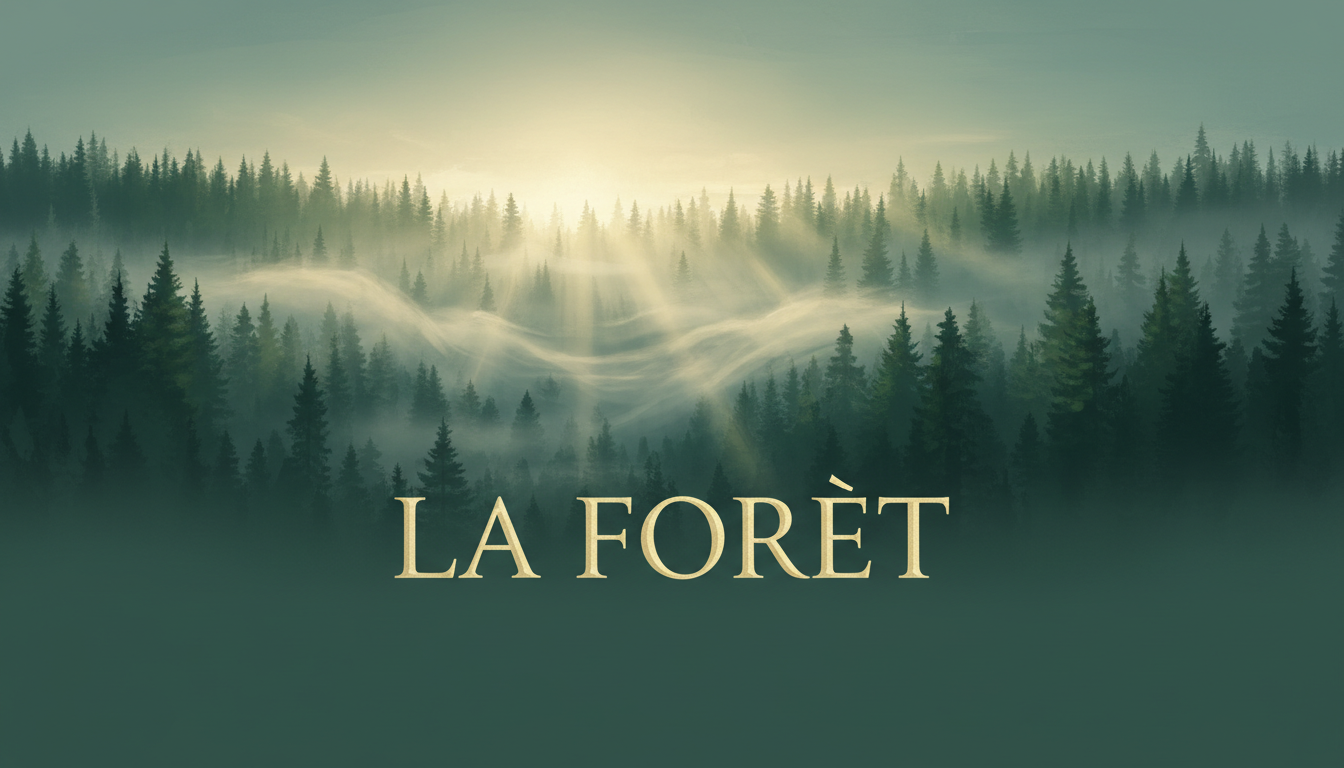
This is the image worth the whole page. The brief asked, in plain words, for a circumflex accent placed above the letter E of the second word so that it would read as the French word for forest, and banned every other mark on the picture. Crop the word at three times size and the mark is a single straight wedge falling from upper left to lower right — an unambiguous grave. The banner reads LA FORÈT. The French word is forêt. Every letterform around it is immaculate: a warm gold serif, correct spacing, correct capitals, no stray marks on any other letter, and the seven letters themselves all correct. So the picture is beautiful, the typography is confident, and the word is misspelled. Naming the accent is not enough on its own, and a grave is not a near miss — it is a different word.
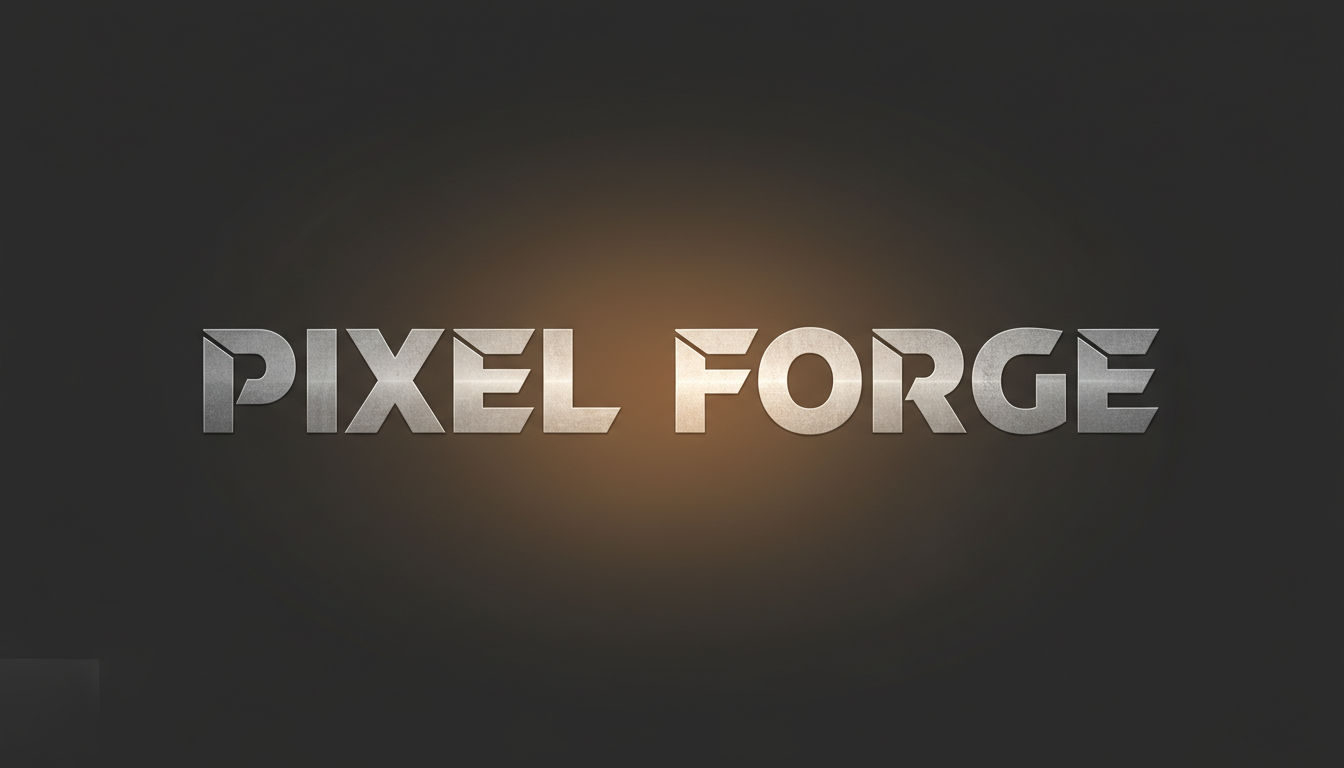
PIXEL FORGE, Ten Letters, All Correct — and a Ghost Box in the Corner
The lettering is the strong side and this proves it. PIXEL FORGE came back on one centred line in heavy angular brushed-metal capitals, all ten letters correct, correctly spaced, with a warm forge glow behind it and no invented accent anywhere — the plain-ASCII clause held here even though it failed on the forest banner. Now look at the bottom left corner, and then measure it, because you will not see it otherwise. There is a rectangle sampling at rgb(46, 46, 46), perfectly neutral, sitting on a background that samples at rgb(43, 42, 42) and is warm-tinted everywhere else. About one percent lighter and the only colour-neutral patch in the frame. It is the safe-zone instruction again, drawn faintly instead of the solid slab it made of the cyberpunk street.
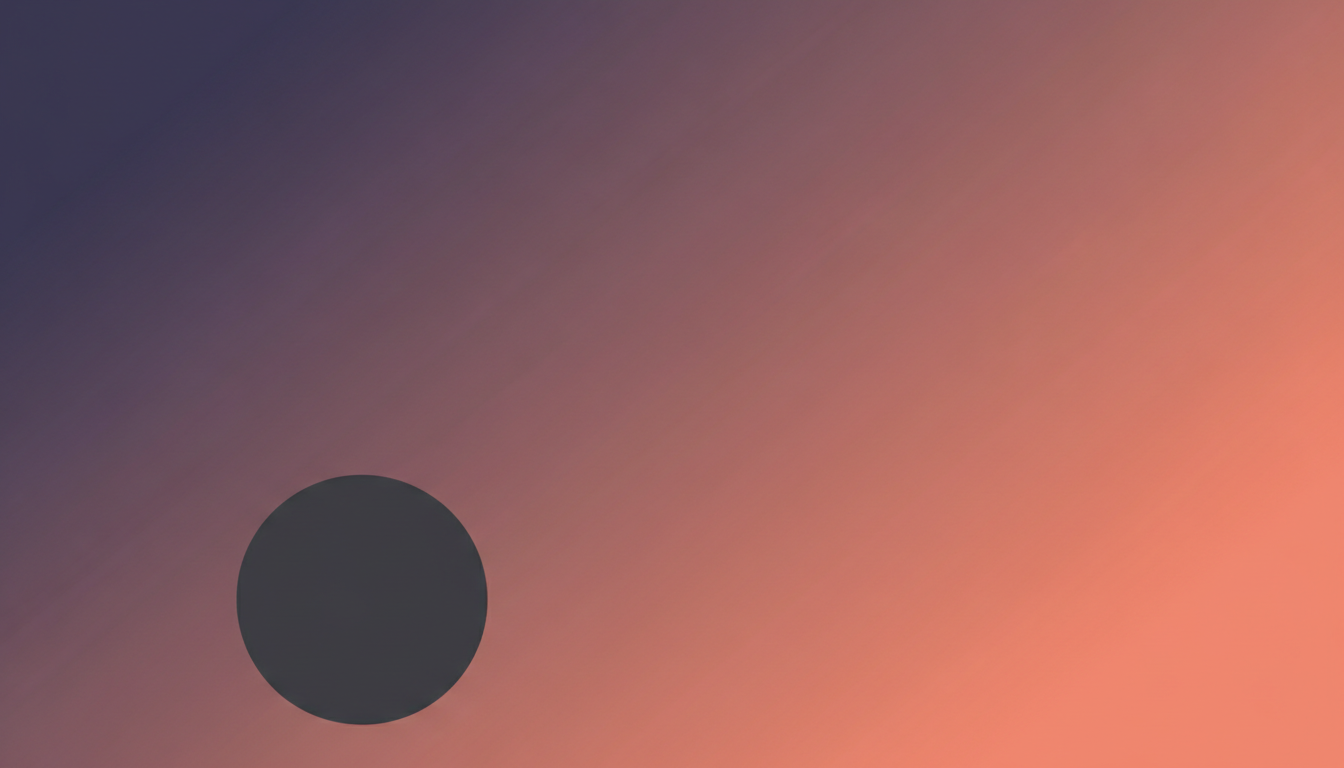
The Avatar Overlap, Drawn to Scale — and 14 Points Too Far Right
This one is a diagram rather than a banner: it shows you where Discord puts your avatar over the top of a profile banner. Pure geometry is what this model is best at, and the size is dead on — the circle measures 248 pixels across, or 32.3 percent of the frame height, against the roughly 33 percent asked for, and its centre sits 77.9 percent of the way down against the 80 percent requested. The horizontal position is the miss, and it is a big one: the centre landed 26.9 percent across when the brief said one eighth, which is 12.5 percent. More than double. Useful as a reminder in both directions — ask for a shape at a size and you will get it, ask for it at a position and check it.
All six were generated at 16:9 through the same model and the same ratio the tool above is locked to, so these are the shape you get rather than a showreel shot at a different size. Each brief named the exact words to letter and the exact number of things to draw, so that lettering, counting and framing could be judged separately. Two of the six briefs described an empty corner in layout language and the model drew it — the presets above have since been rewritten to describe that space as part of the scene instead.
Describe a Safe Zone and the AI Will Draw You a Safe Zone
This is the finding that changed how the presets on this page are written, and it is not in any prompting guide. Two of the six test briefs ended with a layout instruction: leave the lower left corner as a plain flat area of unbroken background colour with nothing drawn inside it. That is a note to a designer. The model treated it as a description of the picture. On the cyberpunk banner it painted a solid rectangle roughly 273 by 132 pixels, sampling at an unvarying rgb(48, 52, 109) across its entire width, straight over the wet road where a building should stand. On the wordmark banner it did the same thing far more quietly — a patch measuring rgb(46, 46, 46), perfectly colour-neutral, on a background of rgb(43, 42, 42) that is warm-tinted everywhere else. One percent lighter and completely invisible on a phone. The same brief also said keep the composition inside the central seventy percent of the height, and it letterboxed rather than composed: the street runs from y=242 to y=522, 280 pixels of 768. So describe the space as part of the scene — open road, bare floor, clear mist — not as a region of the canvas.
Seven Identical Hexagons Where Six Were Asked For
Count anything your banner repeats, because the model will not, and it fails in the one way you will never notice. The icon row brief asked for exactly six identical hexagonal badges in one straight line. Seven came back. What makes this worth a section rather than a footnote is how good the seven are: each badge is 153 by 174 pixels, the areas run from 20,620 to 20,691 — a spread of one third of one percent — every centroid sits at y=386.6, and the gaps measure 28, 28, 28, 28, 27 and 28 pixels. There is no ragged one, no odd one out, nothing to catch your eye. It is a flawlessly executed row of the wrong length. That inverts the usual behaviour, where this model gets a count right and then draws the objects at different sizes. Here the craft is perfect and only the number is wrong, which is strictly harder to spot. The row is also 64 pixels from the left edge and 42 from the right, so it is off centre by 22 pixels as well.
FORÊT Was Requested. FORÈT Arrived. That Is a Different Word.
Naming the accent is not enough, and this is the cleanest demonstration of it on the site. The forest banner was briefed for a circumflex, named as a circumflex, placed on a specific letter — the E of the second word — with every other mark on the picture banned. Enlarge the word three times and the mark is a single straight wedge falling from upper left to lower right. That is a grave. The banner reads LA FORÈT, and the French word is forêt. Everything else is right: a warm gold serif, correct capitals, correct spacing, no stray marks on any other letter, all seven letters themselves correct. The failure is one stroke wide and it changes the word into a non-word, while looking like a deliberate and rather elegant typographic choice. Meanwhile the English wordmark on the same page, briefed in plain unaccented capitals, came back letter perfect. So English server names are a safe ask here; French, Spanish, Portuguese, Turkish and Vietnamese ones need you to look at the mark on its own, separately from the letters, and to generate twice.
One Picture, Three Discord Crops — and the Arithmetic of Each
Discord does not have “a banner size”, it has three, and they are not the same shape. A server banner is 960×540 and an invite splash is 1920×1080, both 16:9. A user profile banner is 600×240, which is 5:2 — far wider and much shorter. Every render from this page arrives at 1344×768, which is 7:4, or 1.75 against a true 16:9’s 1.778. For the server banner that gap is nothing: trim 12 pixels off the height, 1.6 percent, and 1344×756 scales down to 960×540 exactly. For the profile banner the arithmetic bites. Cropping 1344 wide down to 5:2 leaves 537.6 pixels of height out of 768 — you keep the middle 70 percent and lose the other 30. Then Discord lays your avatar over the lower left of what survives, which is what the gradient diagram above is showing to scale. That is why every preset here keeps its subject in the central band and its lower left quiet, and why the AI image cropper is the next stop for a profile banner rather than an optional extra.
One Banner Out of Six Filled Only 28 Percent of Its Own Frame
All six briefs said fill the frame edge to edge, no matte, no border. Five did. One produced a postcard. The cosy lo-fi room is a genuinely lovely illustration — the lamp and the steaming mug on the right, the arched window centre right, the string lights and plants through the middle, all exactly as briefed — and it occupies 756 by 384 pixels at an offset of 440, 192. That is 56.2 percent of the width, 50.0 percent of the height and 28.1 percent of the image, floating right of centre on a flat lavender field. Upload that to a server and you get a stamp on a wall. It is also worth noticing why it drifted right: the same brief asked for an empty lower left, and rather than clearing a corner the model moved the entire picture away from it. One pass through the AI image cropper rescues it, and the AI image upscaler puts the pixels back afterwards — a 756-wide crop needs help before it fills a 960-wide slot.
How the AI Discord Banner Generator Works
Three steps, and the third one is twenty seconds of checking
Pick the Style
Neon Cyberpunk, Server Name, Cosy Lo-Fi, Icon Row, Minimal Gradient or Fantasy Landscape. Each is a complete brief — the palette, the subject and the composition come together, so you are choosing a finished banner rather than assembling one.
Add the Server Name (Optional)
Use the details box under the style buttons for your server name, your game or your colours. Short names letter best. PIXEL FORGE came back with all ten letters correct on the first try, so an English name is a safe ask and an accented one needs a second look.
Count, Check the Corners, Then Crop
Three checks that take twenty seconds. Count anything the design repeats. Look at the four edges for a matte. Look at the lower left for a drawn box. Then trim 12 pixels of height for an exact 16:9 and upload at 960 by 540.
Banner, Icon, Emote or Avatar — Picking the Right Page
This page makes the wide image at the top of the server. The round one beside it is a different job, and the AI profile picture maker is built for it. For the reactions in your channels use the AI emoji generator and the AI Twitch emote generator, which produce the same small square art Discord wants for a custom emoji. Streamers running a server alongside a channel will want the AI stream overlay generator and the AI YouTube banner maker for the other two platforms, and the AI LinkedIn banner generator solves the same crop problem at an even harsher 4:1. If your server has a mascot rather than a wordmark, the AI VTuber avatar generator and the AI sticker generator will keep it consistent across the rest of the server.
Why Use This Discord Banner Generator
Because the free banner sites watermark it, and none of them tell you what to check
Wide Output That Fits the Server Slot
Every render is 1344 by 768, which is 12 pixels of height away from an exact 16:9 and scales straight down to the 960 by 540 Discord asks for. No upscaling, no letterbox to crop off, and the full width is usable.
It Letters Server Names
PIXEL FORGE came back with all ten letters correct, correctly spaced and finished in brushed metal with the glow behind it. The name is lettered into the artwork rather than dropped on top, which is why it picks up the same lighting as the scene.
Composed Around the Avatar Overlap
Discord drops your avatar over the lower left of a profile banner and crops the whole thing to 5:2. The presets keep their subject in the central band and the lower left quiet, so the picture survives the crop instead of losing its face to it.
Six Styles Built for Servers
A neon city, a lettered wordmark, a cosy lo-fi room, a badge row, a flat gradient and a misty forest. Gaming guild, study server, art community or friend group — the six cover what servers actually put at the top of the page.
Honest About the Failures
Seven hexagons where six were asked for. An illustration filling 28 percent of its frame. A grave accent where a circumflex was named. Every one of them is on this page with the measurement next to it, because you cannot check for something nobody told you about.
Free, No Sign Up, No Watermark
Nothing is stamped on the banner, which is the entire problem with the free banner sites. Generate as many as you like without an account. Paid plans start at $2.99 and buy volume, not styles.
Who Makes Discord Banners
Server owners, moderators, guilds and anyone who just hit Boost Level 2
Server Owners
The banner slot unlocks at Boost Level 2 and most owners fill it the same evening with whatever they can find. Three styles generated side by side takes about a minute, which is short enough to put them to a vote in general before the boosts lapse.
Gaming Guilds and Clans
A clan tag lettered into a neon city or a forged metal wordmark reads as a real identity rather than a stock header. PIXEL FORGE came back with all ten letters correct on the first attempt, so a short English tag is a safe thing to ask for.
Nitro Profile Banners
A profile banner is 600×240, so you keep the middle 70 percent of the height and Discord lays your avatar over the lower left of what is left. Pick a style whose subject sits in the central band, then crop it — the gradient diagram above shows the overlap to scale.
Study, Art and Friend Servers
Not every server wants neon. The cosy lo-fi room and the misty forest are there for the study groups, book clubs and friend servers, where the banner is doing the job of a front door rather than a battle standard.
AI Discord Banner Generator FAQ
Sizes, server names, accents, animation and what to double check
Free AI Discord Banner Generator — Three Crops of One Picture
A Discord banner is an odd design problem because Discord does not have one banner size, it has three. The server banner is 960×540 and the invite splash is 1920×1080, both of them 16:9, and a user profile banner is 600×240, which is 5:2 — a completely different shape. Most people find this out at the upload screen. An ai discord banner generator is only worth using if it starts wide enough to serve all three, and every render from this page comes back at 1344×768. That is 7:4, or 1.75 against a true 16:9’s 1.778, so twelve pixels off the height — 1.6 percent — gives you an exact 1344×756 that scales down to 960×540 with nothing else lost. Crop the same file to 5:2 for a profile banner and you keep the middle 70 percent of the height, which is why every preset here puts its subject in the central band.
The lettering is the strong side, and the six test banners on this page show where its edge is. PIXEL FORGE came back on one centred line in brushed metal capitals, all ten letters correct and correctly spaced, with the forge glow behind it and no invented accent anywhere. Type your server name into the details box and you can reasonably expect it back intact. Then there is the forest banner, which was written to test the other side of that. It asked for a circumflex, named as a circumflex, on a specific letter, with every other mark banned — and returned a grave. LA FORÈT, where French wants forêt. The letterforms are immaculate, the other seven letters are correct, and the word is wrong by one stroke in a way that reads as confident typography. English names are safe here. Accented ones need you to look at the mark on its own.
The defect nobody expects is that layout instructions become drawings. Two briefs asked for the lower left corner to be left as plain flat background with nothing in it — a note you would write to a designer — and the model painted exactly that. On the cyberpunk banner it is a solid 273 by 132 pixel rectangle of unvarying rgb(48, 52, 109) sitting over the road; on the wordmark it is a colour-neutral patch a single percent lighter than the warm background around it, invisible until you sample it. The same brief said keep the composition in the central 70 percent of the height and it letterboxed instead, leaving a 280 pixel strip of city in a 768 pixel frame. The lesson generalises past Discord: describe empty space as part of the scene — open road, bare floor, clear mist — and it composes around it; describe it as a region of the canvas and it draws you a rectangle. The presets above were rewritten on that basis after these six were generated.
Which leaves two things to check before you upload, and both take seconds. Count anything the design repeats: six hexagonal badges were requested and seven arrived, each one 153 by 174 pixels with areas inside a third of a percent of each other and gaps of 28 pixels, so the row is flawless and simply one too long. Then look at the four edges: five of the six banners filled the frame, and the sixth returned a lovely lo-fi room occupying 28.1 percent of the image on a flat lavender field. Both are one pass through the AI image cropper from being right, with the AI image upscaler after it if the crop left you under 960 wide. Then finish the rest of the server: the round icon at the AI profile picture maker, the reactions at the AI emoji generator, and the mascot at the AI sticker generator. Everything here is free to try, nothing is watermarked, banners come back at 1344×768, and paid plans start at $2.99. Scroll back up, type your server name, and count the hexagons before you upload.